
1. Introduction
This manual provides essential information for the safe and effective use of your Technical Precision replacement light bulb for the Bell & Howell Slide Cube RF60 projector. Please read these instructions carefully before installation and retain for future reference.
2. Safety Information
- Power Disconnection: Always ensure the projector is unplugged from the power source before attempting to replace the light bulb.
- Cool Down: Allow the old bulb to cool completely before handling. Light bulbs can reach very high temperatures during operation and remain hot for some time after being turned off.
- Handle with Care: Avoid touching the glass part of the new bulb directly with bare hands. Oils from your skin can create hot spots, leading to premature bulb failure. Use a clean cloth or gloves.
- Proper Disposal: Dispose of old bulbs according to local regulations.
- Voltage Compatibility: Ensure the replacement bulb's voltage (120 Volts) matches the requirements of your Bell & Howell Slide Cube RF60 projector.
3. Product Features
This Technical Precision replacement bulb is designed to provide reliable illumination for your Bell & Howell Slide Cube RF60 projector. Key features include:
- Direct replacement for Bell & Howell Slide Cube RF60 light bulbs.
- Standard MR16 shape with a glass material construction.
- Operates at 120 Volts with a wattage of 300 watts.
- Color temperature of 3350 Kelvin for clear and bright projection.
4. Setup and Installation
Follow these steps to safely replace the light bulb in your Bell & Howell Slide Cube RF60 projector:
- Power Off and Unplug: Turn off the projector and unplug it from the electrical outlet.
- Allow to Cool: Wait for at least 15-20 minutes for the old bulb to cool down completely.
- Access Bulb Compartment: Refer to your Bell & Howell Slide Cube RF60 projector's original manual for instructions on how to open the bulb access compartment. This usually involves opening a cover or panel.
- Remove Old Bulb: Carefully grasp the old bulb (using a cloth or gloves if still warm) and gently pull it straight out from its socket. Avoid twisting if it's a push-in type.
- Insert New Bulb: Holding the new Technical Precision bulb with a clean cloth or gloves, align the pins with the socket holes and gently push it straight in until it is firmly seated. Do not force it.
- Close Compartment: Securely close the bulb access compartment.
- Reconnect Power: Plug the projector back into the electrical outlet.

Image: Back view of the replacement bulb showing its two pins for insertion into the projector socket.

Image: The replacement bulb held in a hand, illustrating its compact size and MR16 shape.
5. Operating Instructions
Once the new bulb is installed, operate your Bell & Howell Slide Cube RF60 projector as you normally would. The bulb will illuminate when the projector is powered on and activated. No special operating procedures are required for the bulb itself.
6. Maintenance
- Cleaning: If the bulb's glass surface becomes dusty, gently wipe it with a soft, dry, lint-free cloth when the bulb is cool and the projector is unplugged. Avoid using liquid cleaners.
- Inspection: Periodically inspect the bulb for any signs of damage or discoloration. If any issues are observed, replace the bulb.
- Storage: If storing a spare bulb, keep it in its original packaging in a cool, dry place to protect it from damage.
7. Troubleshooting
If the bulb does not light after installation, consider the following:
- Check Power: Ensure the projector is properly plugged into a working electrical outlet and the power switch is on.
- Bulb Seating: Verify that the bulb is fully and correctly seated in its socket. Gently push it in again to ensure a secure connection.
- Projector Functionality: Confirm that the projector itself is functioning correctly. Test with another known working bulb if available, or consult the projector's manual.
- Bulb Damage: Inspect the new bulb for any visible damage that might have occurred during shipping or handling.
8. Specifications
| Attribute | Detail |
|---|---|
| Brand | Technical Precision |
| Model Number | SLIDE CUBE RF60 |
| Part Number | SLIDE CUBE RF60 |
| Item Package Quantity | 1 |
| Shape | MR16 |
| Material | Glass |
| Voltage | 120 Volts |
| Wattage | 300 Watts |
| Color Temperature | 3350 Kelvin |
| Included Components | Replacement Part (Light Bulb) |

Image: Side view of the Technical Precision replacement light bulb for Bell & Howell Slide Cube RF60.
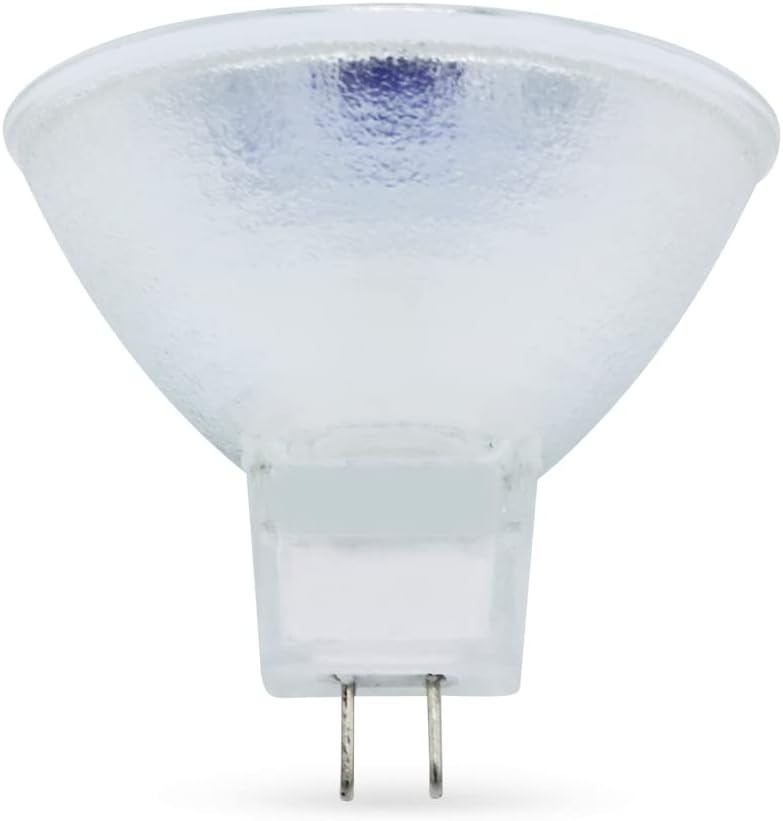
Image: Front view of the Technical Precision replacement light bulb, showing the filament and reflector.
9. Warranty and Support
For warranty information or technical support regarding your Technical Precision replacement light bulb, please contact Technical Precision directly. Refer to the packaging or the official Technical Precision website for the most current contact details and warranty terms.
10. Additional Information
The following video provides a general overview of Technical Precision as a brand. While not specific to this bulb, it offers insight into the manufacturer's commitment to lighting and energy solutions.
Video: General brand overview by Technical Precision. This video is not specific to the installation or operation of the Bell & Howell Slide Cube RF60 replacement bulb.