
Introduction
This manual provides essential instructions for the safe and effective use of your Technical Precision Replacement Light Bulb for the Kodak READYMATIC 500-#503. Please read this manual thoroughly before installation and operation, and retain it for future reference.
This bulb is a replacement component and is not manufactured by Kodak. It is designed to function as a direct replacement for the original #503 light bulb in the Kodak READYMATIC 500 projector.
Important Safety Information
- Electrical Hazard: Always disconnect power to the device before attempting to install or replace the light bulb. Failure to do so may result in electric shock or injury.
- Burn Hazard: Light bulbs can become extremely hot during operation and immediately after being turned off. Allow the bulb to cool completely before handling.
- Fragile Component: Handle the bulb with care. Avoid touching the glass portion directly with bare hands, as oils can reduce bulb life. Use a clean cloth or gloves.
- Proper Disposal: Dispose of old bulbs according to local regulations.
Setup and Installation
Follow these general steps for installing the replacement light bulb. For specific instructions tailored to your Kodak READYMATIC 500 projector, refer to its original user manual.
- Power Disconnection: Ensure the Kodak READYMATIC 500 projector is unplugged from the power outlet.
- Access Bulb Compartment: Locate and open the bulb access compartment on your projector. This usually involves opening a latch or removing a cover.
- Remove Old Bulb: Carefully remove the old bulb. If the bulb is hot, allow it to cool. Note the orientation of the old bulb for correct installation of the new one.
- Install New Bulb: Holding the new Technical Precision bulb by its base or with a clean cloth, align the prong base with the socket in the projector. Gently push and/or twist the bulb into place until it is securely seated. Do not force the bulb.
- Close Compartment: Close the bulb access compartment securely.
- Reconnect Power: Plug the projector back into the power outlet.
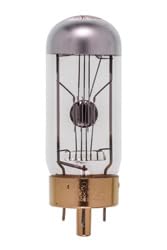
An image showing the Technical Precision replacement light bulb, designed for the Kodak READYMATIC 500-#503. This illustrates the general appearance of the bulb.
Operating Instructions
Once the bulb is correctly installed and the projector is reconnected to power:
- Power On: Turn on your Kodak READYMATIC 500 projector using its power switch.
- Instant On: The bulb features an "Instant On" capability, meaning it should illuminate immediately upon receiving power.
- Check Functionality: Verify that the projector is functioning as expected and the light output is consistent.
Maintenance
To ensure optimal performance and longevity of your replacement bulb:
- Cleaning: If the bulb requires cleaning, ensure the projector is unplugged and the bulb is cool. Gently wipe the glass surface with a soft, dry, lint-free cloth. Avoid using abrasive cleaners or liquids.
- Handling: Always handle the bulb by its base when possible. Avoid touching the glass with bare hands.
- Storage: If storing a spare bulb, keep it in its original packaging in a cool, dry place away from direct sunlight and extreme temperatures.
Troubleshooting
If the bulb does not illuminate or function correctly after installation, consider the following:
- No Light:
- Ensure the projector is properly plugged into a working power outlet.
- Verify that the bulb is securely seated in its socket. Remove and re-insert if necessary, ensuring correct alignment.
- Check the projector's power switch and any internal fuses (refer to the projector's manual).
- If the bulb's operating life (25 hours) has been exceeded, it may need replacement.
- Dim Light or Flickering:
- Ensure the bulb is clean and free of dust or smudges.
- Check for loose connections within the projector's bulb compartment.
If issues persist after performing these checks, consult the Kodak READYMATIC 500 projector's service manual or contact Technical Precision customer support.
Specifications
| Brand | Technical Precision |
| Model Name | READYMATIC 500-#503 |
| Model Number | READYMATIC 500-#503 |
| Wattage | 500 Watts |
| Voltage | 120 Volts |
| Bulb Shape Size | T |
| Bulb Base | Prong |
| Color Temperature | 3300 Kelvin |
| Light Source Operating Life | 25 Hours |
| Material Type | Glass |
| Special Feature | High Efficiency, Instant On |
Warranty Information
This Technical Precision replacement bulb comes with a 1-year manufacturer's warranty. This warranty covers defects in materials and workmanship under normal use. Please retain your proof of purchase for warranty claims.
For detailed warranty terms and conditions, please contact Technical Precision customer support.
Customer Support
If you have any questions, require assistance, or need to make a warranty claim, please contact Technical Precision customer support.
You can find more information and contact details on the Technical Precision Brand Store.