
Introduction
This manual provides essential information for the safe and effective use of your Technical Precision Replacement Light Bulb, model LUMINA II MX60. Please read this manual thoroughly before installation and operation.
Note: This bulb is a replacement product and is not manufactured by BELL & HOWELL.
Product Overview
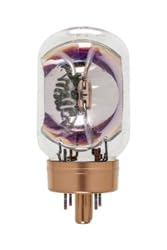
Image: Technical Precision Replacement Light Bulb, showing its tubular glass shape and metal base with pins.
The Technical Precision Replacement Light Bulb (LUMINA II MX60) is designed as a direct replacement for specific lighting applications. It features a tubular glass enclosure and a multi-pin base for secure connection.
- Designed as a replacement for BELL & HOWELL LUMINA II MX60 Light Bulb.
- Unit per sale: 1.
Safety Information
Always observe the following safety precautions:
- Ensure power is disconnected before installing or removing the bulb.
- Allow the bulb to cool completely before handling after use.
- Do not exceed the specified wattage or voltage for your fixture.
- Handle the bulb by its base to avoid touching the glass, which can reduce bulb life.
- Dispose of old bulbs according to local regulations.
Setup and Installation
- Power Disconnection: Before beginning, ensure the power supply to the fixture is completely turned off at the circuit breaker or by unplugging the device.
- Old Bulb Removal: Carefully remove the old bulb from the fixture. If the bulb is hot, allow it to cool down first.
- New Bulb Installation: Align the pins on the base of the Technical Precision Replacement Light Bulb with the corresponding slots in the fixture's socket. Gently push the bulb into place and rotate if necessary to secure it. Do not force the bulb.
- Power Reconnection: Once the new bulb is securely installed, restore power to the fixture.
- Testing: Turn on the light to confirm proper operation.
Operating Instructions
This replacement light bulb operates like a standard incandescent bulb. Once installed, its operation is controlled by the fixture's power switch.
- Turning On/Off: Use the existing switch on your fixture or device to turn the light bulb on or off.
- Dimming: This bulb's dimming capability depends on the fixture it is installed in and the type of dimmer switch used. Consult your fixture's manual for compatibility.
Maintenance
The Technical Precision Replacement Light Bulb requires minimal maintenance.
- Cleaning: If cleaning is necessary, ensure the bulb is cool and the power is off. Gently wipe the glass with a soft, dry, lint-free cloth. Do not use liquid cleaners.
- Inspection: Periodically inspect the bulb for any signs of damage or loose connections. Replace immediately if damage is observed.
Troubleshooting
| Problem | Possible Cause | Solution |
|---|---|---|
| Bulb does not light up. | No power to the fixture. Bulb not properly seated. Bulb is faulty. |
Check circuit breaker or power source. Re-seat the bulb, ensuring pins are aligned. Replace with a new bulb. |
| Bulb flickers. | Loose connection. Incompatible dimmer switch. Voltage fluctuations. |
Ensure bulb is securely seated. Verify dimmer compatibility with incandescent bulbs. Consult an electrician if voltage issues persist. |
| Bulb burns out quickly. | Over-voltage. Excessive vibration. Frequent on/off cycling. |
Ensure fixture voltage matches bulb requirements. Secure fixture to minimize vibration. Reduce frequency of switching if possible. |
Specifications
| Attribute | Detail |
|---|---|
| Brand | Technical Precision |
| Model Number | LUMINA II MX60 |
| Wattage | 80 Watts |
| Unit Count | 1.0 Count |
| Number of Items | 1 |
| Shape | Tubular (T) |
| Material | Glass |
| Connectivity Technology | Normal bulb |
| Color Rendering Index (CRI) | 80 |
| Manufacturer | Technical Precision |
| Date First Available | April 20, 2016 |
Warranty and Support
For information regarding warranty coverage or technical support for your Technical Precision Replacement Light Bulb, please contact the manufacturer directly.
Manufacturer: Technical Precision
Refer to the product packaging or the Technical Precision website for the most current contact information and warranty details.