
Technical Precision EKTAPRO 5020
Technical Precision Replacement Light Bulb for Kodak EKTAPRO 5020 User Manual
Model: EKTAPRO 5020
Introduction
This manual provides essential instructions for the safe and effective installation, operation, and maintenance of the Technical Precision replacement light bulb designed for the Kodak EKTAPRO 5020 projector. Please read this manual thoroughly before attempting installation or use.
Safety Information
WARNING: Risk of electric shock and burns. Always disconnect power before servicing.
- Ensure the projector is completely powered off and unplugged from the electrical outlet before attempting to replace the bulb.
- Allow the old bulb to cool down completely before handling. Hot bulbs can cause severe burns.
- Avoid touching the glass part of the new bulb with bare hands. Oils from your skin can create hot spots and reduce bulb life. Use a clean cloth or gloves.
- Handle the bulb carefully. Dropping or mishandling can cause the bulb to break, potentially releasing glass fragments.
- Dispose of old bulbs according to local regulations.
- This bulb operates at high temperature and voltage. Ensure proper ventilation around the projector.
Product Overview
The Technical Precision replacement light bulb is specifically engineered to be compatible with the Kodak EKTAPRO 5020 projector. It is a 300-watt, 82-volt bulb with a GY5.3 base, designed to provide optimal illumination for your projection needs.
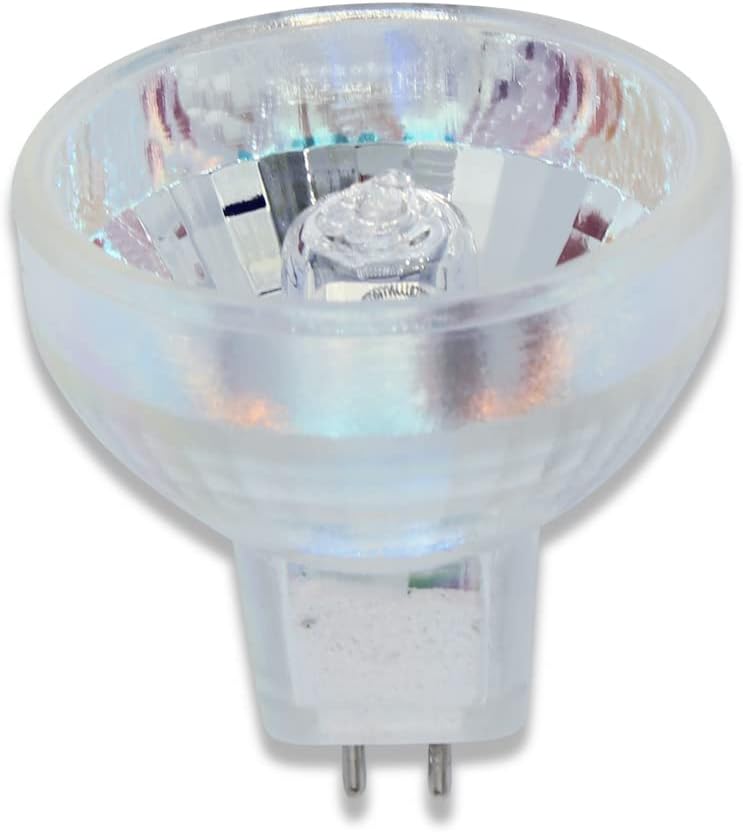
Image 1: Technical Precision Replacement Light Bulb. This image displays the replacement light bulb, featuring its clear glass reflector and the two-pin GY5.3 base. The bulb is designed for compatibility with the Kodak EKTAPRO 5020 projector.
Setup and Installation
Follow these steps to safely replace the light bulb in your Kodak EKTAPRO 5020 projector:
- Power Off and Unplug: Ensure the Kodak EKTAPRO 5020 projector is turned off and completely disconnected from the power source.
- Allow Cooling: Wait for at least 15-30 minutes for the old bulb to cool down. Attempting to remove a hot bulb can cause burns.
- Locate Bulb Access: Refer to your Kodak EKTAPRO 5020 projector's original manual to locate the lamp access door or panel. This is typically secured with screws or a latch.
- Open Access Panel: Carefully open or remove the lamp access panel.
- Remove Old Bulb: Gently grasp the old bulb by its ceramic or plastic base (avoiding the glass) and pull it straight out from its socket. If it's difficult to remove, a slight rocking motion may help.
- Install New Bulb: Using a clean cloth or gloves, carefully insert the pins of the new Technical Precision bulb into the projector's socket. Ensure the pins align correctly and push firmly until the bulb is seated securely. Do not force the bulb.
- Close Access Panel: Replace the lamp access panel and secure it properly.
- Reconnect Power: Plug the projector back into the electrical outlet.
- Test Operation: Power on the projector to confirm the new bulb is functioning correctly.
Operation
Once the replacement bulb is installed, operate your Kodak EKTAPRO 5020 projector as per its original operating instructions. The Technical Precision bulb is designed to integrate seamlessly with the projector's existing functionality.
- Avoid frequent on/off cycles, as this can reduce bulb life.
- Ensure adequate ventilation around the projector during operation to prevent overheating.
Maintenance
Proper maintenance can extend the life of your projector and the replacement bulb:
- Cleaning: Periodically clean the projector's air filters (if applicable) to ensure proper airflow and prevent dust buildup, which can lead to overheating and reduced bulb life.
- Bulb Handling: When handling the bulb for installation or removal, always use a clean, lint-free cloth or gloves to avoid leaving fingerprints or oils on the glass.
- Storage: If storing a spare bulb, keep it in its original protective packaging in a cool, dry place.
Troubleshooting
| Problem | Possible Cause | Solution |
|---|---|---|
| Bulb does not light up. |
|
|
| Bulb flickers or dims. |
|
|
| Projector shuts down unexpectedly. |
|
|
Specifications
| Attribute | Value |
|---|---|
| Brand | Technical Precision |
| Model Name | EKTAPRO 5020 (Replacement) |
| Wattage | 300 Watts |
| Voltage | 82 Volts |
| Bulb Base | GY5.3 |
| Color Temperature | 3300 Kelvin |
| Average Life | 70 Hours |
| Material | Glass |
| Bulb Length | 1.75 Inches |
| Included Components | Replacement Part |
Warranty and Support
For specific warranty information regarding this Technical Precision replacement bulb, please refer to the packaging or contact Technical Precision directly. As this is a replacement part, its warranty may differ from the original projector's warranty.
For technical support or inquiries, please visit the Technical Precision Store on Amazon or contact their customer service.