
1. Introduction
Welcome to the user manual for your Weslo Cardiostride 4.0 Treadmill. This manual provides essential information for the safe assembly, operation, and maintenance of your new fitness equipment. The Cardiostride 4.0 is a self-powered manual treadmill designed to provide an effective cardiovascular workout with an adjustable incline and a convenient space-saving design. Please read this manual thoroughly before using the treadmill to ensure proper function and safety.

Image 1.1: Weslo Cardiostride 4.0 Treadmill in an active use setting.
2. Important Safety Information
To reduce the risk of serious injury, read all important precautions and instructions in this manual before using the treadmill. Weslo assumes no responsibility for personal injury or property damage sustained by or through the use of this product.
- Maximum User Weight: Do not exceed the maximum user weight of 250 lbs (113 kg).
- Magnetic Safety Key: Always ensure the magnetic safety key is properly attached to the console and your clothing during operation. In case of an emergency, the safety key will detach, stopping the treadmill belt.
- Incline Adjustment: Adjust the incline only when the treadmill is not in use and ensure it is securely locked into position before starting your workout.
- Manual Operation: This is a manual treadmill, meaning the belt is powered by your own movement. You control the speed. It is recommended to hold onto the handlebars for stability, especially when starting or adjusting your pace.
- Clearance: Maintain a minimum clearance of 2 feet (0.6 meters) around the treadmill during operation.
- Children and Pets: Keep children and pets away from the treadmill at all times.
- Medical Conditions: Consult a physician before beginning any exercise program, especially if you have pre-existing medical conditions.
- Proper Footwear: Always wear appropriate athletic footwear when using the treadmill.
- Lubrication: Regularly lubricate the walking belt as instructed in the maintenance section to ensure smooth operation and prolong the life of the treadmill.
3. Product Overview
3.1 Key Features
- Self-Powered Design: Operates without electricity, reducing energy costs.
- Adjustable Incline: Allows for varied workout intensity.
- SpaceSaver Design: Folds vertically for convenient storage.
- Integrated Console: Tracks speed, distance, and calories burned.
- 16" x 41" Tread Belt: Provides a comfortable walking and running surface.
- Magnetic Safety Key: Ensures immediate stop in emergencies.
3.2 Components
The Weslo Cardiostride 4.0 Treadmill includes the main treadmill unit, a console for tracking workout metrics, and a magnetic safety key.

Image 3.1: Close-up view of the treadmill's console display, showing workout metrics.

Image 3.2: The treadmill console, featuring a holder for a mobile device.
4. Setup
4.1 Unpacking and Placement
- Carefully remove all components from the packaging.
- Place the treadmill on a level surface with adequate clearance around it. Ensure the surface is stable and can support the treadmill and user weight.
4.2 Assembly
While the treadmill is designed for relatively easy assembly, it is recommended to follow the detailed assembly instructions provided in the separate assembly guide that came with your product. Ensure all bolts and screws are securely tightened.
4.3 Folding and Storage
The SpaceSaver design allows the treadmill to be folded vertically for storage.
- Ensure the treadmill is completely stopped and the safety key is removed.
- Lift the walking platform until it locks into the vertical storage position.
- To unfold, release the locking mechanism and gently lower the walking platform until it rests flat on the floor.
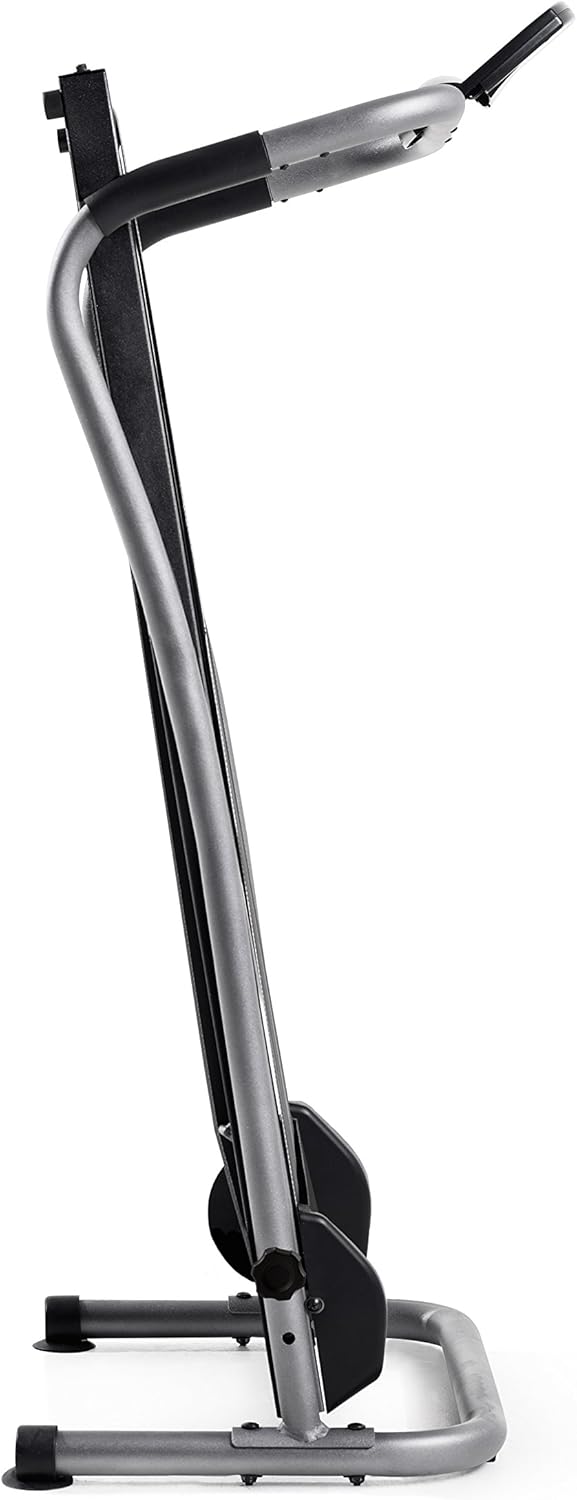
Image 4.1: The treadmill in its folded, vertical storage position.
5. Operating Instructions
5.1 Starting a Workout
- Ensure the treadmill is on a stable, level surface and unfolded.
- Attach the magnetic safety key to the console and clip the other end to your clothing.
- Step onto the treadmill belt. Hold onto the handlebars for balance.
- Begin walking or running. The belt will move as you apply force. Your speed is determined by your pace.

Image 5.1: A user demonstrating walking on the treadmill.

Image 5.2: A user demonstrating running on the treadmill.
5.2 Adjusting Incline
The treadmill's incline can be adjusted to increase workout intensity. Refer to your assembly guide for specific instructions on how to safely adjust the incline mechanism. Always ensure the incline is securely locked before use.
5.3 Using the Console
The integrated console tracks your workout data.
- Display: The LCD screen shows metrics such as time, speed, distance, and calories.
- RESET Button: Press to clear all workout data and restart tracking.
- MODE Button: Press to cycle through different display modes or select a specific metric to view.
5.4 Stopping a Workout
To stop your workout, gradually slow your pace until the belt comes to a complete stop. Alternatively, pull the magnetic safety key from the console to immediately stop the belt.
6. Maintenance
6.1 Belt Lubrication
Regular lubrication of the walking belt is crucial for smooth operation and to prevent premature wear. Apply silicone lubricant between the walking belt and the deck as per the instructions provided with your lubricant. The lubricant supplied with the treadmill may be minimal; additional lubricant may be required.
6.2 Belt Adjustment
If the walking belt begins to slip or drift to one side, it may need adjustment. Use the provided Allen wrench to adjust the tension bolts at the rear of the treadmill. Adjust in small increments (e.g., quarter turns) and test the belt after each adjustment until it runs smoothly and centrally. Refer to your assembly guide for detailed instructions on belt tensioning and centering.
6.3 Cleaning
Wipe down the treadmill surfaces with a damp cloth after each use to remove sweat and dust. Avoid using abrasive cleaners.
7. Troubleshooting
| Problem | Possible Cause | Solution |
|---|---|---|
| Belt slips or drifts to one side | Belt tension is incorrect or belt is off-center. | Adjust the belt tension and centering using the Allen wrench at the rear of the treadmill. Refer to the maintenance section. |
| Treadmill feels stiff or difficult to move | Lack of lubrication under the walking belt. | Lubricate the walking belt as described in the maintenance section. |
| Console display is blank or not working | Batteries are dead or incorrectly installed. | Check and replace the batteries in the console. Ensure they are installed with correct polarity. |
| Treadmill makes unusual noises | Loose components or lack of lubrication. | Check all assembly bolts and tighten if necessary. Lubricate the belt. If noise persists, contact customer support. |
8. Specifications
| Feature | Detail |
|---|---|
| Model Number | WLTL99616 |
| Brand | Weslo |
| Product Type | Manual Treadmill |
| Item Weight | 52 Pounds (23.6 kg) |
| Maximum Weight Recommendation | 250 Pounds (113 kg) |
| Deck Length | 41 Inches (104 cm) |
| Deck Width | 16 Inches (40.6 cm) |
| Maximum Incline Percentage | 15% (Adjustable) |
| Display Type | LCD Screen |
| Metrics Measured | Distance, Speed, Time, Calories |
| Frame Material Type | Steel Frame |
| Folded Size (Approx.) | 41 x 16 x 16 inches (104 x 40.6 x 40.6 cm) |
| Power Source | Electricity (for console display only, treadmill is manual) |
9. Warranty and Support
9.1 Warranty Information
The Weslo Cardiostride 4.0 Treadmill comes with a 90-Day Parts & Labor Warranty. Please retain your proof of purchase for warranty claims. This warranty covers manufacturing defects and workmanship under normal use. It does not cover damage resulting from misuse, neglect, or unauthorized modifications.
9.2 Customer Support
For technical assistance, parts replacement, or any questions regarding your Weslo Cardiostride 4.0 Treadmill, please contact Weslo customer support. Refer to the contact information provided in your product packaging or on the official Weslo website.


