
1. Introduction
Thank you for choosing the Ceptics 35W Universal Travel Adapter Kit. This comprehensive adapter is designed to provide power to your electronic devices in over 200 countries worldwide. It features multiple charging ports, including AC outlets, USB-A, and USB-C with Power Delivery, along with built-in surge protection for safe and efficient charging during your travels.
2. Product Overview
2.1 Components
- Main Adapter Unit (with 2 USA outlets, 1x USB-A, 1x USB-C2, 1x PD 35W USB-C1, and built-in USB-C cable)
- 6 Interchangeable Plug Attachments (Types A, B, C, E/F, G, I)
- Travel Pouch
2.2 Key Features
- Versatile Power Output: 2 USA AC outlets, 1x USB-A (15W Max), 1x USB-C2 (15W Max), 1x PD 35W USB-C1.
- Built-in USB-C Cable: Conveniently integrated for immediate use.
- Worldwide Compatibility: Includes 6 plug attachments for use in Europe (Type C), UK (Type G), US (Type B), Australia/China (Type I), Germany/France (Type E/F), and Japan (Type A).
- Surge Protection: Protects your electronics from voltage spikes.
- Voltage Indicator: LEDs indicate 110V or 220V current.
- Compact Design: Ultra-compact and lightweight for easy portability.

Figure 1: Main Adapter Unit with Plug Attachments

Figure 2: 6-in-1 Design Overview

Figure 3: Product Details and Port Identification
3. Setup
3.1 Attaching/Detaching Plug Attachments
- Identify the correct plug attachment for your destination country. Refer to the 'Works in Over 200 Countries' section for guidance.
- Locate the sliding tab on the main adapter unit.
- Slide the tab to unlock the attachment slot.
- Align the chosen plug attachment with the slot and gently push it in until it clicks securely into place.
- To detach, slide the tab again and pull the attachment out.
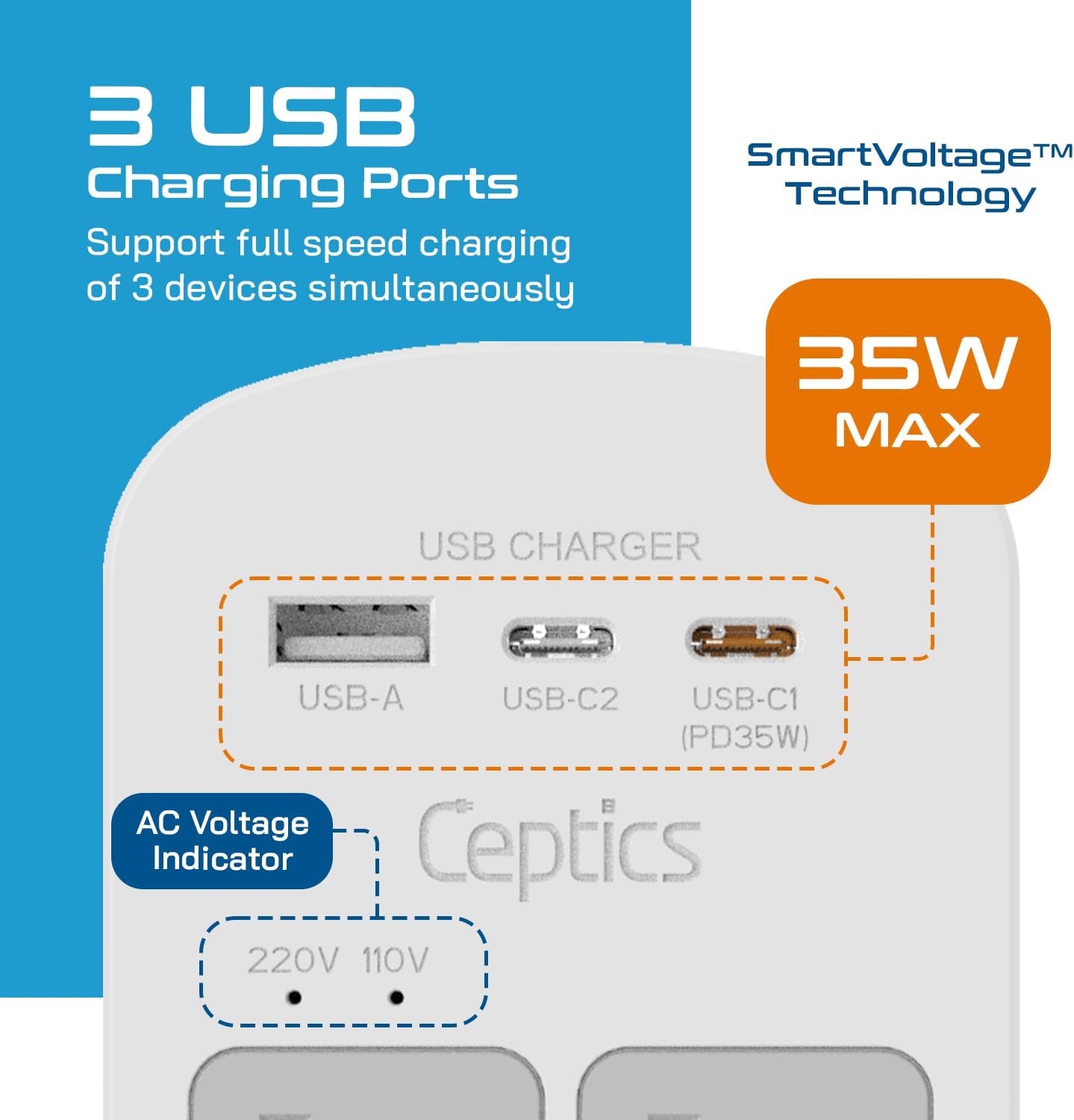
Figure 4: Attaching a Plug Attachment
Video 1: Demonstration of Ceptics Travel Adapter Plug Attachment. This video illustrates the process of attaching and detaching the various plug types to the main adapter unit, ensuring proper connection for different international outlets.
4. Operating Instructions
4.1 Connecting to a Wall Outlet
- Ensure the correct plug attachment is securely installed on the main adapter unit.
- Plug the adapter into the wall outlet of your destination.
- Observe the voltage indicator LEDs on the adapter:
- One LED illuminates to indicate 110V.
- Both LEDs illuminate to indicate 220V.
4.2 Charging Devices
The adapter is equipped with multiple ports for simultaneous charging:
- AC Outlets: Plug in your devices that require standard USA AC power.
- USB-A Port: Connect devices using a USB-A cable for up to 15W charging.
- USB-C2 Port: Connect devices using a USB-C cable for up to 15W charging.
- USB-C1 (PD 35W) Port: For faster charging, connect compatible devices using a USB-C cable to this Power Delivery port (up to 35W).
- Built-in USB-C Cable: Utilize the integrated USB-C cable for convenient charging of compatible devices.
You can charge up to 6 devices simultaneously using a combination of AC outlets and USB ports.

Figure 5: Charging Multiple Devices Simultaneously

Figure 6: Quick Charge Functionality
5. Safety Information
- IMPORTANT: This is NOT a voltage converter. It is an adapter that allows your device's plug to fit into different wall outlets. Ensure your electronic devices are compatible with the local voltage (100-240V AC).
- Do not use with 110V AC only devices such as some hair clippers, hair dryers, or curling irons, unless the device itself is dual voltage (100-240V). Using incompatible devices may cause damage to the device or the adapter.
- The adapter features built-in surge protection to safeguard your electronics.
- Do not expose the adapter to liquids or extreme temperatures.
- Keep out of reach of children.
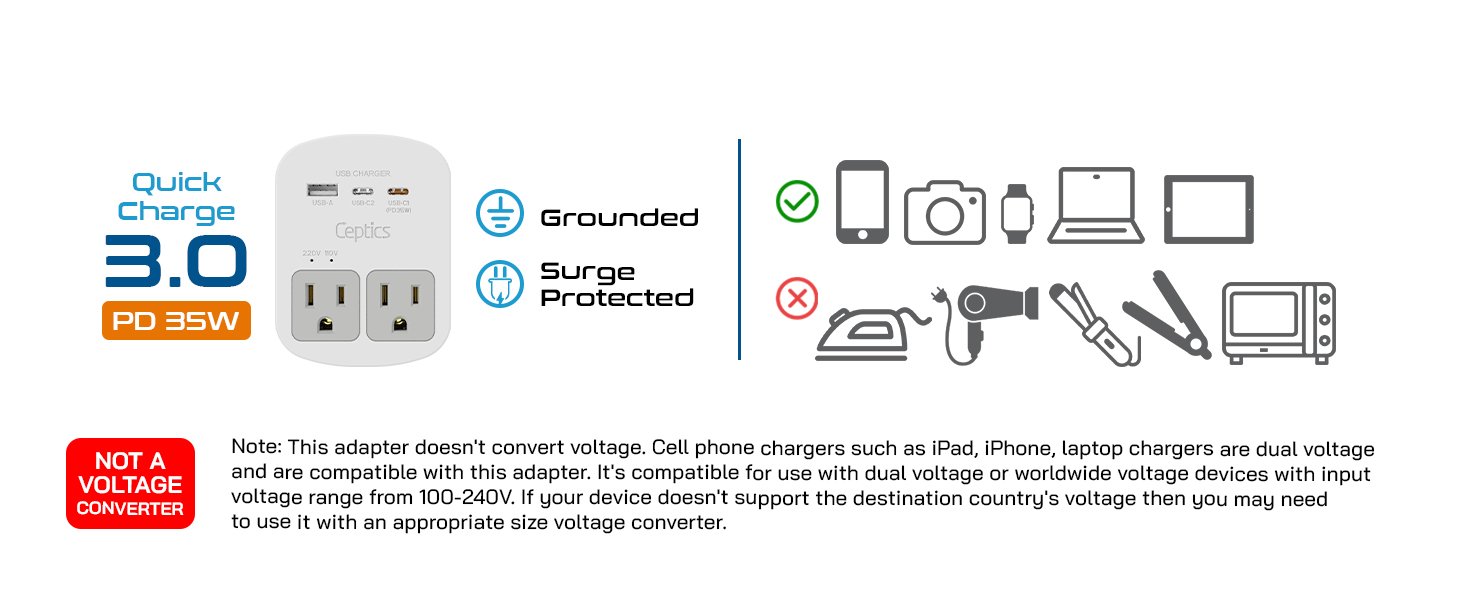
Figure 7: Voltage Converter Warning
6. Maintenance
- Cleaning: Wipe the adapter with a dry, soft cloth. Do not use liquid cleaners or abrasive materials.
- Storage: Store the adapter and its attachments in the provided travel pouch in a cool, dry place when not in use.
- Fuse Replacement: The adapter includes a replaceable fuse for protection. If the adapter stops working, check the fuse. Consult the full product manual for detailed instructions on fuse replacement.
7. Troubleshooting
- No Power: Ensure the adapter is securely plugged into the wall outlet and the correct plug attachment is used. Check if the wall outlet is functional.
- Slow Charging: Verify that your device and cable support fast charging. Ensure the adapter's ports are not overloaded.
- Device Damage: If a device is damaged, immediately unplug it and the adapter. Refer to the safety information regarding voltage compatibility.
- For further assistance, please contact Ceptics customer support.
8. Specifications
| Feature | Specification |
|---|---|
| Model Number | WPS-2B+ |
| Product Dimensions | 2.75 x 1.5 x 3.75 inches |
| Item Weight | 4.5 ounces |
| Input Voltage | 100-240VAC, 50/60Hz, 10A |
| AC Outlets | 2 USA Sockets |
| USB-A Output | 5V/3A (15W Max) |
| USB-C2 Output | 5V/3A (15W Max) |
| USB-C1 (PD) Output | 35W Max (5V/3A, 9V/3A, 12V/2.91A, 15V/2.33A, 20V/1.75A) |
| Total USB Output | 35W Max |
| Surge Protection | Yes |
| Voltage Indicator | 110V / 220V LEDs |
| Included Plugs | Type A, B, C, E/F, G, I |

Figure 8: Worldwide Plug Compatibility
9. Warranty and Support
The Ceptics 35W Universal Travel Adapter Kit comes with a 2-Years Limited Warranty. For warranty claims, technical support, or any inquiries, please contact Ceptics customer service. Information regarding local customer assistance is available through the official Ceptics channels.