
Introduction
Thank you for choosing the RXWLKJ 10-LED Motion Sensor Under Cabinet Light. This portable, wireless LED light is designed to provide convenient illumination in various areas such as closets, cabinets, drawers, and stairways. Featuring a built-in motion sensor and a rechargeable battery, it offers both automatic and continuous lighting modes for enhanced usability.
Product Overview
Key Features:
- Three-Way Switch: Easily switch between ON (continuous lighting), OFF, and G (motion-sensor mode).
- Super Bright & Rechargeable: Equipped with 10 SMD 2835 LEDs and a built-in 850mAh polymer lithium battery.
- Motion Sensor: Automatically detects human motion within 10ft/120° and turns off after approximately 20 seconds of no movement.
- Magnetic Installation: Features a built-in magnet for easy attachment to iron surfaces. Includes a sheet iron and sticky tape for non-iron surfaces, allowing the light to be easily removed for charging or use as a hand-held light.
- Versatile Applications: Ideal for closets, drawers, cabinets, and other dark areas requiring temporary or continuous light.
Package Contents:
- 1x RXWLKJ LED Light
- 1x Micro USB Cable
- 1x Sheet Iron
- 4x Sticky Tapes

Figure 1: Package Contents
Setup
Initial Charging:
Before first use, fully charge the LED light using the provided Micro USB cable. The charging indicator light will typically change color (e.g., red to green) when fully charged.
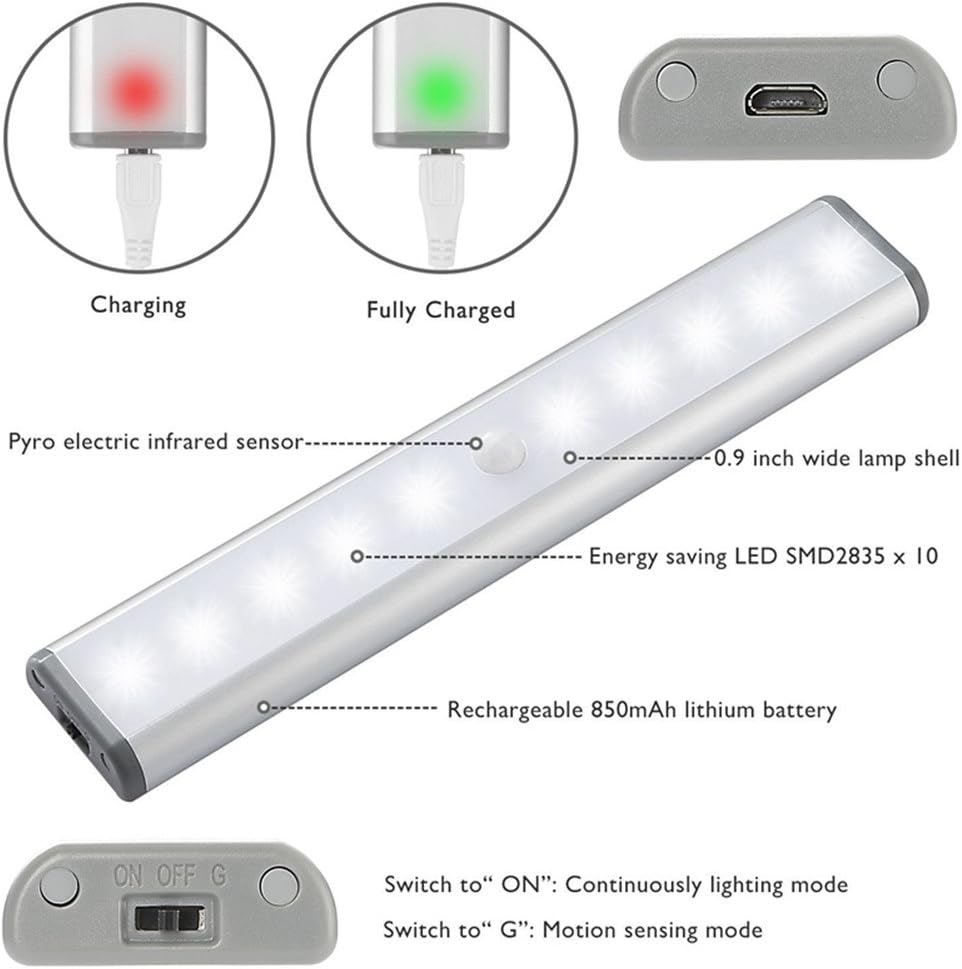
Figure 2: Charging and Component Overview
Installation:
The RXWLKJ LED light features a built-in magnet for easy installation. No drilling or extra switches are required.
- For Iron Surfaces: Simply attach the light directly to any ironwork. The built-in magnet will hold it in place.
- For Non-Iron Surfaces: Use the provided sheet iron and sticky tapes.
- Peel the backing from one side of the sticky tape and attach it to the sheet iron.
- Peel the backing from the other side of the sticky tape and firmly press the sheet iron onto the desired clean, dry surface.
- Attach the LED light magnetically to the installed sheet iron. This allows for easy removal of the light for charging or portable use.

Figure 3: Simple Installation
Operating Instructions
The light features a three-way switch located at one end for mode selection:
- ON: Continuously lighting mode. The light will stay on until manually switched off or to motion sensor mode.
- OFF: The light is completely off.
- G (Motion Sensor Mode): The light will automatically turn on when human motion is detected within its range (approximately 10ft/120°) in a dark environment. It will turn off after about 20 seconds of no movement.
Figure 4: Switch Settings
Maintenance
Charging the Battery:
When the light dims or stops functioning, it indicates a low battery. Remove the light from its magnetic mount and connect it to a 5V, 500mA (or 1000mA) USB power source using the Micro USB cable. The indicator light will show charging status.
Battery Life Extension:
If the product is not in use for an extended period, charge it at least once a month to maintain battery health and extend its lifespan.
Troubleshooting
- Light not turning on in motion sensor mode: Ensure the switch is set to 'G' mode. Check if the environment is dark enough, as the sensor may not activate in bright conditions. Verify the battery is charged.
- Light not staying on in ON mode: Ensure the switch is set to 'ON' mode. Check if the battery is fully charged.
- Short battery life: Ensure the light is fully charged. Frequent activation in high-traffic areas or continuous 'ON' mode will deplete the battery faster. Consider charging monthly if not in regular use.
- Light falling from mounting: Ensure the mounting surface is clean and dry before applying sticky tape. For non-iron surfaces, ensure the sheet iron is securely attached.
Specifications
| Feature | Specification |
|---|---|
| Model Number | DL002A |
| Brand | RXWLKJ |
| LED Quantity | 10 SMD 2835 |
| Color Temperature | 6000-6500K (Cool white) |
| Luminous Flux | 100lm (+/- 20%) |
| LED Life | >50000H |
| Battery Type | Built-in 850 mAh Polymer lithium battery |
| Battery Voltage | 3.7V |
| Charging Parameter | 5V, 500mA (or 1000mA) |
| Motion Sensor Distance | 3m/10ft (+/- 20%) |
| Motion Sensor Angle | 100° (+/-20%) |
| Product Dimensions | 7.5 x 0.5 x 1.33 inches |
| Item Weight | 6.3 ounces |
| Material | Acrylonitrile Butadiene Styrene, Aluminum |
| Water Resistance | Not Water Resistant |
Safety Information
- This product is not waterproof. Do not use it in damp places or expose it to water.
- Do not attempt to disassemble or modify the product, as this may void the warranty and pose a safety risk.
- Keep out of reach of children.
Warranty & Support
This product comes with a 2-year manufacturer's warranty. For any questions, concerns, or support needs, please contact RXWLKJ customer service through your purchase platform.