
La Crosse Technology 327-1417BW
La Crosse Technology 327-1417BW Wind Speed Weather Station Instruction Manual
Model: 327-1417BW
1. Introduction
This manual provides detailed instructions for the setup, operation, and maintenance of your La Crosse Technology 327-1417BW Wind Speed Weather Station. This device offers accurate backyard weather monitoring, including wind speed, temperature, and humidity, displayed on an indoor console.

Image 1.1: Front view of the La Crosse Technology 327-1417BW Weather Station display unit, showing time, date, outdoor temperature, humidity, indoor temperature, humidity, wind speed, and forecast icons.
2. What's Included
Verify that all components are present in your package:
- Indoor Display Console (Receiver)
- Wireless Wind/Thermo-Hygro Sensor (Outdoor Multi-Sensor)
- Mounting Bracket with Hardware

Image 2.1: The main display unit and the outdoor multi-sensor, which measures wind speed, temperature, and humidity.
3. Setup Guide
3.1 Battery Installation
- For the Outdoor Multi-Sensor:
- Locate the battery compartment on the sensor.
- Insert 2 C batteries (not included), observing correct polarity (+/-).
- Securely close the battery compartment.
- For the Indoor Display Console:
- Locate the battery compartment on the back of the display.
- Insert 3 AA alkaline batteries (not included), observing correct polarity (+/-).
- Securely close the battery compartment.
Note: It is recommended to install batteries in the outdoor sensor first, then in the indoor display console to ensure proper synchronization.
3.2 Sensor Placement and Mounting
Optimal placement of the outdoor sensor is crucial for accurate readings.
- Mount the sensor in an open area, away from obstructions like buildings, trees, or fences, which can block wind or affect temperature readings.
- Ensure the sensor is mounted securely using the provided bracket and hardware. A pole or post is often suitable.
- The sensor transmits data wirelessly up to 330 feet (open air) to the indoor console. Consider the distance and potential interference when choosing a location.
- Position the indoor display console in a central location within your home for easy viewing.
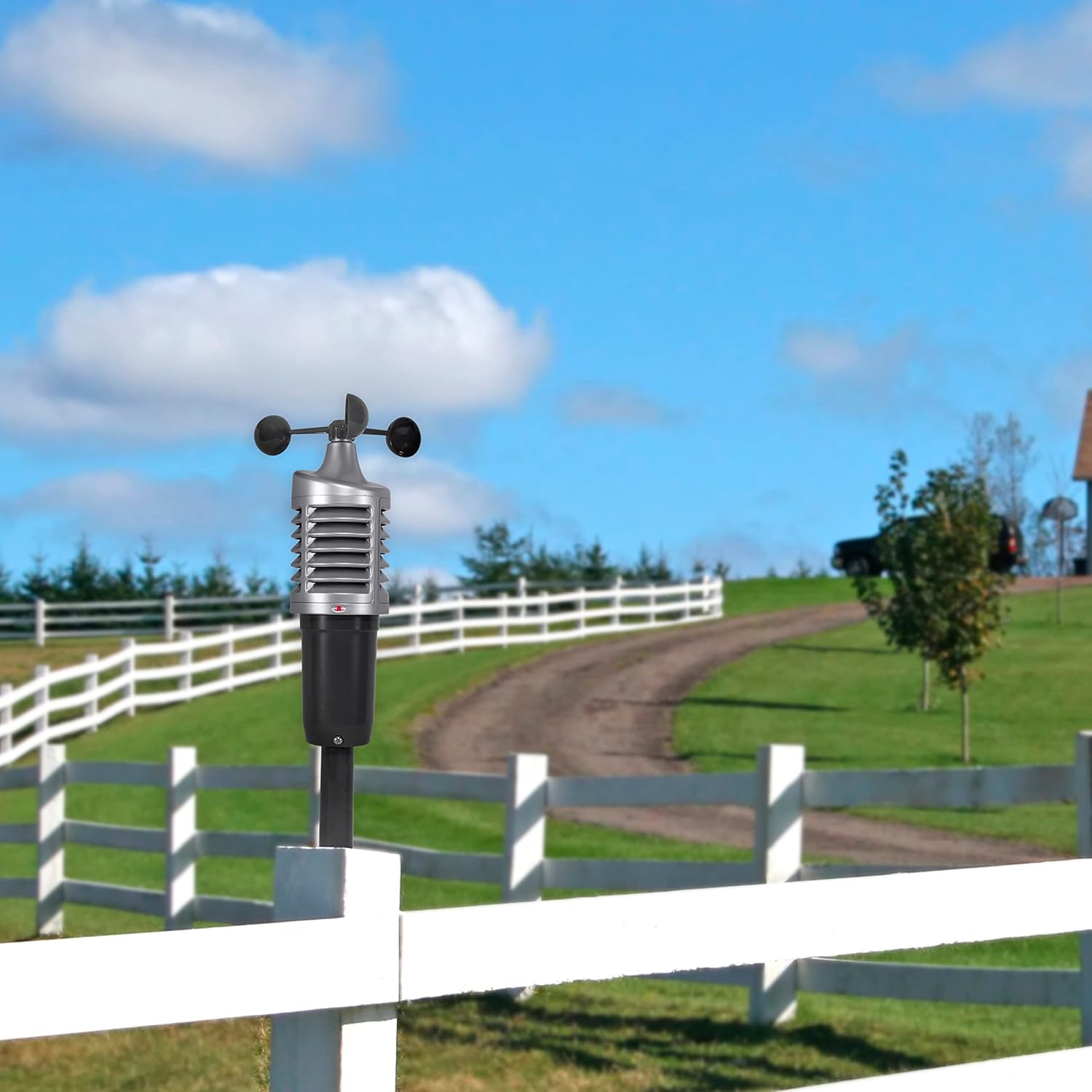
Image 3.1: The outdoor multi-sensor mounted on a post in an open area, demonstrating ideal placement for accurate wind and temperature readings.
4. Operating Instructions
4.1 Display Overview
The indoor display console provides a comprehensive overview of current weather conditions. Key display areas include:
- Time and Date: Displays current time and calendar information.
- Outdoor Temperature & Humidity: Shows current readings from the wireless sensor.
- Indoor Temperature & Humidity: Shows current readings from the console's internal sensors.
- Wind Speed: Displays current and top wind speeds.
- "Feels Like" Temperature: Calculates and displays the perceived temperature based on wind speed and actual temperature.
- Forecast Icons: Provides a visual representation of the future weather forecast with tendency indicators.
- Alert Icons: Flashing icons indicate Frost or Storm Warnings.
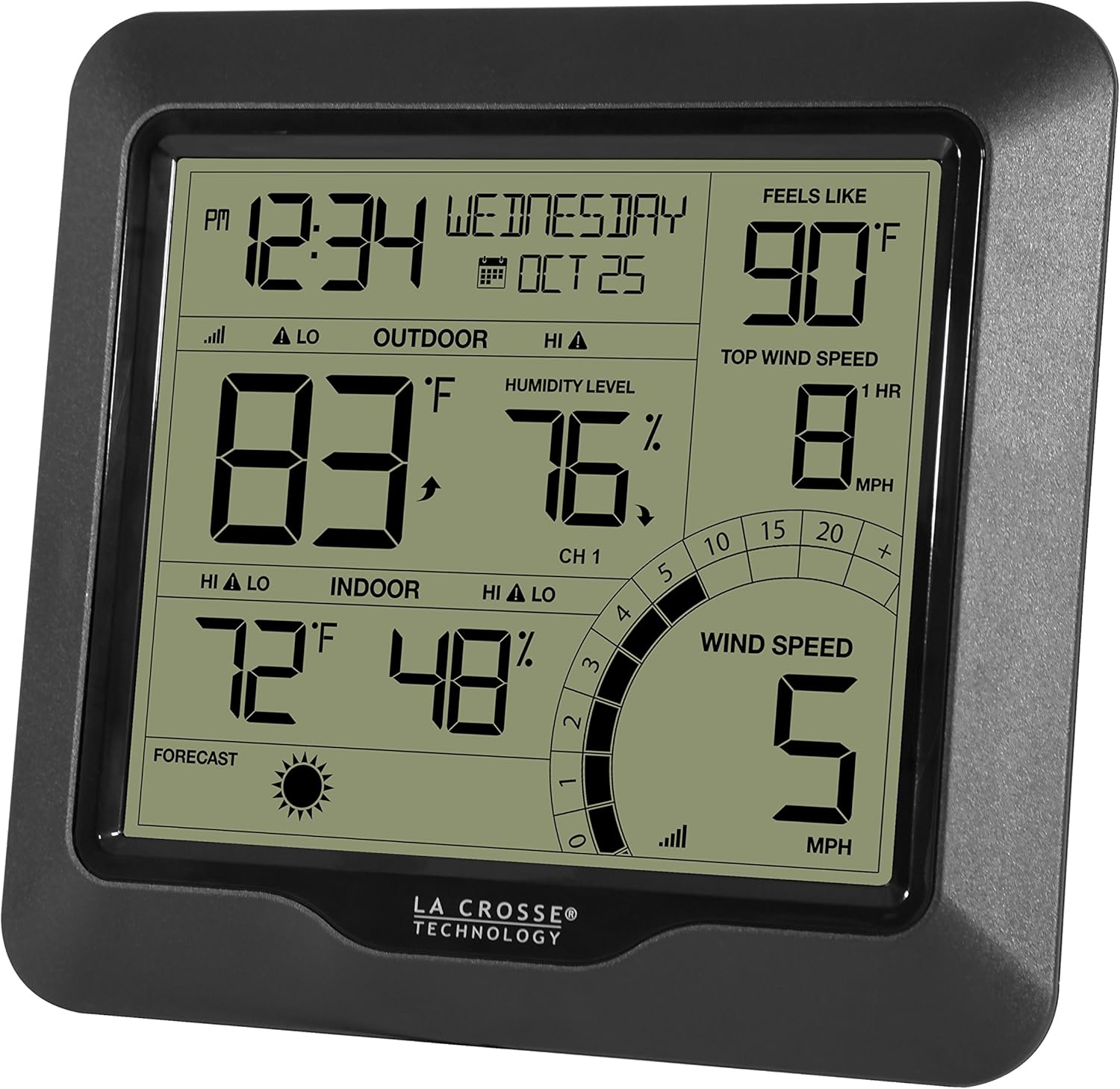
Image 4.1: The display console showing various weather parameters, including outdoor temperature (83°F), humidity (76%), indoor temperature (72°F), humidity (48%), wind speed (5 MPH), and a sunny forecast icon.
4.2 Setting Alerts
The weather station allows you to set customizable HIGH and LOW alerts for temperature, humidity, and wind speed. Refer to the full user manual for specific button functions and navigation to set these alerts.
- Access the alert settings menu on the display console.
- Select the desired parameter (temperature, humidity, or wind speed).
- Adjust the HIGH and LOW thresholds as needed.
- Confirm your settings. An audible alarm or flashing icon will activate when conditions exceed or fall below your set limits.
5. Key Features
- 3-in-1 Combo Wind Sensor: Wirelessly transmits wind speed, outdoor temperature, and outdoor humidity.
- Digital Forecast: Future forecast icons with tendency indicators, including Frost and Storm Warnings (flashing alert icons).
- Wind Speed Monitoring: Displays current and top wind speeds, historical records, and a customizable speed alert. Includes "Feels-like" temperature calculation.
- Temperature and Humidity: Monitors indoor and outdoor temperatures (°F/°C) and humidity levels (%RH) with HI/LO records and custom alerts.
- Battery Operated: Both the display and sensor are battery-powered for flexible placement.
- Expandable: Supports up to 2 additional thermo-hygro sensors (model TX141TH-BCH compatible, not included).
6. Maintenance
- Battery Replacement: Replace batteries in both the sensor and display console annually, or when the low battery indicator appears. Always replace all batteries at the same time.
- Cleaning: Wipe the display console and sensor with a soft, damp cloth. Avoid abrasive cleaners or solvents.
- Sensor Check: Periodically check the outdoor sensor for debris (leaves, spiderwebs) that might obstruct the wind cups or vents.
- Reset: If readings appear inaccurate or the device malfunctions, remove all batteries from both units for 15 minutes, then reinsert them, starting with the outdoor sensor.
7. Troubleshooting
| Problem | Solution |
|---|---|
| No outdoor data (dashes) |
|
| Inaccurate readings |
|
| Display is blank |
|
8. Specifications
- Model: 327-1417BW
- Brand: La Crosse Technology
- Display Dimensions: 1.33"D x 6.88"W x 6.37"H
- Power Source (Display): 3 AA batteries (not included)
- Power Source (Sensor): 2 C batteries (not included)
- Connectivity: Radio Frequency (Wireless)
- Wireless Range: Up to 330 feet (open air)
- Temperature Accuracy: 0.1 degree Celsius
- Special Features: Clock, Customizable Alerts, Weather Resistant, Hygrometer
- Included Components: Receiver, Wireless Sensor, Mounting bracket with hardware

Image 8.1: Diagram illustrating the dimensions of the La Crosse Technology 327-1417BW display unit.
9. Warranty and Support
For product support, technical assistance, or warranty inquiries, please contact La Crosse Technology customer service. La Crosse Technology products are designed in La Crosse, WI, and are backed by a USA-based support team.
Please refer to the official La Crosse Technology website or the packaging for the most current warranty information and contact details.
Ask a question about this manual
Ask about setup, troubleshooting, compatibility, parts, safety, or missing instructions. Manuals+ will review the question and use this page’s manual context to help answer it.