
V008A
Generic V008A 38 Melody Chime Door Bell User Manual
Model: V008A
Introduction
This manual provides comprehensive instructions for the installation, operation, and maintenance of your Generic V008A 38 Melody Chime Door Bell. Please read this manual thoroughly before use to ensure proper functionality and safety.
Safety Information
- Do not expose the device to rain or moisture.
- Do not disassemble or attempt to repair the device yourself. Refer to qualified service personnel.
- Keep out of reach of children.
- Ensure correct battery polarity when inserting batteries.
- Dispose of old batteries responsibly according to local regulations.
Package Contents
Please check the package for the following items:
- 1 x Doorbell Receiver (Chime Unit)
- 1 x Remote Control (Transmitter Button)
- Mounting Screws
- Adhesive Pad
- User Manual (This document)
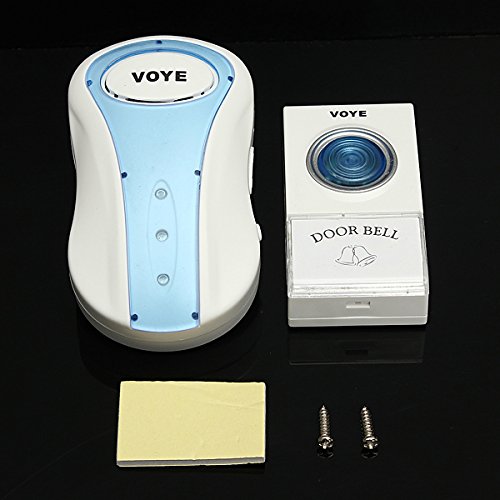
Image: Contents of the Generic V008A Door Bell package, showing the white and blue receiver unit, the white transmitter button, two mounting screws, and a rectangular adhesive pad.
Setup and Installation
1. Installing Batteries
- Receiver Unit: Open the battery compartment on the back of the receiver. Insert 3 x AA batteries (not included), ensuring correct polarity (+/-). Close the compartment.
- Transmitter Button: Open the battery compartment on the back of the transmitter. Insert 1 x 12V 23A battery (included), ensuring correct polarity (+/-). Close the compartment.
2. Mounting the Transmitter Button
Choose a suitable location near your door, ensuring it is easily accessible and protected from direct rain if possible.
- Using Adhesive Pad: Clean the mounting surface thoroughly. Peel off one side of the adhesive pad and stick it firmly to the back of the transmitter. Peel off the other side and press the transmitter firmly onto the desired wall location for at least 30 seconds.
- Using Screws: Open the transmitter casing. Mark the positions for the two mounting screws on the wall. Drill pilot holes if necessary. Secure the transmitter base to the wall using the provided screws. Reattach the transmitter casing.
3. Placing the Receiver Unit
Plug the receiver unit into any standard electrical outlet indoors. For optimal performance, place it within range of the transmitter (typically up to 100 meters in open air, less with obstacles).
Operating Instructions
Changing Melodies
The V008A doorbell offers 38 selectable melodies. To change the melody:
- On the receiver unit, locate the "Music Selection" button (often indicated by a musical note icon or up/down arrows).
- Press this button repeatedly to cycle through the available melodies.
- Once you hear the desired melody, stop pressing the button. The doorbell will remember this selection.
Adjusting Volume
To adjust the volume of the chime:
- On the receiver unit, locate the "Volume Control" button (often indicated by a speaker icon).
- Press this button to cycle through the available volume levels (e.g., high, medium, low, mute).
- Select the desired volume level.
Pairing (If Needed)
Your doorbell should be pre-paired from the factory. If the transmitter and receiver lose connection or you add new components, follow these steps to re-pair:
- Plug in the receiver unit.
- Press and hold the "Volume Control" button on the receiver for approximately 5 seconds until you hear a "ding" sound and the indicator light flashes. This indicates pairing mode.
- Within 5 seconds, press the transmitter button. The receiver should chime, confirming successful pairing.
- Test the doorbell by pressing the transmitter button.
Maintenance
- Cleaning: Wipe the units with a soft, dry cloth. Do not use abrasive cleaners or solvents.
- Battery Replacement: Replace batteries in the transmitter when the range decreases or it stops working. Replace receiver batteries when the chime sound becomes weak or stops.
- Environmental Protection: While the transmitter is designed for outdoor use, prolonged exposure to extreme weather conditions (heavy rain, direct sunlight, extreme cold) may reduce its lifespan. Consider a protective cover if exposed.
Troubleshooting
| Problem | Possible Cause | Solution |
|---|---|---|
| Doorbell does not chime. |
|
|
| Chime volume is too low/high. | Volume setting needs adjustment. | Press the volume control button on the receiver to adjust. |
| Interference or false alarms. | Other wireless devices nearby. | Try relocating the receiver or transmitter to minimize interference. |
Specifications
| Feature | Detail |
|---|---|
| Model Number | V008A (MAP-B06XP2DDFQ) |
| Operating Voltage (Receiver) | AC 110-240V (Plug-in) |
| Battery (Transmitter) | 1 x 12V 23A (included) |
| Battery (Receiver) | 3 x AA (not included) |
| Operating Frequency | 433MHz |
| Wireless Range | Up to 100 meters (open air) |
| Melodies | 38 selectable |
| Volume Levels | 4 levels |
| Product Dimensions | 15 x 10 x 5 cm (approximate, for entire package) |
Warranty and Support
This product comes with a standard manufacturer's warranty. Please refer to the packaging or contact your retailer for specific warranty terms and conditions.
For technical support or inquiries, please contact the seller or manufacturer through the platform where you purchased the product. Provide your model number (V008A) and a detailed description of the issue for faster assistance.
Note: Warranty terms may vary by region and retailer.