
1. Introduction
This manual provides instructions for the safe and effective use of the LSC Lighting Systems MAXLITE Flexible LED Wand Light. This product is designed to provide flexible illumination, primarily for use with LSC Consoles. Please read this manual thoroughly before installation and operation, and retain it for future reference.
2. Safety Information
WARNING: To reduce the risk of electric shock, fire, or injury, always follow basic safety precautions.
- Ensure the power source matches the voltage requirements specified for the device.
- Do not expose the light to water or excessive moisture.
- Do not attempt to disassemble or modify the unit. Refer all servicing to qualified personnel.
- Avoid direct eye exposure to the LED light source, as it may cause discomfort.
- Keep out of reach of children.
- Always disconnect power before cleaning or performing any maintenance.
3. Product Overview
The MAXLITE Flexible LED Wand Light is a compact and versatile lighting solution featuring a flexible gooseneck design and a 3-pin connector for integration with compatible LSC Consoles.
3.1 Package Contents
- 1 x LSC Lighting Systems MAXLITE Flexible LED Wand Light
3.2 Components
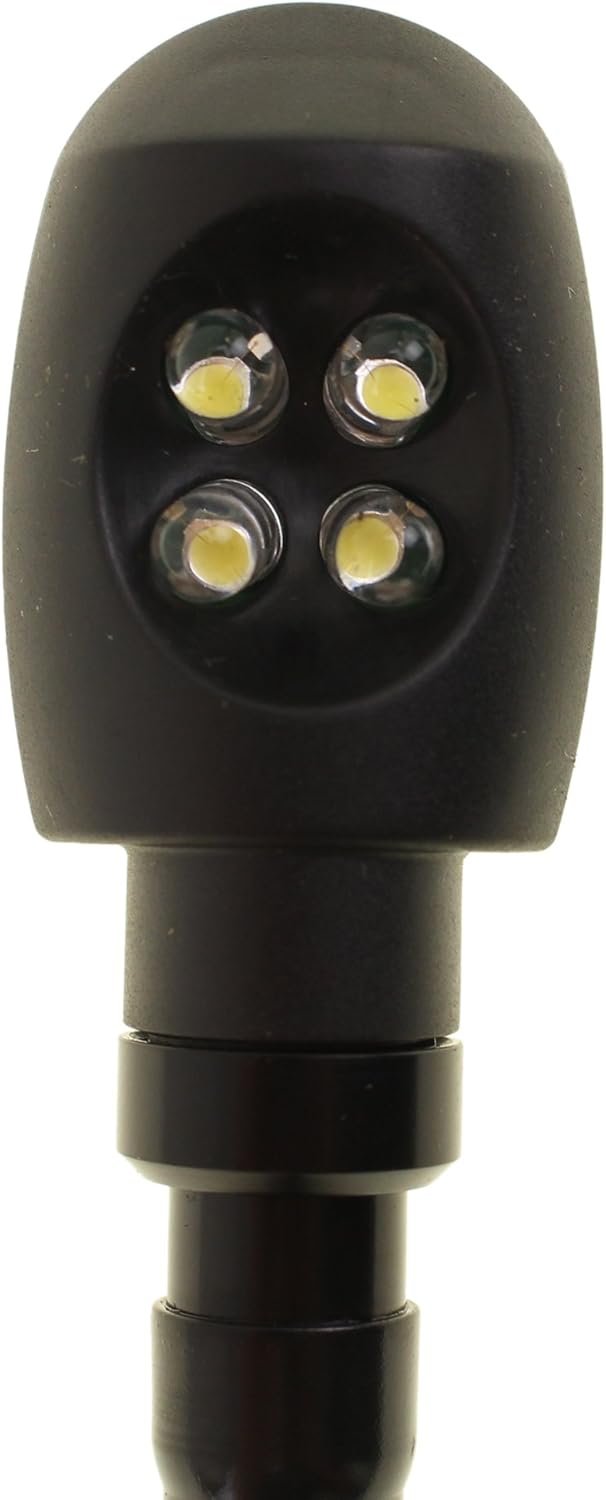
Figure 1: Full view of the MAXLITE Flexible LED Wand Light. This image displays the entire length of the flexible gooseneck, the LED light head at one end, and the 3-pin connector at the other end.
- LED Light Head: Contains four bright LED emitters for illumination.
- Flexible Gooseneck: Allows for precise positioning and direction of the light.
- 3-Pin Connector: Standard connector for power and signal, compatible with LSC Consoles.

Figure 2: Close-up of the LED Light Head. This image highlights the four individual LED bulbs embedded in the black housing.

Figure 3: Close-up of the 3-Pin Connector. This image clearly shows the three metal pins designed for secure connection to a compatible port.
4. Setup
Follow these steps to properly set up your MAXLITE Flexible LED Wand Light:
- Identify Compatible Port: Locate a compatible 3-pin connector port on your LSC Console or other intended device. Ensure the port is designed to supply power to an LED wand light.
- Connect the Light: Align the 3-pin connector of the MAXLITE wand light with the corresponding port. Gently push the connector into the port until it is firmly seated. Do not force the connection.
- Secure Connection (if applicable): Some ports may have a locking mechanism. Ensure any such mechanism is engaged to prevent accidental disconnection.
- Position the Light: Once connected, adjust the flexible gooseneck to direct the LED light to your desired area. The gooseneck can be bent and twisted to achieve optimal illumination.
Note: This light is specifically designed for use with LSC Consoles. Compatibility with other devices is not guaranteed and may require specific power and signal configurations.
5. Operating Instructions
The MAXLITE Flexible LED Wand Light typically operates directly upon connection to a powered LSC Console or compatible device. There are no external controls on the wand light itself.
- Power On: Ensure your LSC Console or host device is powered on. The LED wand light should illuminate automatically if the port provides power.
- Adjust Position: Reposition the flexible gooseneck as needed to illuminate your workspace or console controls.
- Power Off: To turn off the light, power down the LSC Console or host device, or carefully disconnect the wand light from its port.
6. Maintenance
Regular maintenance ensures the longevity and optimal performance of your LED wand light.
- Cleaning: Disconnect the light from its power source before cleaning. Use a soft, dry cloth to wipe the surface of the LED head and gooseneck. Do not use abrasive cleaners or solvents.
- Storage: When not in use, store the light in a clean, dry environment, away from extreme temperatures and direct sunlight.
- Inspection: Periodically inspect the cable and connector for any signs of damage, such as fraying or bent pins. If damage is observed, discontinue use and contact support.
7. Troubleshooting
If you encounter issues with your MAXLITE Flexible LED Wand Light, refer to the following common problems and solutions:
| Problem | Possible Cause | Solution |
|---|---|---|
| Light does not turn on. |
|
|
| Light flickers. |
|
|
If the problem persists after attempting these solutions, please contact LSC Lighting Systems customer support.
8. Specifications
| Feature | Detail |
|---|---|
| Model Number | MAXLITE |
| Brand | LSC Lighting Systems |
| Type | Flexible LED Wand Light |
| Connector Type | 3-Pin |
| Color | Black |
| Power Source | Corded Electric (via host device) |
| Item Weight | 6.4 ounces (approx. 181 grams) |
| Product Dimensions | 20 x 1.75 x 1 inches (approx. 50.8 x 4.45 x 2.54 cm) |
| UPC | 643129361593 |
9. Warranty and Support
9.1 Warranty Information
LSC Lighting Systems products are manufactured to high-quality standards. For specific warranty details regarding your MAXLITE Flexible LED Wand Light, please refer to the warranty card included with your purchase or visit the official LSC Lighting Systems website. The warranty typically covers defects in materials and workmanship under normal use.
9.2 Customer Support
If you have any questions, require technical assistance, or need to report an issue with your product, please contact LSC Lighting Systems customer support through their official website or the contact information provided with your purchase documentation.
For the most up-to-date support information, please visit: www.lsclighting.com/support (example link, replace with actual if known).