
1. Introduction
The Nitecore D4 is an advanced, fully automatic digital charger designed for a wide range of rechargeable batteries. It intelligently detects battery types including Li-ion, Ni-MH, and Ni-Cd, and allows for manual selection of LiFePO4 batteries. The D4 features four microcomputer-controlled charging slots that monitor and charge batteries independently, applying optimal charging modes (CC, CV, and dV/dt). An integrated digital LCD screen provides clear information on charging progress, voltage, current, and time. This manual provides essential information for safe and effective use of your Nitecore D4 charger.
2. Safety Information
Please read all safety instructions carefully before using the charger. Failure to follow these instructions may result in electric shock, fire, or personal injury.
- Use this charger only for rechargeable batteries specified in this manual. Do not attempt to charge non-rechargeable batteries.
- Ensure correct battery polarity before inserting batteries into the charging slots.
- Do not expose the charger to water or high humidity.
- Do not disassemble, modify, or attempt to repair the charger.
- Keep the charger away from direct sunlight, high temperatures, and open flames.
- Ensure adequate ventilation around the charger during operation.
- The charger features over-charge prevention to protect batteries and temperature monitoring to prevent overheating.
- Reverse polarity protection is integrated to prevent damage from incorrect battery insertion.
3. Product Overview
The Nitecore D4 charger is designed for ease of use and comprehensive battery management.

Figure 1: Nitecore D4 Digital Smart Battery Charger with included 12V DC car adapter, AC power cord, NBM40 battery magazine, and BBX3 EdisonBright battery carry case.
Key Components:
- Charging Slots (x4): Independent slots for charging various battery sizes.
- LCD Display: Shows real-time charging status, battery type, voltage, current, and elapsed time.
- Side Buttons: Two conveniently located buttons for mode selection and display cycling.
- Power Input: For connecting the AC power cord or 12V DC car adapter.

Figure 2: Close-up of the Nitecore D4's highly visible liquid crystal display, showing charging current and other parameters.
4. Setup
Follow these steps to set up your Nitecore D4 charger:
- Connect Power: Plug the AC power cord into the charger's power input port and then into a standard wall outlet. Alternatively, for in-car charging, connect the 12V DC car adapter to the charger and then to your vehicle's 12V DC socket.
- Initial Display: Upon power-up, the LCD screen will illuminate, performing a self-test before displaying standby information.
5. Operating Instructions
5.1 Automatic Battery Detection
The Nitecore D4 features an intelligent auto-detect function:
- Insert Battery: Carefully insert a compatible rechargeable battery into one of the charging slots, ensuring correct polarity.
- Automatic Identification: The charger will automatically detect the battery type (Li-ion, Ni-MH, or Ni-Cd) and its power status.
- Optimal Charging Mode: The intelligent circuitry will then select the appropriate charging voltage and mode (Constant Current - CC, Constant Voltage - CV, or Negative Delta V - dV/dt) for the inserted battery.
- Charging Begins: Charging will commence automatically, and the LCD will display real-time information.
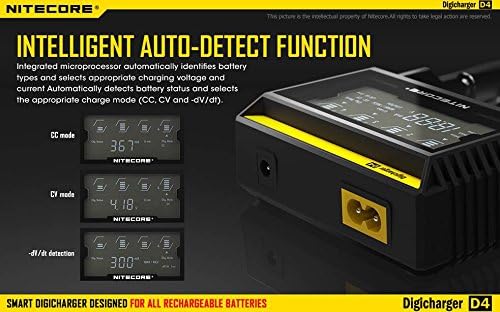
Figure 3: The Nitecore D4's intelligent auto-detect function, illustrating the automatic selection of CC, CV, and -dV/dt charging modes.
5.2 Manual LiFePO4 Selection
For LiFePO4 batteries, manual selection is required:
- Insert LiFePO4 Battery: Insert a LiFePO4 battery into a charging slot.
- Activate Manual Mode: Within 8 seconds of inserting the battery, press and hold the side button associated with that slot until the display shows 'LiFePO4'.
- Confirm Selection: Release the button. The charger will now begin charging the LiFePO4 battery.
5.3 Understanding the LCD Display
The LCD display provides comprehensive information about the charging process:
- Charging Progress: Indicated by battery icons.
- Battery Type: Displays the detected or selected battery chemistry (e.g., Li-ion, Ni-MH, LiFePO4).
- Voltage: Shows the current voltage of the battery.
- Current: Displays the charging current in mA.
- Time: Indicates the elapsed charging time.
You can cycle through the displayed information for each slot by briefly pressing the corresponding side button.

Figure 4: The Nitecore D4's display cycling through charging voltage, charging current, and charging time, providing detailed information.
6. Battery Compatibility
The Nitecore D4 is compatible with a wide range of rechargeable battery types and sizes:

Figure 5: The Nitecore D4 charger demonstrating its intelligent ultra-compatibility with various battery types.
Compatible Battery Types:
- Li-ion / IMR / LiFePO4: 26650, 22650, 18650, 17670, 18490, 17500, 18350, 16340 (RCR123), 14500, 10440
- Ni-MH / Ni-Cd: AA, AAA, AAAA, C
Important Note: Type C and 26650 batteries fit only in the two outer charging slots.

Figure 6: The Nitecore D4's compatibility with various battery sizes and chemistries, including IMR, Li-ion, LiFePO4, Ni-MH, and Ni-Cd.
7. Maintenance
Proper maintenance ensures the longevity and optimal performance of your Nitecore D4 charger:
- Cleaning: Disconnect the charger from power before cleaning. Use a soft, dry cloth to wipe the surface. Do not use abrasive cleaners or solvents.
- Storage: When not in use, store the charger in a cool, dry place away from direct sunlight and extreme temperatures.
- Inspection: Periodically inspect the power cords and charging slots for any signs of damage or wear.
8. Troubleshooting
If you encounter issues with your Nitecore D4 charger, refer to the following table:
| Problem | Possible Cause | Solution |
|---|---|---|
| Charger not powering on | No power supply; faulty cable; charger malfunction. | Check power connections. Try a different outlet or cable. If issue persists, contact support. |
| Battery not charging | Incorrect battery insertion; battery incompatible; battery deeply discharged or damaged. | Ensure correct polarity. Verify battery compatibility. Some deeply discharged batteries may require a specific recovery process (refer to battery manufacturer). Try a different battery. |
| Display error message | Battery issue; internal fault. | Remove and reinsert the battery. Try a different battery. If the error persists across multiple batteries, contact support. |
| LiFePO4 battery not charging correctly | Manual selection not performed. | Ensure you manually select 'LiFePO4' mode within 8 seconds of inserting the battery. |
9. Specifications
Technical specifications for the Nitecore D4 Digital Smart Battery Charger:

Figure 7: Detailed specifications for the Nitecore D4 charger, including input/output voltage, current, dimensions, and weight.
| Feature | Detail |
|---|---|
| Input Voltage | AC 100-240V 50/60Hz 0.35A (MAX) or DC 12V |
| Output Voltage | 4.2V ±1% / 3.7V ±1% / 1.48V ±1% |
| Output Current | 375mA x 4 / 750mA x 2 |
| Dimensions | 143mm x 99mm x 36mm (5.63 x 3.90 x 1.42 inches) |
| Item Weight | 15 ounces (approximately 425g) |
| Compatible with | Li-ion / IMR / LiFePO4: 26650, 22650, 18650, 17670, 18490, 17500, 18350, 16340 (RCR123), 14500, 10440; Ni-MH / Ni-Cd: AA, AAA, AAAA, C |
10. Included Accessories
Your EdisonBright Nitecore D4 package includes the following accessories:
- Nitecore NBM40 Battery Magazine: A multi-purpose portable battery magazine designed to hold up to 4x 18650 batteries. Constructed from environmentally friendly gum, it offers extreme resilience and is tear and rupture proof, capable of handling up to 40 lbs of weight.
- BBX3 EdisonBright Battery Carry Case: A protective case for safely transporting your batteries.
- 12V DC Car Adapter: For charging your device on the go.

Figure 8: The Nitecore NBM40 Multi-purpose Portable Battery Magazine, designed for secure battery storage.
11. Warranty and Support
For warranty information or technical support, please contact EdisonBright customer service. Keep your purchase receipt as proof of purchase for any warranty claims.