
Introduction
This manual provides essential information for the safe and effective use of your PwrON 6.6 FT AC Adapter. This power supply is designed to provide reliable power to Himedia HD910A and HD910B 3D Full HD Blu-Ray Network Media Players.
The PwrON AC Adapter is engineered for durability and performance, ensuring your device receives stable power. Please read this manual thoroughly before use.
Safety Information
To ensure safe operation and prevent damage, observe the following safety guidelines:
- Indoor Use Only: This adapter is designed for indoor use. Do not expose it to rain, moisture, or extreme temperatures.
- Proper Ventilation: Ensure the adapter has adequate ventilation. Do not cover it or place it in an enclosed space during operation.
- Voltage Compatibility: The adapter supports a worldwide input voltage range of 100-240VAC, 50/60Hz. Ensure your wall outlet voltage is within this range.
- Over Current Protection: The adapter includes built-in protection against excessive current, safeguarding your device.
- Over Voltage Protection: Designed to protect against voltage surges, preventing damage to connected equipment.
- Over Temperature Protection: Features a mechanism to prevent overheating, enhancing safety and longevity.
- Short Circuit Protection: Automatically protects against short circuits, minimizing risk of damage.
- Avoid Damage: Do not bend, twist, or pull the power cord excessively. Avoid placing heavy objects on the cord.
- Disconnect When Not in Use: Unplug the adapter from the power outlet when not in use for extended periods.
Setup Instructions
Follow these steps to connect your PwrON AC Adapter:
- Verify Compatibility: Ensure your device is a Himedia HD910A or HD910B 3D Full HD Blu-Ray Network Media Player.
- Connect to Device: Insert the DC output plug of the PwrON AC Adapter firmly into the power input port of your Himedia media player.
- Connect to Power Outlet: Plug the AC input prongs of the adapter into a standard wall power outlet.
- Power On: Once connected, your media player should receive power. Refer to your media player's manual for specific power-on procedures.
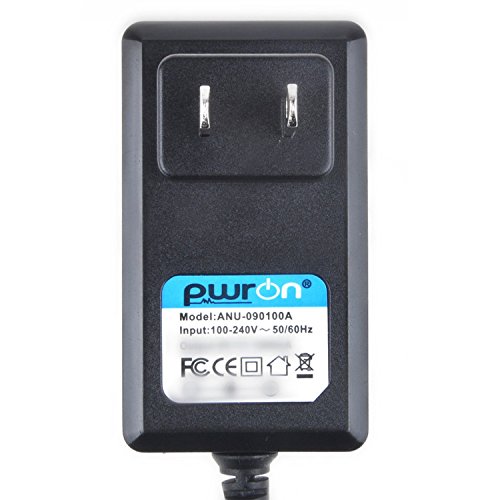
Image: PwrON AC Adapter with its 6.6 FT extra long cord, illustrating the compact design and cable length.
Operating Instructions
The PwrON AC Adapter operates automatically once connected to a power source and your compatible device. It converts the alternating current (AC) from your wall outlet into direct current (DC) required by your Himedia media player.
- Ensure the adapter is securely plugged into both the wall outlet and the media player.
- The adapter is designed for continuous operation, but it is recommended to unplug it when the device is not in use for extended periods.
Maintenance
Proper maintenance ensures the longevity and safe operation of your AC adapter:
- Cleaning: Disconnect the adapter from all power sources before cleaning. Use a soft, dry cloth to wipe the exterior. Do not use liquid cleaners or solvents.
- Storage: Store the adapter in a cool, dry place away from direct sunlight and extreme temperatures when not in use. Avoid tightly coiling the cable to prevent damage.
- Inspection: Periodically inspect the adapter and cable for any signs of damage, such as cuts, frayed wires, or bent prongs. If damage is found, discontinue use immediately and replace the adapter.
Troubleshooting
If your device is not powering on or functioning correctly, consider the following:
- No Power:
- Ensure the adapter is securely plugged into both the wall outlet and the media player.
- Test the wall outlet with another device to confirm it is supplying power.
- Check the adapter cable for any visible damage.
- Device Not Charging/Operating:
- Confirm that the adapter model (1701-0301) is correct for your Himedia HD910A or HD910B media player.
- Ensure the DC plug is fully inserted into the media player's power port.
- Overheating:
- If the adapter feels excessively hot, unplug it immediately. Ensure it is in a well-ventilated area and not covered.
- If overheating persists, discontinue use.
If troubleshooting steps do not resolve the issue, please contact PwrON customer support.
Specifications
| Model Number | 1701-0301 |
| Input Voltage | 100-240VAC, 50/60Hz |
| Cable Length | 6.6 FT (approximately 2 meters) |
| Certifications | CE, FCC |
| Safety Features | Over Current Protection, Over Voltage Protection, Over Temperature Protection, Short Circuit Protection |
| Compatible Devices | Himedia HD910A, Himedia HD910B 3D Full HD Blu-Ray Network Media Player |
Warranty and Support
PwrON products are designed for quality and reliability. For any questions, concerns, or support needs regarding your AC adapter, please contact PwrON customer service. We are committed to assisting you.
Please refer to your purchase documentation for specific warranty terms and contact information.