
1. Introduction
This manual provides essential information for the safe and effective use of your Roland GR-33 Guitar Synthesizer. Please read this manual thoroughly before using the unit and retain it for future reference. The GR-33 is a powerful guitar synthesizer designed to expand the sonic capabilities of your guitar, offering a wide range of sounds and effects.

Figure 1.1: Top view of the Roland GR-33 Guitar Synthesizer, showing the control panel, footswitches, and expression pedal.
2. Important Safety Information
To prevent electric shock, fire, or other hazards, always observe the following precautions:
- Do not open the unit or attempt to modify its internal components.
- Do not expose the unit to rain, moisture, or extreme temperatures.
- Use only the specified AC adapter (Roland PSB-1U or equivalent).
- Ensure proper ventilation; do not block vents.
- Avoid placing heavy objects on the unit.
- Keep out of reach of small children.
3. Package Contents
Verify that your package contains the following items:
- Roland GR-33 Guitar Synthesizer Unit
- AC Adapter
- Owner's Manual (this document)

Figure 3.1: Included accessories: AC adapter and the owner's manual.
4. Setup
4.1 Connecting the AC Adapter
- Ensure the GR-33's power switch is OFF.
- Connect the AC adapter to the AC IN jack on the rear panel of the GR-33.
- Plug the AC adapter into a standard AC outlet.
4.2 Connecting Your Guitar (GK Pickup)
The GR-33 requires a guitar equipped with a Roland GK-compatible pickup (e.g., GK-2A, GK-3) and a 13-pin cable.
- Connect one end of the 13-pin GK cable to the GK IN jack on the GR-33.
- Connect the other end of the GK cable to the GK output on your guitar's GK pickup.
4.3 Audio Output Connections
Connect the GR-33 to an amplifier, mixer, or audio interface using standard 1/4-inch cables.
- L (MONO)/R MIX OUT: For stereo output, connect both L and R jacks. For mono output, connect only the L (MONO) jack.
- GUITAR OUT: This jack outputs the normal guitar signal (from your guitar's standard output) that passes through the GR-33 without synthesis.
- GUITAR RETURN: If you wish to process your guitar's normal signal through external effects before it reaches the GR-33's GUITAR OUT, connect the output of your external effects to this jack.
4.4 MIDI Connections
The GR-33 can send and receive MIDI messages for control with other MIDI devices.
- MIDI IN: Connect to the MIDI OUT of a MIDI controller or computer interface to control the GR-33.
- MIDI OUT: Connect to the MIDI IN of another MIDI device or computer interface to send MIDI data from the GR-33.

Figure 4.1: Rear panel of the GR-33, showing the AC IN, MIDI IN/OUT, GK IN, GUITAR OUT, GUITAR RETURN, and L/R MIX OUT jacks.

Figure 4.2: Detailed view of the power input and MIDI IN/OUT ports on the GR-33 rear panel.

Figure 4.3: Detailed view of the GK IN, GUITAR OUT, GUITAR RETURN, and L/R MIX OUT jacks on the GR-33 rear panel.
5. Operating the GR-33
5.1 Power On/Off
After all connections are made, turn on your audio system (amplifier/mixer) first, then the GR-33. When powering off, turn off the GR-33 first, then your audio system.
5.2 Basic Controls Overview
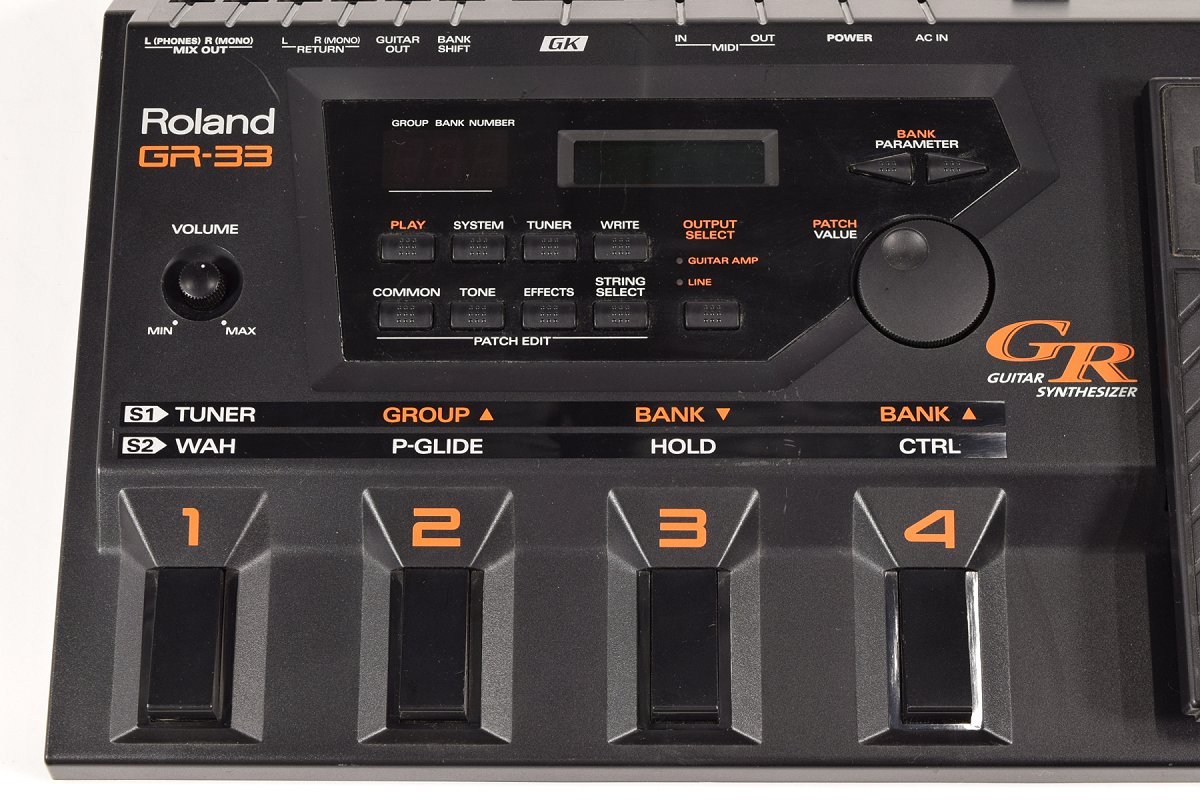
Figure 5.1: Close-up view of the GR-33's main control panel, including the display, navigation buttons, and patch edit controls.
- VOLUME Knob: Adjusts the overall output level of the GR-33.
- Footswitches (1-4): Used for selecting patches, banks, and controlling various functions.
- Expression Pedal: Controls parameters such as volume, wah, or pitch glide depending on the selected patch.
- Display: Shows current patch number, name, and parameter values.
- BANK ▼/▲ Buttons: Navigate through banks of patches.
- PATCH VALUE Knob: Adjusts parameter values during editing.
- PLAY/SYSTEM/TUNER/WRITE Buttons: Access different modes of operation.
- COMMON/TONE/EFFECTS/STRING SELECT Buttons: Used for editing patch parameters.
5.3 Selecting Patches
- In PLAY mode, use the BANK ▼/▲ buttons to select a bank.
- Use footswitches 1-4 to select a specific patch within the bank.
5.4 Using the Tuner
- Press the TUNER button to enter tuner mode.
- Play a single note on your guitar. The display will indicate the note and pitch deviation.
- Adjust your guitar's tuning until the display shows the correct pitch.
- Press the TUNER button again to exit tuner mode.
5.5 Expression Pedal Functions
The expression pedal can be assigned to various functions. Common assignments include:
- Volume: Controls the overall output volume.
- Wah: Applies a wah effect to the synthesized sound.
- P-Glide (Pitch Glide): Smoothly shifts the pitch of the synthesized sound.

Figure 5.2: Side view of the GR-33, highlighting the expression pedal for real-time control of effects and parameters.
6. Maintenance
6.1 Cleaning
Wipe the unit with a soft, dry cloth. For stubborn dirt, use a slightly damp cloth and then wipe dry. Do not use abrasive cleaners, waxes, or solvents.
6.2 Storage
When not in use for extended periods, store the GR-33 in a dry, dust-free environment away from direct sunlight and extreme temperatures. Disconnect the AC adapter.
7. Troubleshooting
If you encounter issues, refer to the following table before contacting service personnel.
| Problem | Possible Cause | Solution |
|---|---|---|
| No sound | Power not connected; Volume low; Cables incorrect; GK pickup not active. | Check AC adapter connection; Increase VOLUME knob; Verify all audio and GK cables are securely connected; Ensure GK pickup is switched ON. |
| Synthesized sound is distorted or noisy | Input level too high; Output level too high; Incorrect GK sensitivity settings. | Adjust guitar volume; Lower GR-33 VOLUME knob; Adjust GK sensitivity in SYSTEM settings. |
| MIDI not working | MIDI cables incorrect; MIDI channels mismatched; MIDI settings incorrect. | Check MIDI IN/OUT connections; Verify MIDI channels on GR-33 and external device match; Review MIDI settings in SYSTEM mode. |
8. Specifications
| Feature | Detail |
|---|---|
| Model Name | GR-33 |
| Brand | Roland |
| Body Material | Plastic |
| Finish Type | Metallic |
| Item Weight | 1 Kilograms |
| Connector | 1/4" jack, 13-pin GK, MIDI IN/OUT |
| Colour | Multicolor (predominantly black) |
| Manufacturer | Roland |
9. Warranty and Support
The Roland GR-33 Guitar Synthesizer comes with a manufacturer's warranty. Please refer to the warranty card included with your product for specific terms and conditions, including the warranty period and coverage details. For technical support, service, or further inquiries, please contact your local Roland authorized service center or visit the official Roland website for support resources.