
1. Introduction
Thank you for choosing the ObusForme Back Massager with Heat. This device is designed to provide supportive comfort and vibration massage for your back and thighs, enhancing your well-being whether at home, in the office, or on the go. Please read this manual thoroughly before use to ensure proper operation and safety.
2. Safety Information
This product includes safety warnings. Always adhere to all safety precautions to prevent injury or damage to the device. Do not use this product if you have any medical conditions that may be aggravated by heat or massage. Consult a physician before use if you have concerns. Keep out of reach of children. Do not use while driving. Unplug the unit when not in use.
3. Product Features
- Adjustable Back Support: Integrated backrest frame conforms to the natural shape of your back, providing supportive comfort.
- Removable Lumbar Pad: Provides personalized comfort and support for the lower back.
- Customized Vibration Massage: Features 8 massage motors with multiple pre-programmed options for upper, middle, and/or lower back, as well as thighs.
- Easy-to-Use LED Touchpad Controller: Allows for simple selection of massage zones, programs, intensity, and speed. Stores neatly in an integrated pocket.
- Heat Function: Enhances comfort, particularly in cold weather.
- Breathable Mesh Fabric: Allows for cooling airflow through the cushion.
- 3-Way Auto Shut-Off Safety Features: Ensures safe operation.
- Portable Comfort: Includes both 12 Volt DC and 110 Volt AC adaptors for versatile use.
4. Setup
- Placement: Place the ObusForme Back Massager on a chair or seat. Ensure it is securely positioned.
- Secure Attachment: The massager features an elastic band on the side. Slip this band over the top of your office chair or car seat to hold it in place.
- Adjust Lumbar Pad: Adjust the removable lumbar pad to your preferred position for personalized comfort and support.
- Power Connection: Connect the appropriate power adaptor (12V DC for car, 110V AC for home/office) to the massager and then to a power source.

Figure 1: ObusForme Back Massager with Heat and Vibration, showing its design and remote control.
5. Operating Instructions
The massager is controlled via an LED touchpad remote. Familiarize yourself with the remote's layout:
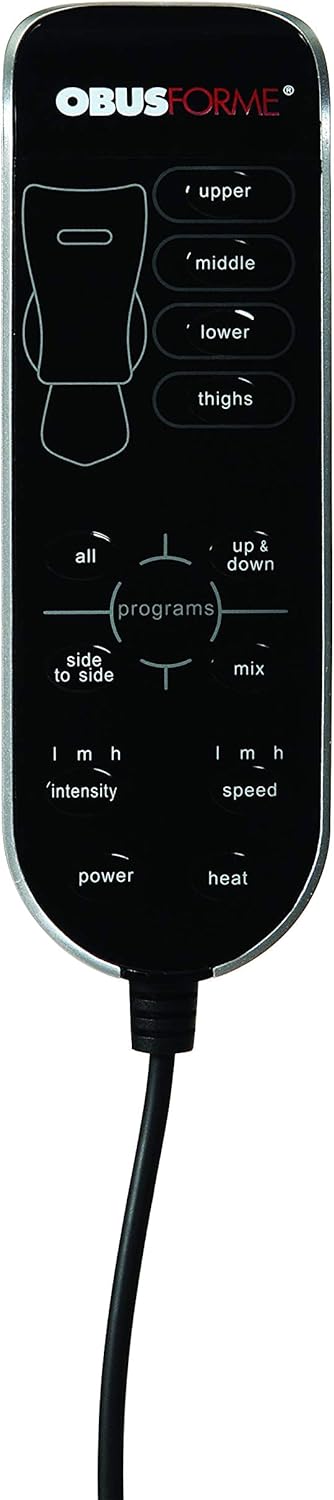
Figure 2: Close-up view of the ObusForme Back Massager remote control, highlighting various buttons for massage zones, programs, intensity, speed, and heat.
- Power On/Off: Press the Power button to turn the unit on or off. The LED indicator will illuminate when on.
- Select Massage Zones: Use the buttons labeled Upper, Middle, Lower, and Thighs to activate specific massage areas. You can select one or multiple zones simultaneously.
- Choose Programs: The Programs section offers different massage patterns:
- All: Activates all massage zones with a continuous vibration.
- Up & Down: Provides a sequential massage pattern moving from upper to lower zones.
- Side to Side: Offers a massage pattern that alternates between the left and right sides of the back.
- Mix: Combines various massage patterns for a dynamic experience.
- Adjust Intensity: Use the Intensity buttons (L, M, H) to select low, medium, or high vibration intensity.
- Adjust Speed: Use the Speed buttons (L, M, H) to select low, medium, or high vibration speed.
- Activate Heat: Press the Heat button to turn on the warming function. The heat will be applied to the seat cushion. Press again to turn off.
The 3-way auto shut-off safety feature will automatically turn off the massager after a set period to prevent overheating and ensure user safety.
6. Maintenance
- Cleaning: Unplug the unit before cleaning. Wipe the surface with a soft, damp cloth. Do not use abrasive cleaners or immerse the unit in water.
- Storage: Store the massager in a cool, dry place when not in use. Avoid placing heavy objects on it.
- Cord Care: Do not pull the power cord by force or wrap it tightly around the unit.
7. Troubleshooting
- Unit does not power on:
- Ensure the power adaptor is securely connected to both the unit and the power outlet.
- Verify the power outlet is functional.
- Massage function is weak or inconsistent:
- Check the intensity and speed settings on the remote control.
- Ensure the unit is placed on a flat, stable surface.
- Heat function is not working:
- Ensure the heat button is activated on the remote.
- Allow a few minutes for the heat to become noticeable.
If problems persist, discontinue use and contact customer support.
8. Specifications
| Model Number | CC-BDS-01 |
| Product Dimensions | 6 x 17 x 4.85 inches |
| Item Weight | 4.75 Pounds |
| Power Source | Corded Electric (12V DC and 110V AC adaptors included) |
| Color | Black |
| Special Feature | Heat, Vibration Massage |
9. Warranty and Support
The ObusForme Back Massager with Heat includes a 1-year warranty from the date of purchase. For warranty claims, technical support, or any inquiries regarding your product, please refer to the contact information provided with your purchase documentation or visit the official ObusForme website.