
1. Introduction
The EXMAX EX-938 UHF Wireless Headset Microphone Audio Tour Guide System is designed for clear and reliable voice transmission over distances. This system facilitates simultaneous interpretation, guided tours, teaching, and other applications where a speaker's voice needs to be transmitted clearly to multiple listeners, helping to overcome background noise and maintain social distancing. This manual provides detailed instructions for the setup, operation, and maintenance of your EX-938 system.
2. Product Overview
2.1 Components
The EXMAX EX-938 system typically includes the following components:
- EX-938T Transmitter (1 unit)
- EX-938R Receivers (quantity varies, e.g., 200 units)
- Headset Microphone (1 unit)
- Lapel Microphone (1 unit)
- Earphones (quantity matches receivers)
- AUX Cable (1 unit)

Image: Contents of the EXMAX EX-938 system box, illustrating the transmitter, receivers, microphones, earphones, and AUX cable.
2.2 Key Features
- Extended Transmission Range: The system supports a transmission distance of approximately 492 feet (150 meters), ensuring clear audio reception over long distances.
- Multiple Channel Operation: Features 11 selectable UHF channels, allowing up to 5 groups to operate simultaneously without interference. Each group utilizes a unique Channel ID.
- Long Battery Life: Powered by AA batteries (not included), offering over 15 hours of continuous working time. The design allows for easy battery replacement and is convenient for air travel due to the absence of a built-in battery.
- Dual Audio Inputs: The EX-938T transmitter includes both AUX and MIC input jacks. The AUX input is for external audio sources (e.g., CD/MP3 players), while the MIC input is for real-time human voice input.
- Stable UHF Transmission: Utilizes PLL frequency synthesized technology for stable and reliable voice transmission performance.

Image: The EXMAX EX-938T transmitter and EX-938R receiver, highlighting the 492 feet (150m) wireless transmission distance.

Image: Two EXMAX EX-938 units, a transmitter and a receiver, demonstrating UHF frequency band for stable audio transmission.
3. Setup
3.1 Battery Installation
- Open the battery compartment covers on both the transmitter (EX-938T) and all receivers (EX-938R).
- Insert two AA batteries into each unit, ensuring correct polarity (positive and negative poles).
- Close the battery compartment covers securely.

Image: An EXMAX EX-938 unit with the battery compartment open, illustrating the insertion of two AA batteries for power.
3.2 Connecting Microphones and Earphones
- For the transmitter (EX-938T): Insert the headset or lapel microphone into the MIC IN port. If using an external audio source, connect it to the AUX port. Caution: Do not mix up the MIC IN and AUX ports to avoid noise.
- For each receiver (EX-938R): Insert the earphone into the OUT port.

Image: A visual guide to the quick and easy operation of the EXMAX EX-938, detailing battery insertion and microphone/earphone connections.
4. Operating Instructions
4.1 Power On/Off
Locate the power switch (OFF/ON) on the side of both the transmitter and receivers. Slide the switch to the 'ON' position to power on the device, and to 'OFF' to power it off.
4.2 Channel Adjustment
The EX-938 system features 11 selectable UHF channels. To adjust the channel:
- On both the transmitter and receivers, use the CH- and CH+ buttons to increase or decrease the Channel ID.
- Ensure that all receivers are set to the same Channel ID as the transmitter to receive the audio signal.
- For multiple groups operating simultaneously, each group must use a unique Channel ID to avoid interference.

Image: Illustration of multiple EXMAX EX-938 groups operating simultaneously on distinct UHF channels to prevent interference.
4.3 Volume Adjustment
On each receiver, use the volume adjustment knob (labeled MIN to MAX) to set the desired listening volume.
4.4 System Operation Overview
The EX-938 system works by transmitting audio from a microphone or external source connected to the transmitter, which is then wirelessly sent to all receivers tuned to the same channel. Listeners wearing earphones connected to the receivers can hear the transmitted audio clearly.
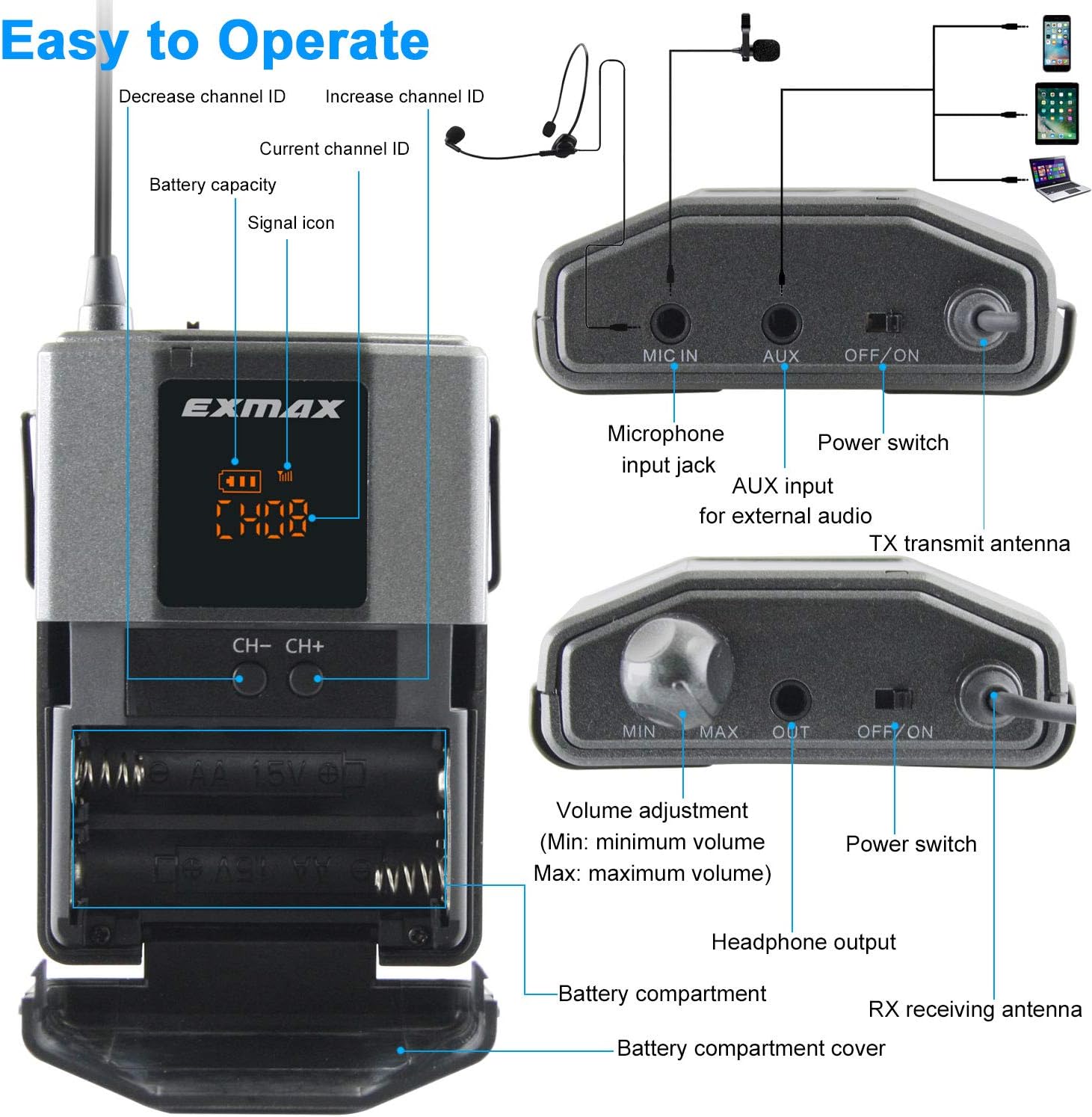
Image: Detailed view of the EXMAX EX-938 unit, showing controls such as channel adjustment buttons, battery compartment, and input/output ports.

Image: An overview of how the EXMAX EX-938 system functions, from audio input to wireless transmission and reception, alongside various application scenarios.
5. Maintenance
Proper maintenance ensures the longevity and optimal performance of your EXMAX EX-938 system.
- Cleaning: Use a soft, dry cloth to clean the exterior of the transmitter and receivers. Avoid using liquid cleaners or solvents.
- Storage: Store the system in a cool, dry place away from direct sunlight and extreme temperatures. Remove batteries if the system will not be used for an extended period to prevent leakage.
- Battery Care: Always use fresh, high-quality AA batteries. Replace batteries promptly when the low power indicator appears to ensure uninterrupted operation.
- Cable Management: Handle all cables and connectors with care to prevent damage. Avoid sharp bends or excessive pulling.
6. Troubleshooting
If you encounter issues with your EXMAX EX-938 system, refer to the following troubleshooting guide:
| Problem | Possible Cause | Solution |
|---|---|---|
| No sound from receivers |
|
|
| Interference or static noise |
|
|
| Short transmission range |
|
|
| Microphone not working |
|
|
7. Specifications
| Feature | Specification |
|---|---|
| Brand | EXMAX |
| Model | EX-938 |
| Connectivity Technology | Wireless (UHF) |
| Transmission Distance | Up to 492 feet (150 meters) |
| Channels | 11 Selectable UHF Channels |
| Power Source | AA Batteries (not included) |
| Working Time | Over 15 hours |
| Transmitter Inputs | MIC IN, AUX |
| Receiver Output | 3.5 mm Headphone Jack |
| Impedance | 100 Ohms |
| Control Type | Volume Control, Channel Selection |
| Control Method | Touch (buttons) |
| Noise Control | Sound Isolation (earphones) |
| Additional Features | Lightweight, Microphone Included |
8. Warranty and Support
8.1 Warranty Information
For detailed warranty information regarding your EXMAX EX-938 system, please refer to the warranty card included with your product or contact EXMAX customer service directly. Warranty terms and conditions may vary based on region and purchase date.
8.2 Customer Support
Should you encounter any problems or require assistance with your EXMAX EX-938 system, please contact EXMAX customer support. You can typically find contact information on the EXMAX official website or through your retailer.