
1. Product Overview
The Godox AD200 Pocket Flash is a compact and powerful 200Ws strobe flash monolight designed for professional photography. It features a built-in 2.4G Wireless X System, offering stable output and compatibility with various Godox X System products. The flash supports TTL, 1/8000s HSS, first/second curtain sync, and manual flash modes. Its interchangeable flash heads provide versatility for different lighting effects, and the high-capacity lithium battery ensures extended use.

Figure 1.1: Godox AD200 Pocket Flash with interchangeable speedlite and bare bulb flash heads.
2. What's in the Box
Verify that all components are present upon unboxing:
- 1x AD200 Flash Body
- 1x Battery (WB29A)
- 1x Battery Charger
- 1x Charger Cable
- 1x Bare Bulb Flash Head
- 1x Speedlite Flash Head

Figure 2.1: Included components of the Godox AD200 Pocket Flash kit.
3. Setup
3.1 Attaching Flash Heads
The AD200 features interchangeable flash heads. To attach a flash head, align the head with the flash body's mounting slot and slide it in until it clicks securely into place. To remove, press the release button and slide the head out.

Figure 3.1: Exploded view of the AD200 showing the bare bulb and speedlite flash heads, battery, and control panel.
3.2 Battery Installation and Charging
Insert the WB29A lithium battery into the battery compartment until it locks. To charge, remove the battery and place it into the provided charger. Connect the charger to a power source using the charger cable. The battery level indicators on the charger will illuminate during charging.

Figure 3.2: Battery installation and charging process for the AD200.
3.3 Mounting the Flash
The AD200 can be mounted on a light stand using its 1/4" screw hole. Ensure the flash is securely fastened to prevent accidental drops.
4. Operating Instructions
4.1 Controls Overview
The AD200 features an intuitive control panel with a VA display for easy operation. Key controls include:
- Power Switch: Turns the unit on/off.
- Group/Channel Button (GR/CH): Long press to adjust group or channel settings for wireless control.
- Test/C.Fn Button: Triggers a test flash; long press to access custom functions.
- Mode/Wireless Selection Button: Switches between flash modes (TTL, Manual, Multi) and wireless modes.
- Modeling Lamp/HSS Button: Activates the modeling lamp or High-Speed Sync mode.
- Select Dial: Used to navigate menus and adjust settings.
- Set Button: Confirms selections.
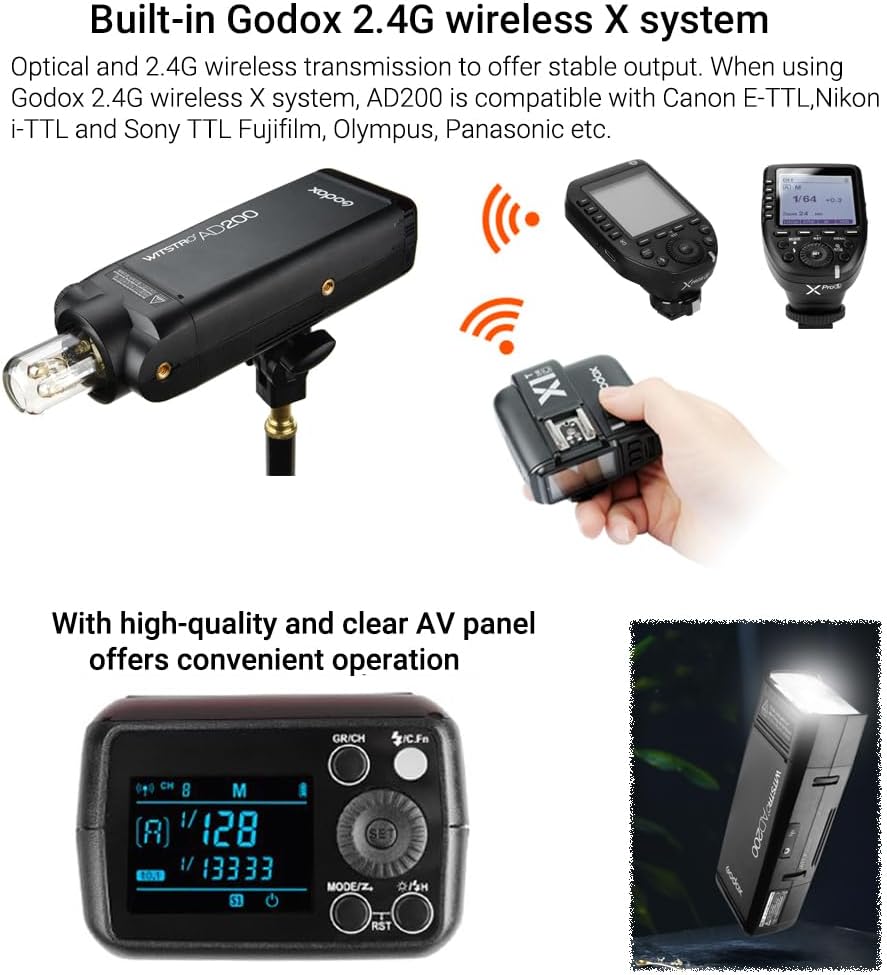
Figure 4.1: The AD200 control panel and display.
4.2 Flash Modes and Power Adjustment
The AD200 offers 8 stops of power adjustment, from 1/1 to 1/256, providing precise control over light output. Use the Select Dial to adjust power levels. Supported flash modes include:
- TTL (Through-The-Lens): Automatic exposure control.
- Manual (M): Manual power adjustment.
- Multi (Stroboscopic): Fires a series of rapid flashes.
- HSS (High-Speed Sync): Allows flash synchronization at shutter speeds up to 1/8000s.
- First/Second Curtain Sync: Controls when the flash fires relative to the shutter curtains.

Figure 4.2: TTL Auto Metering and Exposure Compensation in action.
4.3 2.4G Wireless X System
The built-in 2.4G Wireless X System enables wireless control of the AD200. It is compatible with Godox X1, X2, XPro, XProII, and X3 triggers for Canon, Nikon, Sony, Olympus, Panasonic, and Fujifilm cameras. This system allows for remote adjustment of flash power levels and TTL functions.

Figure 4.3: Wireless control of the AD200 using a Godox X-system trigger.
4.4 Using Accessories
The AD200 supports a wide range of light effect accessories. The bare bulb flash head is compatible with AD360 accessories, while the speedlite flash head can be adapted to Bowens mount accessories using an S-type bracket (sold separately).
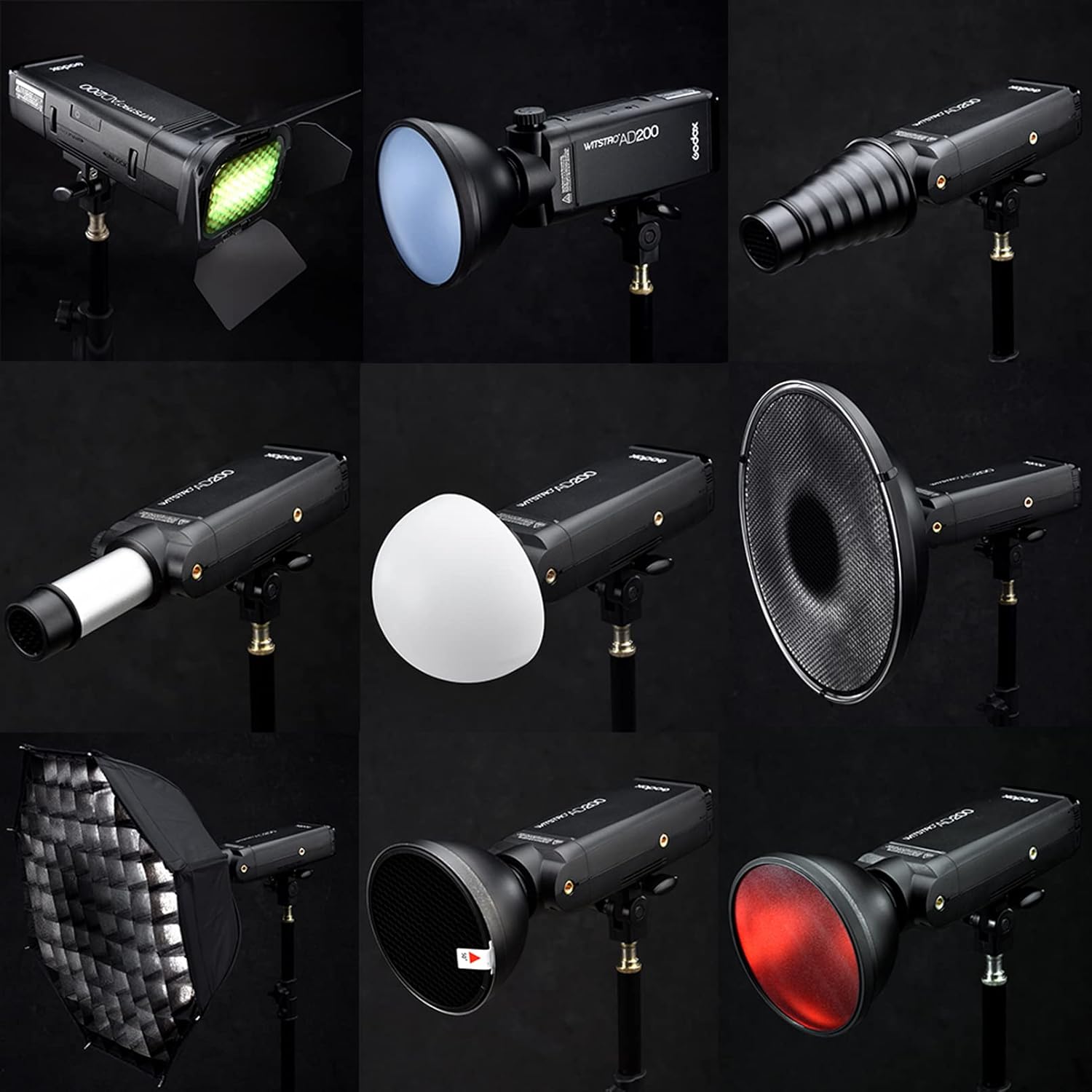
Figure 4.4: Examples of light modifiers and accessories for the AD200.
5. Maintenance
5.1 Battery Care
- Charge the battery fully before first use.
- Avoid completely draining the battery to prolong its lifespan.
- Store the battery in a cool, dry place when not in use.
- Do not expose the battery to extreme temperatures or direct sunlight.
5.2 Cleaning and Storage
- Clean the flash body with a soft, dry cloth. Do not use solvents or abrasive cleaners.
- Handle the bare bulb flash head with care as it is fragile.
- Store the AD200 in its carry bag to protect it from dust and impact.
6. Troubleshooting
If you encounter issues with your Godox AD200, consider the following:
- Flash not firing: Check battery level, ensure flash head is securely attached, and verify wireless trigger settings (group, channel, mode).
- Inconsistent power output: Ensure battery is fully charged. Check for proper connection between flash head and body.
- Wireless connection issues: Confirm that the flash and trigger are on the same group and channel. Check for interference from other 2.4G devices.
For further assistance, please refer to the official Godox support resources or contact customer service.
7. Specifications
| Brand | GODOX |
| Model Name | AD200 |
| Power Output | 200Ws |
| Flash Sync Speed | 1/8000s (HSS) |
| Recycle Time | 0.01-2.1s |
| Full Power Flashes | Approx. 500 |
| Battery Capacity | 14.4V/2900mAh Lithium-ion (WB29A) |
| Color Temperature | 5600K ± 200K |
| Wireless Technology | 2.4G RF (Godox X System) |
| Compatible Mountings | Canon, Nikon, Sony, Fujifilm, Panasonic, Olympus |
| Item Dimensions (D x W x H) | 6.61"D x 2.95"W x 19.69"H (approximate, with bare bulb head) |
| Item Weight | 1.97 Kilograms |

Figure 7.1: Dimensions of the Godox AD200 with different flash heads.
8. Official Product Videos
Godox AD200 TTL Studio Flash
Video 8.1: An overview of the Godox AD200 TTL Studio Flash features and capabilities.
Godox AD200 Real Shot Scene
Video 8.2: Demonstrates the Godox AD200 in various real-world shooting scenarios, highlighting its versatility.
Godox AD200 Studio Flash Strobe Light
Video 8.3: Showcases the Godox AD200 as a studio flash strobe light, emphasizing its performance.
9. Warranty and Support
The Godox AD200 Pocket Flash comes with a 1 Year Warranty. For warranty claims, technical support, or service inquiries, please contact your authorized Godox dealer or visit the official Godox website for customer service contact information.


