
1. Introduction
Thank you for choosing the Vidpro VB-H Top Hand Grip. This manual provides detailed instructions for the proper setup, operation, and maintenance of your new hand grip. Designed for DSLRs, cameras, and camcorders, the VB-H offers enhanced stability and versatility for your video recording needs. Please read this manual thoroughly before use to ensure optimal performance and longevity of the product.
2. Product Overview
The Vidpro VB-H Top Hand Grip is a lightweight and durable accessory designed to improve camera handling and provide multiple attachment points for additional equipment.
2.1 Key Features
- Lightweight and Durable Construction: Crafted from solid aluminum for a secure and comfortable grip.
- Enhanced Stability: Aids in recording smoother video footage.
- Universal Compatibility: Attaches to all cameras featuring a standard hot-shoe mount.
- Multiple Mounting Points: Features several ¼” and 3/8” threads for accessories.
- Cold Shoe Mount: An additional cold shoe mount for attaching microphones, lights, or monitors.
- Integrated Bubble Level: Helps maintain a level horizon during shooting.
2.2 Components

Figure 1: Front view of the Vidpro VB-H Top Hand Grip. This image shows the main body of the grip, highlighting the multiple threaded mounting points along its length, the integrated bubble level on top, and the hot-shoe adapter at the base. The Vidpro logo is visible on the side.
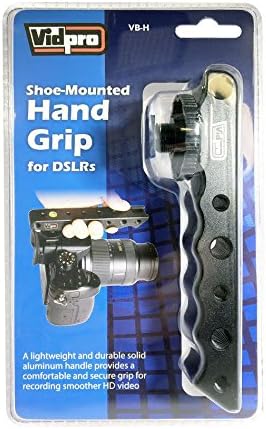
Figure 2: The Vidpro VB-H Top Hand Grip as it appears in its retail packaging. The packaging displays the product name "Shoe-Mounted Hand Grip for DSLRs" and highlights key features such as its lightweight and durable aluminum construction.
3. Setup and Installation
Follow these steps to properly attach the Vidpro VB-H Top Hand Grip to your camera or camcorder.
- Locate the Hot Shoe Mount: Identify the hot shoe mount on your camera or camcorder. This is typically found on the top of the camera body.
- Align the Grip: Position the hot shoe adapter at the base of the Vidpro VB-H grip directly over your camera's hot shoe mount.
- Slide into Place: Gently slide the grip's hot shoe adapter into the camera's hot shoe mount until it is fully seated.
- Secure the Grip: Tighten the locking wheel or screw on the hot shoe adapter (located at the base of the grip) to firmly secure the grip to your camera. Ensure it is snug but do not overtighten.

Figure 3: The Vidpro VB-H Top Hand Grip securely attached to a DSLR camera via its hot shoe mount. A hand is shown gripping the handle, demonstrating its intended use for improved camera stability and control during operation.
4. Operating Instructions
Once the Vidpro VB-H Top Hand Grip is securely attached to your camera, you can begin using it to enhance your shooting experience.
4.1 Holding the Grip
Hold the grip firmly with one hand while operating your camera with the other. The ergonomic design provides a comfortable and stable platform, reducing camera shake and fatigue during extended shooting sessions.
4.2 Attaching Accessories
The VB-H grip features multiple ¼” and 3/8” threaded holes, as well as a cold shoe mount, allowing you to attach various accessories.
- Threaded Mounts: Use the ¼” and 3/8” threads to attach external monitors, articulating arms, small LED lights, or other compatible accessories. Ensure accessories are securely fastened.
- Cold Shoe Mount: The integrated cold shoe mount is ideal for attaching microphones, wireless receivers, or small on-camera lights that utilize a standard cold shoe foot.
4.3 Using the Bubble Level
The built-in bubble level on top of the grip helps you maintain a perfectly level shot. Observe the bubble within the liquid to ensure it is centered between the two lines, indicating a horizontal camera position. This is particularly useful for landscape photography or when precise framing is required.
5. Maintenance and Care
Proper care will ensure the longevity and reliable performance of your Vidpro VB-H Top Hand Grip.
- Cleaning: Wipe the grip with a soft, dry cloth to remove dust and fingerprints. For stubborn dirt, a slightly damp cloth can be used, followed by immediate drying. Avoid harsh chemicals or abrasive cleaners.
- Storage: Store the grip in a cool, dry place away from direct sunlight and extreme temperatures when not in use.
- Inspection: Periodically check all screws and mounting points for tightness. Re-tighten if necessary, but do not overtighten.
- Avoid Impact: While durable, avoid dropping the grip or subjecting it to strong impacts, which could damage its structure or the integrated bubble level.
6. Troubleshooting
This section addresses common issues you might encounter with the Vidpro VB-H Top Hand Grip.
- Grip feels loose on camera:
- Ensure the hot shoe locking wheel/screw is fully tightened.
- Verify that the grip is correctly seated in the camera's hot shoe mount.
- Accessories not attaching securely:
- Check if the accessory uses a ¼” or 3/8” screw, or a cold shoe foot, compatible with the grip's mounts.
- Ensure the accessory's screw is fully threaded into the grip's mounting point.
- Bubble level not accurate:
- Ensure the camera and grip are on a truly flat surface for calibration.
- If the bubble level appears damaged or consistently inaccurate, contact customer support.
7. Specifications
| Model Number | VB-H |
| Brand | VidPro |
| Product Dimensions | 2 x 2 x 2 inches |
| Item Weight | 6.1 ounces (approx. 173 grams) |
| Material | Solid Aluminum |
| Mounting Type | Standard Hot Shoe Mount |
| Accessory Mounts | ¼” threads, 3/8” threads, Cold Shoe Mount |
| UPC | 724327724868 |
8. Warranty and Customer Support
Vidpro products are manufactured to high-quality standards. For specific warranty information regarding your VB-H Top Hand Grip, please refer to the warranty card included with your purchase or visit the official Vidpro website.
If you encounter any issues or have questions not covered in this manual, please contact Vidpro customer support for assistance.
- Online Support: Visit the Vidpro Store on Amazon for product information and support resources.
- Manufacturer: Vidpro