
1. Introduction
Thank you for choosing the Aqua-Flo Gecko In.k600 Topside Control Panel. This manual provides essential information for the safe and efficient installation, operation, and maintenance of your new control panel. Please read these instructions thoroughly before attempting to install or operate the unit.
The In.k600 is designed to provide intuitive control over your spa's functions, featuring an 11-button interface and a clear LCD display for easy monitoring and adjustment.
2. Product Overview
The Aqua-Flo Gecko In.k600 is an advanced topside control panel for spa systems. It features an 11-button interface and an LCD screen, allowing users to manage various spa functions such as temperature, jets, lighting, and more. This unit is designed for seamless integration with compatible Gecko spa packs, offering a reliable and user-friendly control experience.
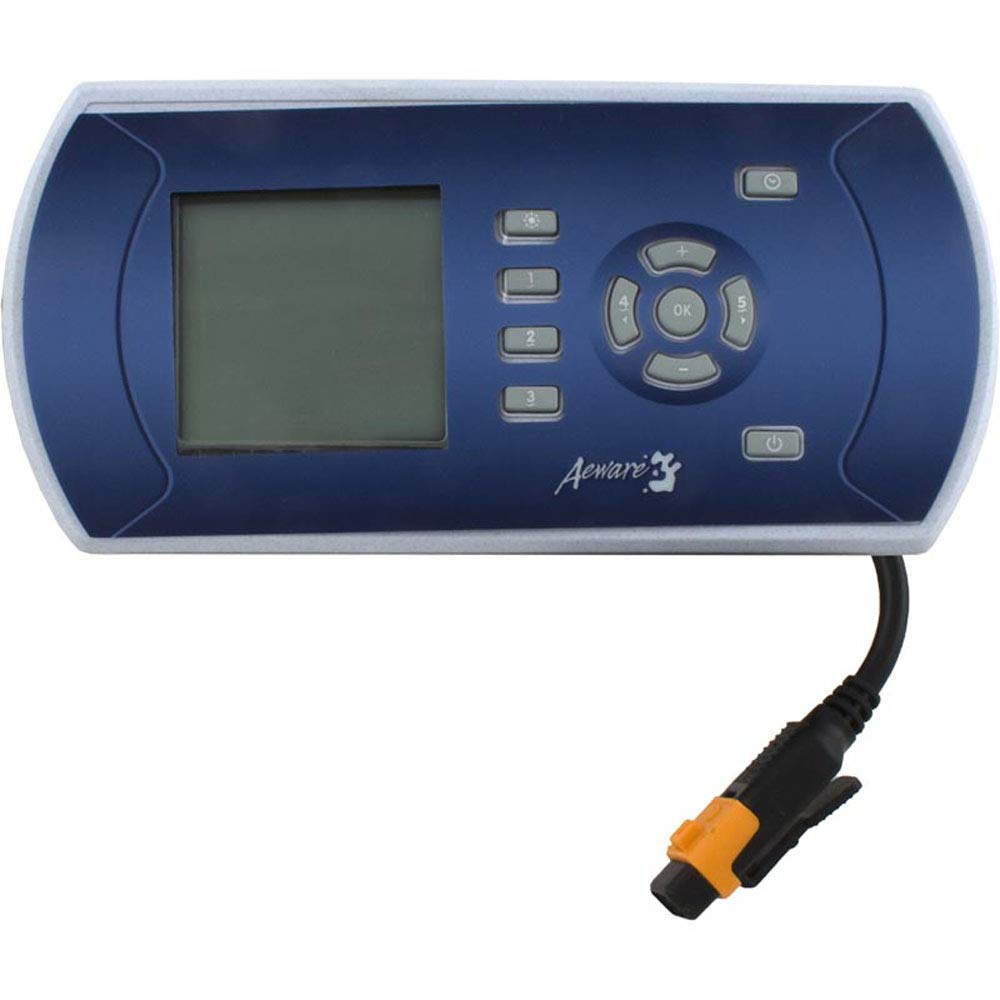
Figure 1: Aqua-Flo Gecko In.k600 Topside Control Panel. This image shows the front view of the control panel, highlighting its LCD screen and the arrangement of its 11 control buttons.
Key Features:
- 11-button interface for comprehensive control.
- Clear LCD display for easy monitoring of spa status and settings.
- Designed for 5-output spa systems.
- Durable construction suitable for spa environments.
3. Setup and Installation
Important: Installation should only be performed by a qualified technician in accordance with all local electrical codes and regulations. Disconnect all power to the spa before beginning installation.
- Power Disconnection: Ensure the main power supply to the spa is completely shut off at the circuit breaker.
- Remove Old Panel (if applicable): Carefully detach the existing topside control panel from its mounting location. Disconnect its cable from the spa pack.
- Mount New Panel: Position the In.k600 control panel in the desired location. Ensure the mounting surface is clean and dry. Secure the panel using appropriate fasteners (not included) or by adhering it if designed for adhesive mounting.
- Connect Cable: Route the new control panel cable to the spa pack. Connect the cable securely to the designated port on the Gecko spa pack. Refer to your spa pack's manual for specific port identification.
- Seal and Test: Ensure all connections are tight and the panel is properly sealed to prevent water ingress. Restore power to the spa and test all functions of the control panel.
4. Operating Instructions
The In.k600 control panel provides intuitive access to your spa's features. While specific button functions may vary slightly depending on your spa pack configuration, the general operation principles are as follows:
- Power Button: Typically used to turn the spa system on or off, or to activate/deactivate specific modes.
- Temperature Control: Use dedicated Up/Down arrows or a single temperature button to adjust the desired water temperature. The LCD will display the current and set temperatures.
- Jet Buttons: Activate and cycle through different jet pumps. Multiple presses may change speed settings (e.g., low/high).
- Light Button: Controls the spa lighting system. Press to turn lights on/off or to cycle through color modes if available.
- Mode/Program Button: Accesses different operating modes (e.g., Standard, Economy, Sleep) or programming menus for filtration cycles and other settings.
- Auxiliary Buttons: Additional buttons may control features like blowers, waterfalls, or other accessories connected to your spa pack.
Refer to your specific spa system's documentation for a detailed explanation of each button's function and advanced programming options.
5. Maintenance
Proper maintenance ensures the longevity and optimal performance of your In.k600 control panel.
- Cleaning: Gently wipe the control panel surface with a soft, damp cloth. Do not use abrasive cleaners, solvents, or harsh chemicals, as these can damage the display and buttons.
- Water Exposure: While designed for spa environments, avoid prolonged direct exposure to strong jets of water or submersion. Ensure the panel's seal remains intact.
- Cable Inspection: Periodically inspect the control panel cable for any signs of wear, cuts, or damage. Damaged cables should be replaced by a qualified technician.
6. Troubleshooting
If you encounter issues with your In.k600 control panel, try the following basic troubleshooting steps:
- Panel Not Responding:
- Check if the spa has power. Ensure the circuit breaker is on.
- Verify the control panel cable is securely connected to the spa pack.
- Try cycling the power to the spa (turn off at breaker for 30 seconds, then turn back on).
- Display is Blank or Dim:
- Ensure the spa has power.
- Adjust display brightness settings if your spa pack supports it (refer to spa pack manual).
- If the display remains blank after a power cycle, the panel may require service.
- Buttons Not Working:
- Ensure the panel surface is clean and free of debris that might obstruct buttons.
- Perform a power cycle of the spa.
- If only specific buttons are unresponsive, there might be an internal issue with the panel.
For persistent issues or error codes displayed on the screen, consult your spa pack's manual or contact a qualified spa technician.
7. Specifications
| Model | In.k600 |
| Brand | Aqua-Flo (Manufactured by Gecko Alliance) |
| Interface | 11-Button, LCD Display |
| Outputs | 5 Output Compatible |
| Product Dimensions | 12 x 5.5 x 3.75 inches |
| Item Weight | 1.3 pounds |
| ASIN | B06W2KW7M4 |
8. Warranty and Support
This Aqua-Flo Gecko In.k600 Topside Control Panel is manufactured by Gecko Alliance. For specific warranty information, please refer to the documentation provided with your complete spa system or contact Gecko Alliance directly. Warranty terms typically cover manufacturing defects under normal use.
For technical support, replacement parts, or service inquiries, please contact your spa dealer or a certified Gecko Alliance service center. Always provide your product model number (In.k600) and any relevant serial numbers when seeking support.
Manufacturer: Gecko Alliance