
S.M.S.L SA-36A
SMSL SA-36A Pro HiFi Digital Amplifier
User Manual
Introduction
Thank you for purchasing the SMSL SA-36A Pro HiFi Digital Amplifier. This compact and powerful amplifier is designed to deliver high-fidelity audio for your home audio setup. Please read this manual carefully before operating the device to ensure proper use and optimal performance. Keep this manual for future reference.
Safety Information
- Do not expose this device to rain or moisture.
- Do not disassemble the unit. Refer all servicing to qualified personnel.
- Ensure proper ventilation around the amplifier to prevent overheating.
- Use only the provided power adapter or a compatible 12V-24V DC power supply.
- Avoid placing the amplifier near heat sources or in direct sunlight.
- Keep out of reach of children.
Package Contents
Please check the package for the following items:
- SMSL SA-36A Pro Digital Amplifier Unit
- 12V Power Adapter
- User Manual (this document)
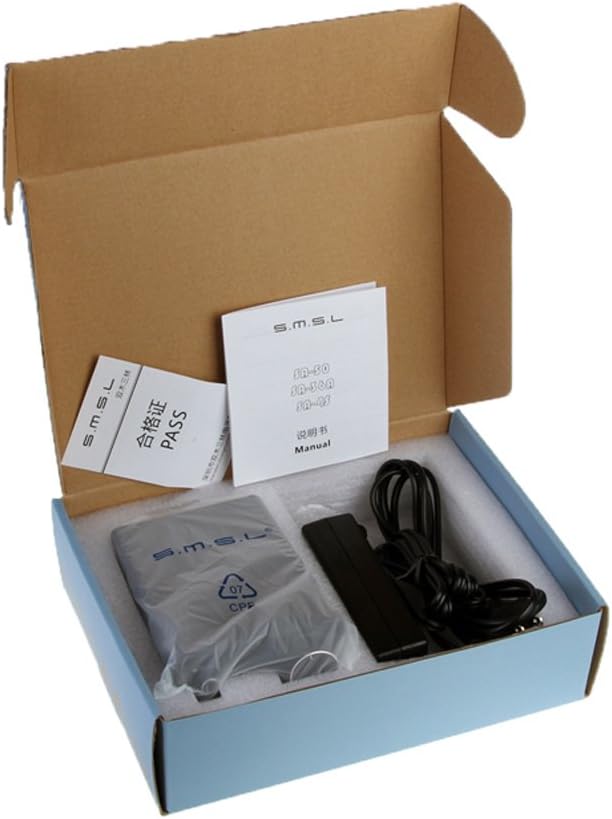
Figure 1: Package contents of the SMSL SA-36A Pro amplifier. The image shows the amplifier unit, a power adapter, and a small manual, all neatly packed in a cardboard box.
Product Overview
Front Panel

Figure 2: Front view of the SMSL SA-36A Pro amplifier. The front panel features a power button on the left and a large volume knob on the right, with "MIN" and "MAX" indicators.
- Power Button: Press to turn the amplifier on or off.
- Volume Knob: Rotate to adjust the output volume.
Rear Panel

Figure 3: Rear view of the SMSL SA-36A Pro amplifier. The rear panel includes RCA audio input jacks (L/R), speaker output binding posts (L/R), and a DC power input jack.
- AUDIO IN (RCA): Connect your audio source (e.g., CD player, DAC, phone) using RCA cables.
- SPEAKER OUT: Connect your passive speakers using speaker wire. Ensure correct polarity (+ to + and - to -).
- POWER (12-24V): Connect the provided 12V power adapter here.
Setup
- Connect Speakers: Connect your passive speakers to the "SPEAKER OUT" binding posts on the rear panel. Ensure the positive (+) terminal of the amplifier connects to the positive (+) terminal of the speaker, and the negative (-) terminal of the amplifier connects to the negative (-) terminal of the speaker. Incorrect polarity can affect sound quality.
- Connect Audio Source: Connect your audio source (e.g., smartphone, computer, CD player) to the "AUDIO IN" RCA jacks on the rear panel using an RCA cable. Match the left (white) and right (red) channels.
- Connect Power: Insert the DC plug of the 12V power adapter into the "POWER" input jack on the rear panel. Then, plug the power adapter into a wall outlet.
- Initial Volume Setting: Before powering on, turn the volume knob on the front panel counter-clockwise to the minimum position to avoid sudden loud sounds.
Operating Instructions
- Power On: Press the power button on the front panel. The amplifier will power on.
- Play Audio: Start playing audio from your connected source device.
- Adjust Volume: Slowly turn the volume knob clockwise to increase the volume to your desired listening level. Turn counter-clockwise to decrease volume.
- Power Off: When finished, press the power button again to turn off the amplifier. It is recommended to turn off the amplifier before turning off your audio source or speakers to prevent pops or clicks.
Maintenance
- Cleaning: Use a soft, dry cloth to clean the exterior of the amplifier. Do not use liquid cleaners or aerosols.
- Ventilation: Ensure the ventilation holes are not blocked.
- Storage: If storing the amplifier for an extended period, disconnect it from power and store it in a cool, dry place.
Troubleshooting
| Problem | Possible Cause | Solution |
|---|---|---|
| No sound |
|
|
| Distorted sound |
|
|
| Unit gets warm |
|
|
Specifications
| Brand | S.M.S.L |
| Model | SA-36A Pro |
| Dimensions (L x W x H) | 4.72 x 3.62 x 1.57 inches (120 x 92 x 40 mm) |
| Weight | 12.3 ounces (348.7 grams) |
| Input Voltage | 12 Volts (DC 12-24V compatible) |
| Material | Aluminum |
| Manufacturer | SMSL |
| First Available Date | June 12, 2016 |
Note: Specifications are subject to change without notice.
Warranty and Support
SMSL products are designed for reliability and performance. For warranty information and technical support, please refer to the warranty card included with your product or visit the official SMSL website. Please retain your proof of purchase for warranty claims.
For further assistance, you may contact SMSL customer support through their official channels. Details can typically be found on the manufacturer's website or the product packaging.
Ask a question about this manual
Ask about setup, troubleshooting, compatibility, parts, safety, or missing instructions. Manuals+ will review the question and use this page’s manual context to help answer it.