
BOSS Audio Systems MCK632WB.64
BOSS Audio Systems MCK632WB.64 Marine Stereo System User Manual
Model: MCK632WB.64
1. Introduction
This manual provides detailed instructions for the installation, operation, and maintenance of your BOSS Audio Systems MCK632WB.64 Marine Stereo System. This package includes a single-DIN marine receiver, four 6.5-inch marine speakers, a wireless remote control, and a dipole antenna. Designed for marine environments, the system features Bluetooth connectivity, USB and auxiliary inputs, and AM/FM radio capabilities. Please read this manual thoroughly before use to ensure proper functionality and safety.

Image: The BOSS Audio Systems MCK632WB.64 Marine Stereo System, featuring the main receiver unit, four 6.5-inch white marine speakers, and associated wiring.
2. Package Contents
Verify that all items listed below are present in your package. If any items are missing or damaged, please contact customer support.
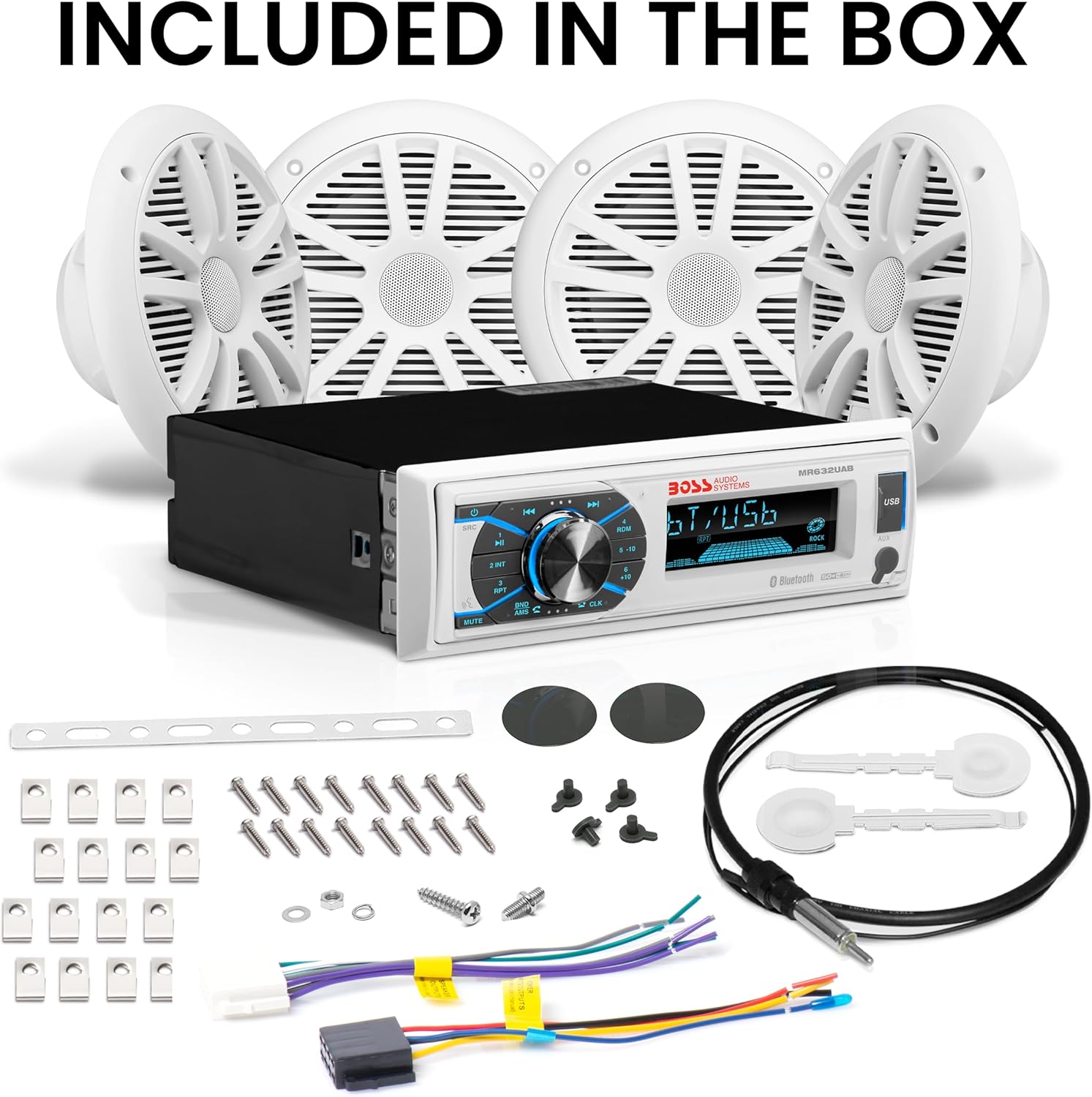
Image: A detailed view of all components included in the BOSS Audio Systems MCK632WB.64 package, such as the marine receiver, four speakers, wiring harness, mounting brackets, screws, and a wireless remote.
- Marine Receiver Unit (MR632UAB)
- Four 6.5-inch Marine Speakers (White)
- Wireless Remote Control
- Dipole Antenna
- Wiring Harness
- Mounting Hardware (brackets, screws, nuts)
- Auxiliary Input Cable
- Speaker Grilles
3. Setup and Installation
Professional installation is strongly encouraged to ensure proper and safe functionality. Incorrect wiring can damage the unit or your vessel's electrical system.
3.1 Safety Precautions
- Disconnect the vessel's battery before starting any electrical work.
- Ensure proper ventilation around the receiver.
- Use appropriate gauge wiring for power and speakers.
- Protect all wiring from sharp edges and moving parts.
- This unit is designed for 12V DC negative ground systems.
3.2 Mounting the Receiver
- Choose a suitable location on your vessel's dashboard or console that is protected from direct water exposure and allows for adequate ventilation.
- Cut an opening in the mounting surface according to the receiver's dimensions (refer to the specifications section for exact measurements).
- Insert the receiver into the opening and secure it using the provided mounting hardware.
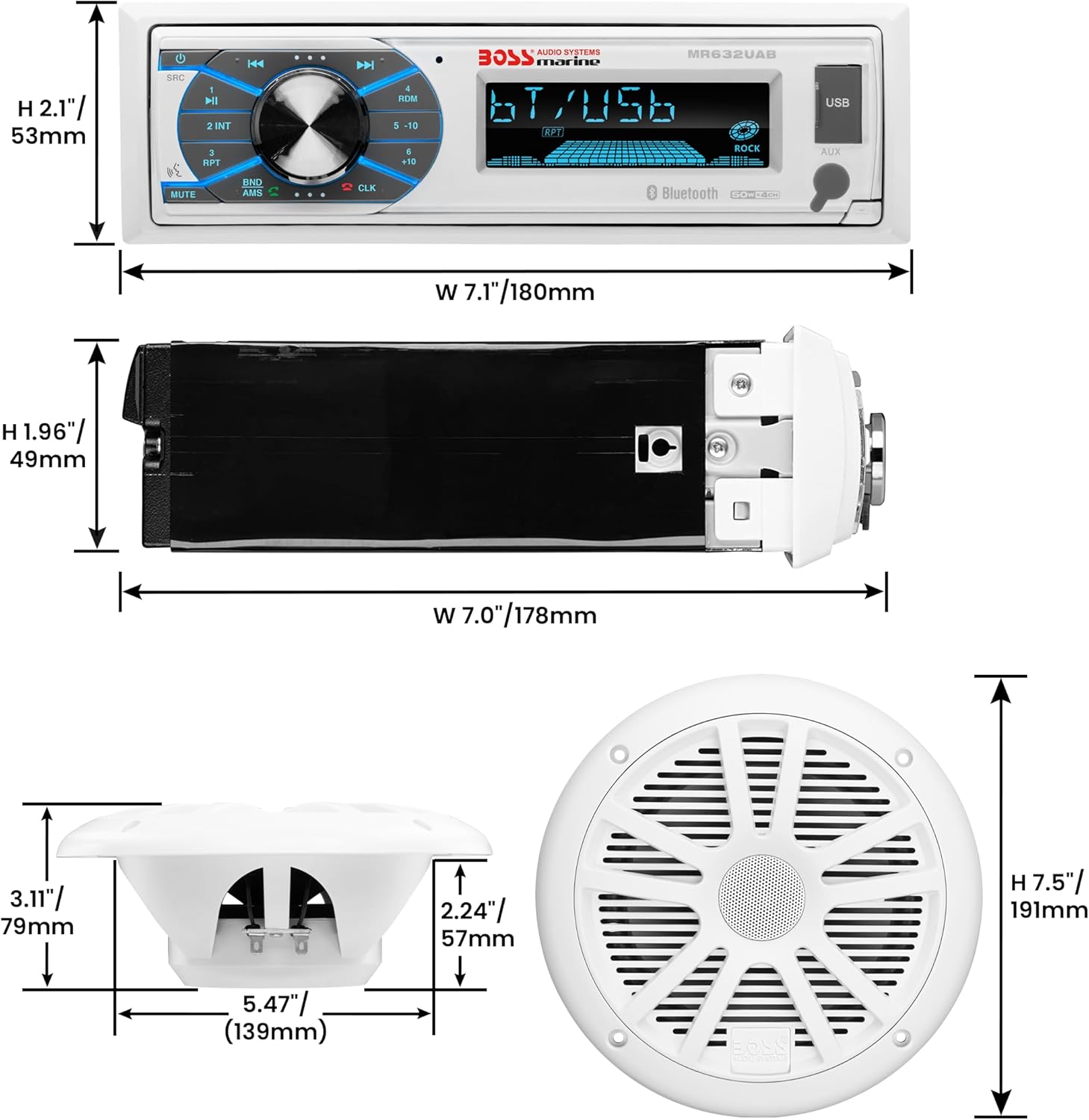
Image: Technical diagram showing the precise dimensions of the marine receiver unit and a 6.5-inch speaker, including height, width, depth, and mounting hole sizes.
3.3 Speaker Installation
- Select locations for the four 6.5-inch speakers, ensuring they are evenly distributed for optimal sound and are protected from excessive moisture.
- Cut circular openings for each speaker, matching the specified mounting hole diameter (refer to specifications).
- Connect the speaker wires to the receiver's speaker outputs, observing correct polarity (+ to + and - to -).
- Mount the speakers securely using the provided screws and grilles.

Image: Two white BOSS Audio Systems marine speakers seamlessly integrated into the interior panel of a boat, demonstrating a typical installation scenario.
3.4 Wiring Connections
Use the provided wiring harness to connect the receiver to your vessel's power, ground, and accessory circuits. Connect the dipole antenna for AM/FM reception. Utilize the pre-amp outputs if connecting external amplifiers.
- Yellow Wire: Connect to constant 12V power (battery positive).
- Red Wire: Connect to switched 12V accessory power.
- Black Wire: Connect to ground (battery negative or chassis ground).
- Speaker Wires: Connect to corresponding speaker terminals (Front Left, Front Right, Rear Left, Rear Right).
- Antenna: Connect the dipole antenna to the receiver's antenna input.
- Pre-Amp Outputs: Use RCA cables to connect to external amplifiers if desired.
4. Operating Instructions
4.1 Basic Controls
The receiver features a user-friendly interface with push-button controls and a rotary knob for volume and menu navigation.
- Power Button: Press to turn the unit on/off.
- Volume Knob: Rotate to adjust volume. Press to access menu options.
- Mode Button: Cycle through available sources (Radio, Bluetooth, USB, AUX).
- Tune/Track Buttons: Navigate radio stations or music tracks.
- Mute Button: Mute/unmute audio output.
4.2 Bluetooth Operation
Connect your smartphone or other Bluetooth-enabled device to stream audio wirelessly and utilize the Push-to-Talk feature.
- Turn on the receiver and select Bluetooth mode.
- Enable Bluetooth on your mobile device and search for available devices.
- Select "BOSS Audio" or a similar name from the list to pair.
- Once paired, you can stream audio from your device.
- Push-to-Talk: Press the dedicated button on the receiver to activate your smartphone's voice assistant (e.g., Siri, Google Assistant) for hands-free commands.

Image: A user's hand holding a smartphone displaying a music player, wirelessly connected to the BOSS marine stereo receiver mounted in a boat's dashboard, illustrating Bluetooth audio streaming.
4.3 USB and AUX Inputs
- USB: Insert a USB flash drive into the USB port to play compatible audio files. The unit supports ID3 Tag display for track information.
- AUX: Connect an external audio device (e.g., MP3 player) to the 3.5mm auxiliary input using the provided cable.
4.4 AM/FM Radio
- Select Radio mode.
- Use the Tune buttons to manually search for stations or press and hold to auto-seek.
- Save your favorite stations to preset buttons for quick access.
- The unit features a switchable tuner for different regional broadcast frequencies.
5. Maintenance
Regular maintenance ensures the longevity and optimal performance of your marine stereo system.
- Cleaning: Wipe the receiver and speakers with a soft, damp cloth. Avoid abrasive cleaners or solvents.
- Weatherproofing: While the unit and speakers are weatherproof, avoid direct high-pressure water spray. Ensure all connections are secure and protected from moisture.
- Battery: The wireless remote control requires one CR2032 battery. Replace when necessary.
- Connections: Periodically check all wiring connections for corrosion or looseness, especially in a marine environment.
6. Troubleshooting
Refer to the table below for common issues and their solutions. If the problem persists, contact customer support.
| Problem | Possible Cause | Solution |
|---|---|---|
| No power | Blown fuse; incorrect wiring; loose power connection. | Check and replace fuse; verify wiring connections (yellow, red, black); ensure secure connections. |
| No sound | Volume too low; mute activated; incorrect speaker wiring; source not selected. | Increase volume; deactivate mute; check speaker polarity and connections; select correct input source. |
| Bluetooth disconnects frequently | Device too far; interference; pairing issue. | Keep device within range; avoid sources of interference; unpair and re-pair the device. |
| Poor radio reception | Antenna not connected; poor antenna placement; weak signal. | Ensure antenna is securely connected; reposition antenna for better reception; try auto-seek for stronger stations. |
| USB playback issues | Incompatible file format; corrupted USB drive; USB drive not properly inserted. | Ensure audio files are compatible; try a different USB drive; reinsert USB drive. |
7. Specifications
Receiver (MR632UAB)
- Power Output: 50 Watts x 4 Channels (Max)
- Inputs: USB, 3.5mm AUX, Bluetooth
- Outputs: Front & Rear Pre-Amp (RCA)
- Features: Built-In Bluetooth, Push-to-Talk, AM/FM Radio, Mechless (No CD/DVD Player), Electronic Skip Protection, ID3 Tag Display, Switchable Tuner, Fully Marinized
- Dimensions (W x H x D): 7.4" x 2.1" x 4.9" (188mm x 53mm x 124mm)
- Weight: Approximately 2 lbs
- Power Requirement: 12V DC (Negative Ground)
- Controller Type: Push Button
- Compatible Devices: Smartphone
Speakers (6.5-inch Marine Speakers)
- Size: 6.5 inches
- Type: Dual Cone
- Power Handling: 180 Watts (Pair)
- Impedance: 4 Ohms
- Frequency Response: 80 Hz to 20 kHz
- Sensitivity: 89 dB
- Mounting Depth: 2.18 inches
- Mounting Hole Diameter: 5.75 inches
- Dimensions (H x W x D): 7.5" x 7.5" x 3.4" (191mm x 191mm x 86mm)
- Weight: Approximately 3.75 lbs (Pair)
- Features: Weatherproof
8. Warranty and Support
BOSS Audio Systems provides a powerful 3-year platinum online dealer warranty for this product, provided the purchase is made through Amazon.com. To ensure warranty validity, product registration online after purchase is recommended.

Image: Information regarding the 3-year platinum online dealer warranty provided by BOSS Audio Systems, along with a summary of key product features.
For technical support, warranty claims, or further assistance, please visit the official BOSS Audio Systems website or contact their customer service department. Keep your proof of purchase for warranty purposes.
Important: We strongly encourage professional installation of this product to ensure proper and safe functionality and to maintain warranty coverage.
Related Documents - MCK632WB.64
 |
BOSS AUDIO SYSTEMS Marine 2022 Catalog: Receivers, Speakers, Amplifiers & More Explore the 2022 BOSS AUDIO SYSTEMS marine catalog featuring a wide range of weatherproof audio equipment, including receivers, speakers, amplifiers, subwoofers, and accessories designed for boats and marine environments. |
 |
BOSS Audio Systems 2020 Catalog: Multimedia Receivers, Amplifiers, Speakers, and More Explore the comprehensive 2020 catalog from BOSS Audio Systems, featuring a wide range of multimedia receivers, amplifiers, subwoofers, speakers, marine audio, powersports equipment, and accessories designed to enhance your vehicle's sound system. |
 |
BOSS Audio MPWT60RGBW 6.5" Marine & Powersports Wake Tower Speaker Pods User Manual This user manual provides detailed information for the BOSS Audio MPWT60RGBW 6.5-inch marine and powersports wake tower speaker pods. It covers product specifications, package contents, safety guidelines, step-by-step installation instructions, wiring guidance, LED light control via remote, and battery replacement for the remote. |
 |
BOSS Audio Systems MR50B/MR50W Marine Speaker Installation Instructions Detailed installation instructions for BOSS Audio Systems MR50B and MR50W 5.25-inch (133 mm) marine 2-way full-range speakers. Covers package contents, technical specifications, speaker dimensions, important installation notes, mounting procedures, and wiring guidance. |
 |
BOSS Audio Systems MR6B/MR6W 6.5-Inch Marine Dual Cone Speaker Installation Instructions Comprehensive installation guide for BOSS Audio Systems MR6B/MR6W 6.5-inch (165 mm) Dual Cone Marine Full Range Speakers, covering package contents, specifications, dimensions, mounting, and wiring. |
 |
BOSS Audio Systems MR52B/MR52W Marine Speaker Installation Instructions Comprehensive installation guide for BOSS Audio Systems MR52B/MR52W 5.25-inch marine 2-way full-range speakers. Includes package contents, detailed specifications, speaker dimensions, mounting procedures, and wiring instructions for optimal performance and safety. |
Ask a question about this manual
Ask about setup, troubleshooting, compatibility, parts, safety, or missing instructions. Manuals+ will review the question and use this page’s manual context to help answer it.