
1. Introduction
Thank you for choosing the PRO-ELEC Individually Switched 4-Gang Surge Protection Extension Lead. This product is designed to provide power distribution and surge protection for your electronic devices. Each socket features an individual switch for convenient control, and the built-in surge protection helps safeguard your equipment from power fluctuations.
Please read this manual thoroughly before use to ensure safe and optimal performance of your extension lead.
2. Important Safety Information
- Do not exceed the maximum load rating of the extension lead. Refer to the specifications section for details.
- This product is designed for indoor use only. Do not expose to moisture or extreme temperatures.
- Do not connect multiple extension leads together.
- Ensure the plug is fully inserted into the wall socket.
- Keep out of reach of children.
- Do not open or attempt to repair the unit. Refer all servicing to qualified personnel.
- Unplug the extension lead from the wall socket when not in use or before cleaning.
- If the surge protection indicator light (if present) is off, the surge protection may no longer be active. Replace the unit.
3. Product Features
The PRO-ELEC extension lead offers the following key features:
- 4 Individually Switched Sockets: Each outlet can be controlled independently, saving energy and providing convenience.
- Surge Protection: Protects connected devices from power surges and spikes.
- Wall-Mountable Design: Allows for secure installation on walls or under desks.
- Durable Construction: Built to BS 1363/A and BS 5733/A compliance standards.
- 2-Meter Lead: Provides ample reach for various setups.
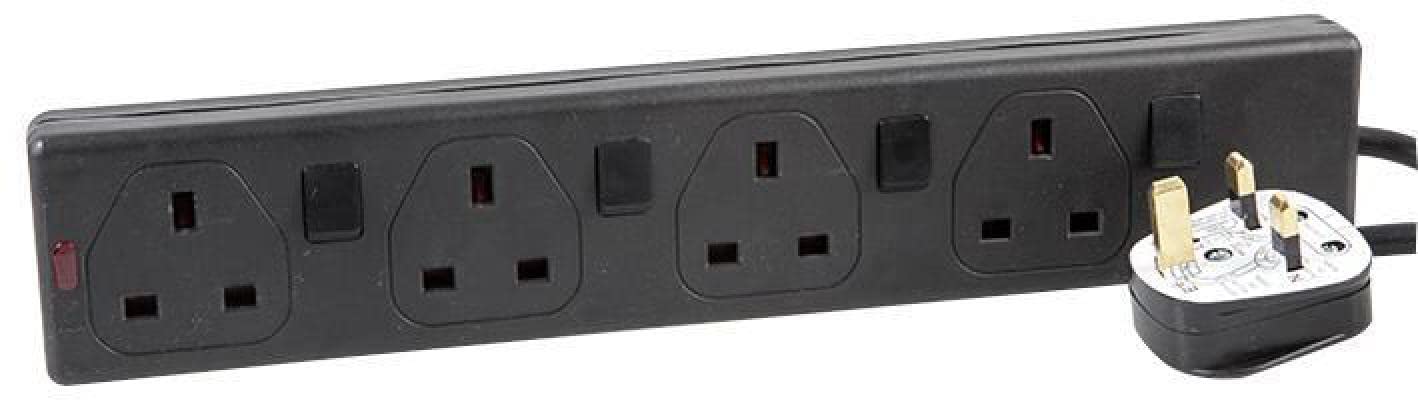
Image 1: PRO-ELEC 4-Gang Individually Switched Surge Protection Extension Lead. This image shows the white extension lead with four sockets, each having an individual red power switch. The main power cord extends from one end.
4. Setup and Installation
- Unpack: Carefully remove the extension lead from its packaging.
- Placement: Choose a dry, indoor location away from direct sunlight, heat sources, and moisture. Ensure the 2-meter lead can reach the wall socket without being stretched or obstructed.
- Wall Mounting (Optional): If wall mounting, identify the mounting holes on the back of the unit. Use appropriate screws (not included) and wall anchors for your wall type to secure the extension lead. Ensure it is firmly attached before plugging in devices.
- Connect to Power: Plug the extension lead's main power cord into a properly grounded wall socket.
- Indicator Lights: Check for any power or surge protection indicator lights on the unit. A green light typically indicates active surge protection.
5. Operating Instructions
- Connecting Devices: Plug your electronic devices into the individual sockets on the extension lead.
- Individual Switching: Each socket has a dedicated ON/OFF switch. Press the switch to the 'ON' position (usually illuminated) to supply power to the connected device. Press it to the 'OFF' position to cut power.
- Surge Protection: The extension lead continuously monitors the incoming power for surges. In the event of a power surge, the internal protection circuitry will activate to divert excess voltage away from your connected devices.
- Power Management: Use the individual switches to turn off devices when not in use, helping to conserve energy.
6. Maintenance
- Cleaning: Disconnect the extension lead from the wall socket before cleaning. Wipe the unit with a soft, dry cloth. Do not use liquid cleaners or abrasive materials.
- Inspection: Periodically inspect the power cord and the extension lead for any signs of damage, such as frayed wires or cracked casing. If damage is found, discontinue use immediately and replace the unit.
- Surge Protection Indicator: If the surge protection indicator light (if present) goes out, it means the surge protection components have absorbed a significant surge and may no longer be active. The unit will still function as an extension lead, but without surge protection. It is recommended to replace the unit to maintain protection.
7. Troubleshooting
| Problem | Possible Cause | Solution |
|---|---|---|
| No power to connected devices. | Extension lead not plugged in. Individual switch is OFF. Wall socket is not live. Overload. | Ensure the extension lead is securely plugged into a live wall socket. Turn the individual switch to the ON position. Test the wall socket with another device. Reduce the number of connected devices or their total power consumption. |
| Surge protection indicator light is off. | Surge protection components have been compromised by a power surge. | The unit may still function as an extension lead, but surge protection is no longer active. Replace the extension lead to ensure continued surge protection. |
| Extension lead feels hot. | Overload. | Immediately unplug all devices and the extension lead from the wall. Reduce the total load. If the problem persists, discontinue use. |
8. Specifications
- Model: B01NCVAAOT
- Brand: PRO-ELEC
- Type: 4-Gang Individually Switched Surge Protection Extension Lead
- Color: White
- Voltage: 250 Volts
- Cable Length: 2 meters
- Special Features: Mountable, Surge Protection, Individually Switched Sockets
- Compliance: BS 1363/A, BS 5733/A
- Item Weight: Approximately 15.4 ounces (436 grams)
- Shape: Rectangle
- Manufacturer: Pro Elec
9. Warranty and Support
PRO-ELEC products are manufactured to high-quality standards. For information regarding warranty coverage, please refer to the documentation provided at the time of purchase or contact your retailer. If you experience any issues or require technical assistance, please contact the retailer or manufacturer's customer support.
Please retain your proof of purchase for warranty claims.