
1. Introduction
The ACOPOWER Midas 30A MPPT Solar Charge Controller is designed to efficiently manage power flow from your solar panels to your battery bank. Utilizing advanced Maximum Power Point Tracking (MPPT) technology, it optimizes energy harvest and ensures safe, reliable charging for various battery types, including Sealed, Gel, Flooded, and Lithium (LiFePO4) batteries. This manual provides essential information for the proper installation, operation, and maintenance of your solar charge controller.
2. Safety Information
- Read all instructions carefully before installation and operation.
- Ensure all wiring is performed by qualified personnel and complies with local electrical codes.
- Always disconnect the solar panel and battery power before installing or adjusting the controller.
- Use appropriate circuit breakers or fuses for each line to protect against overcurrent.
- Avoid short-circuiting the battery terminals or solar panel terminals.
- Install the controller in a well-ventilated area, away from flammable materials and direct sunlight.
- Wear appropriate personal protective equipment (PPE) such as gloves and eye protection during installation.
- Ensure proper grounding of the system.
3. Product Overview
The ACOPOWER Midas 30A MPPT Solar Charge Controller features a robust design and user-friendly interface for efficient solar power management.
Key Features:
- Advanced MPPT technology with 99.5% tracking efficiency and 98% peak conversion efficiency.
- Automatic temperature compensation for optimized battery charging.
- Automatically detects 12V/24V DC system voltage.
- Compatible with Sealed, Gel, Flooded, and Lithium-ion (LiFePO4) batteries.
- Supports multiple load control methods.
- Backlit LCD screen and die-cast aluminum design for durability.
- 4-stage battery charging (bulk, boost, float, and equalization).
- Comprehensive protection against reverse polarity, overcharging, over-discharging, overload, short-circuiting, and reverse current.
Physical Dimensions and Components:

Figure 3.1: ACOPOWER Midas 30A MPPT Solar Charge Controller with dimensions.

Figure 3.2: Component diagram of the controller, highlighting ports and buttons.

Figure 3.3: Front view of the ACOPOWER Midas Y Series MPPT Solar Charge Controller.

Figure 3.4: High tracking efficiency of the MPPT controller.

Figure 3.5: The controller features an IP33 waterproof enclosure.
4. Setup
Installation Location:
Mount the controller vertically on a wall or sturdy surface. Ensure there is ample space around the controller for proper heat dissipation. Avoid direct sunlight, high temperatures, and humid environments.
Wiring Diagram:
Follow the wiring diagram carefully. Incorrect wiring can damage the controller and other components.
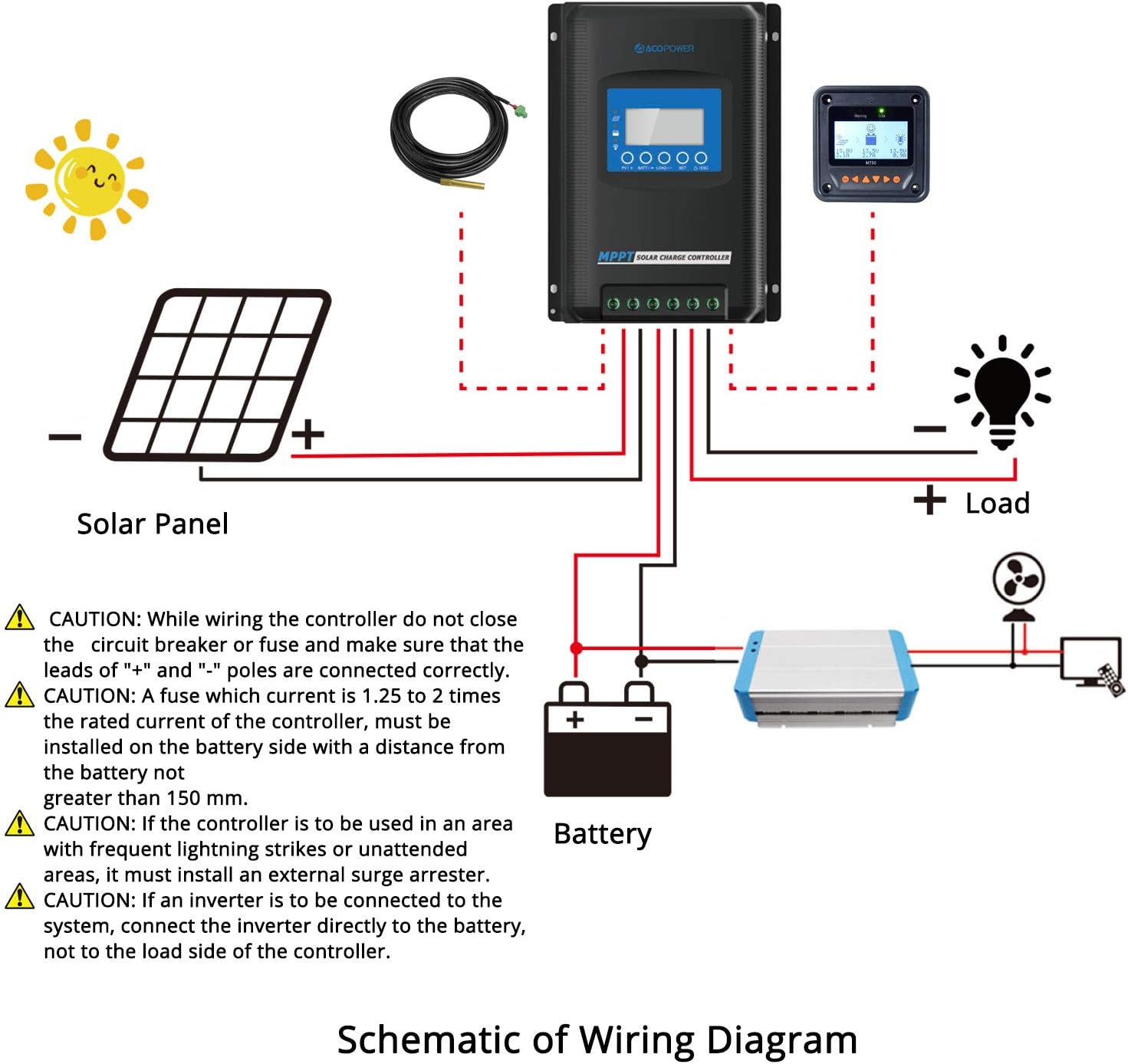
Figure 4.1: Schematic of Wiring Diagram.
Wiring Steps:
- Mount the Controller: Securely mount the controller to a wall using screws. Ensure controllers are at the same horizontal level with ample space for heat dissipation between devices.
- Remove Port Cover: Carefully remove the terminal cover from the bottom of the controller.
- Connect Battery Cables: Connect the positive (+) and negative (-) battery cables to the corresponding terminals on the controller. Ensure the battery circuit breaker is open before connecting.
- Connect Solar Panel Cables: Connect the positive (+) and negative (-) solar panel cables to the corresponding PV input terminals. Ensure the solar circuit breaker is open before connecting.
- Connect Load Cables (Optional): If using the load output, connect the positive (+) and negative (-) load cables to the load terminals.
- Install Port Cover: Replace the terminal cover.
- Power On: First, close the battery circuit breaker. Then, close the solar circuit breaker. The controller display should power on.
CAUTION: While wiring, ensure the circuit breaker or fuse is closed and that the leads of "+" and "-" poles are connected correctly. A fuse with a current 1.25 to 2 times the rated current of the controller must be installed on the battery side with a distance from the battery not greater than 150 mm. If the controller is to be used in an area with frequent lightning strikes or unattended areas, an external surge arrester must be installed. If an inverter is to be connected to the system, connect the inverter directly to the battery, not to the load side of the controller.
Parallel Communication Setup (for multiple controllers):
If using multiple controllers in parallel, they can communicate to synchronize settings. Assemble the parallel communication cable by connecting red and black wires to the green terminal blocks as shown in the diagram. Connect these cables to the RS485 communication ports on each controller.

Video: Assembling the parallel communication cable. (Note: This video is for a different model series (POW-M80/M100-PRO) and is not directly applicable to the Midas 30A. No relevant videos for this specific model were provided by the seller.)

Video: Installation and wiring guide. (Note: This video is for a different model series (POW-M80/M100-PRO) and is not directly applicable to the Midas 30A. No relevant videos for this specific model were provided by the seller.)
After connecting the parallel communication cable, power on the controllers by closing the battery circuit breaker first. Set a unique parallel code for each controller. The device with the smallest code becomes the main controller, and other controllers will automatically synchronize their configurations with the main controller.
5. Operating Instructions
LCD Display and Buttons:
The controller features an LCD display and multiple buttons for navigation and settings adjustment.

Figure 5.1: Examples of various display settings.
Setting Battery Type:
The controller is compatible with Sealed, Gel, Flooded, and User-defined (LiFePO4) battery types. To set the battery type:
- Press and hold the 'PV/SET' button to enter the setup program.
- Navigate through the settings using the 'BAT+' and 'BAT-' buttons.
- Select the desired battery type (SEL for Sealed, GEL for Gel, FLD for Flooded, USE for User-defined).
- For LiFePO4 batteries, select 'USE' and manually enter the specific parameters as per your battery manufacturer's recommendations.
- Press and hold 'PV/SET' again to save the settings and exit.
Monitoring Parameters:
The LCD display shows various parameters such as PV voltage, battery voltage, charging current, load current, and temperature. Use the navigation buttons to cycle through these displays.
Load Control:
The controller supports multiple load control methods. Refer to the detailed operating manual for specific programming of load timers and modes.
6. Maintenance
- Regular Inspection: Periodically check all wiring connections for tightness and corrosion.
- Cleaning: Keep the controller clean and free from dust and debris. Use a dry cloth for cleaning.
- Ventilation: Ensure the ventilation openings are not blocked to allow for proper heat dissipation.
- Battery Health: Monitor battery voltage and health regularly.
- Firmware Updates: Check the manufacturer's website for any available firmware updates.
7. Troubleshooting
If you encounter issues with your ACOPOWER Midas 30A MPPT Solar Charge Controller, refer to the following common troubleshooting steps:
- No Display/No Power: Check battery connections and ensure the battery circuit breaker is closed. Verify battery voltage is within the operating range.
- No Charging: Check solar panel connections and ensure the solar circuit breaker is closed. Verify solar panel voltage is sufficient for charging. Check for shading on solar panels.
- Incorrect Battery Voltage Reading: Ensure the battery type setting is correct for your battery.
- Overheating: Ensure the controller is installed in a well-ventilated area and that its heat sinks are not obstructed. Reduce load if necessary.
- Error Codes: If an error code appears on the display, consult the full product manual or contact customer support for specific interpretations and solutions.
If problems persist after attempting these steps, contact ACOPOWER customer support.
8. Specifications
| Feature | Specification |
|---|---|
| Brand | ACOPOWER |
| Model | Midas 30A MPPT Solar Charge Controller |
| Color | Black |
| Material | Aluminum |
| Item Weight | 1.5 Kilograms |
| Display Type | LCD |
| Tracking Efficiency | 99.5% |
| Peak Conversion Efficiency | 98% |
| System Voltage | 12V/24V DC Auto Detect |
| Battery Compatibility | Sealed, Gel, Flooded, Lithium-ion (LiFePO4) |
| Charging Stages | 4-stage (bulk, boost, float, equalization) |
| Protection Features | Reverse polarity, overcharging, over-discharging, overload, short-circuiting, reverse current |
9. Warranty and Support
The ACOPOWER Midas 30A MPPT Solar Charge Controller comes with an 18-month warranty. ACOPOWER is a US-based company offering local support for its products. For technical assistance, warranty claims, or further inquiries, please contact ACOPOWER customer service through their official channels.
10. Applications
The ACOPOWER Midas 30A MPPT Solar Charge Controller is suitable for a variety of off-grid solar applications, providing reliable power management for:
- Recreational Vehicles (RVs)
- Campers
- Boats and Yachts
- Remote Cabins
- Other off-grid power systems

Figure 10.1: Examples of controller applications.

