
1. Introduction
The Bang & Olufsen Beolit 17 is a portable wireless Bluetooth speaker designed to deliver immersive 360-degree sound. Constructed with premium materials such as anodized aluminum and full-grain leather, it offers durability and a refined aesthetic. This manual provides essential information for setting up, operating, and maintaining your Beolit 17 speaker.
2. What's in the Box
- Beolit 17 Portable Speaker
- Mains Cable
- Quick Start Guide
3. Setup
3.1 Initial Charging
Before first use, fully charge your Beolit 17. Connect the included USB-C charger to the speaker and a power outlet. A full charge takes approximately 2.5 hours.
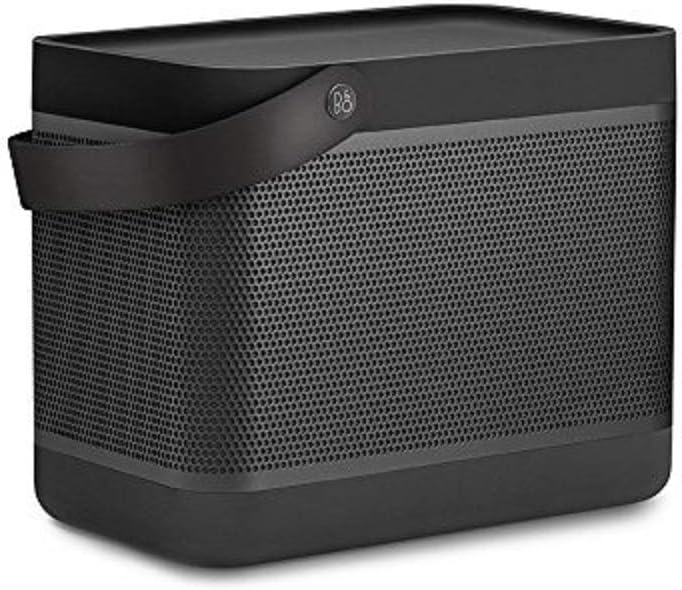
Figure 1: Bang & Olufsen Beolit 17 Speaker (Stone Grey)
3.2 Bluetooth Pairing
- Power on the Beolit 17 by pressing the power button located on the top panel.
- Activate Bluetooth pairing mode on the speaker. Refer to the Quick Start Guide for specific button presses.
- On your mobile device (smartphone, tablet, etc.), go to Bluetooth settings and select 'Beolit 17' from the list of available devices.
- Once connected, the speaker will indicate successful pairing.

Figure 2: Top Control Panel of Beolit 17
4. Operating Instructions
4.1 Basic Controls
- Power Button: Press to turn the speaker on or off.
- Bluetooth Button: Press to enter pairing mode or connect to a previously paired device.
- Volume Buttons (+/-): Adjust the playback volume.
- Connect Button: This customizable button can be configured via the Beoplay App for various functions such as alarm, last played song, or tone touch settings.
4.2 Beoplay App Integration
Download the Beoplay App for enhanced control and customization options. The app allows you to:
- Customize sound profiles (ToneTouch).
- Configure the 'Connect' button for specific actions.
- Monitor battery status.
- Update speaker firmware.
- Pair two Beolit 17 speakers for stereo sound.

Figure 3: Beolit 17 in a Home Setting
5. Maintenance
5.1 Cleaning
Wipe the speaker with a soft, dry cloth. Avoid using abrasive cleaners or solvents that may damage the finish. The anodized aluminum grille and polymer frame are designed for durability.
5.2 Battery Care
To prolong battery life, avoid fully discharging the speaker frequently. Charge the speaker regularly, especially if it will be stored for an extended period. The Beolit 17 offers up to 24 hours of battery life at background listening volumes and up to 4 hours at typical listening volumes.

Figure 4: Beolit 17 with Leather Carrying Handle
6. Troubleshooting
6.1 No Power
- Ensure the speaker is fully charged. Connect it to the mains power using the provided cable and charger.
- Check if the power outlet is functional.
6.2 Bluetooth Connectivity Issues
- Make sure the speaker is in Bluetooth pairing mode (indicator light flashing).
- Ensure your device's Bluetooth is enabled and within range (up to 10 meters).
- Try forgetting the device in your phone's Bluetooth settings and re-pairing.
- Restart both the speaker and your mobile device.
6.3 Sound Distortion or Low Volume
- Adjust the volume on both the speaker and your connected device.
- Check the audio source for quality issues.
- Ensure no obstructions are blocking the speaker's sound output.
7. Specifications
| Feature | Detail |
|---|---|
| Model Name | Beolit 17 |
| Dimensions | 7.5 x 5.3 x 9 inches |
| Item Weight | 5.95 pounds |
| Connectivity Technology | Bluetooth 4.2, USB |
| Speaker Maximum Output Power | 240 Watts |
| Frequency Range | 37 - 20,000 Hz |
| Battery Life | Up to 24 hours (background listening), up to 4 hours (typical listening) |
| Charging Time | 2.5 hours (at 15V - 3A) |
| Power Source | Battery Powered |
| Control Method | Touch |
| Included Components | Beolit 17, mains cable, Quick Start Guide |
8. Warranty and Support
The Bang & Olufsen Beolit 17 comes with a limited warranty. For detailed warranty information, product registration, or technical support, please refer to the official Bang & Olufsen website or contact their customer service. Keep your proof of purchase for warranty claims.


