
1. Introduction
Thank you for choosing the Audster F112 LED 12-inch Professional Speaker. This active speaker cabinet is designed to deliver clear and powerful audio with 180 watts of output. This manual provides essential information for the safe and efficient use of your speaker. Please read it thoroughly before operating the device and retain it for future reference.
2. Safety Instructions
WARNING: To reduce the risk of electric shock, do not expose this appliance to rain or moisture.
- Read these instructions carefully before use.
- Keep these instructions for future reference.
- Heed all warnings on the product and in the operating instructions.
- Follow all instructions.
- Do not use this apparatus near water.
- Clean only with a dry cloth.
- Do not block any ventilation openings. Install in accordance with the manufacturer's instructions.
- Do not install near any heat sources such as radiators, heat registers, stoves, or other apparatus (including amplifiers) that produce heat.
- Do not defeat the safety purpose of the polarized or grounding-type plug. A polarized plug has two blades with one wider than the other. A grounding-type plug has two blades and a third grounding prong. The wide blade or the third prong are provided for your safety. If the provided plug does not fit into your outlet, consult an electrician for replacement of the obsolete outlet.
- Protect the power cord from being walked on or pinched, particularly at plugs, convenience receptacles, and the point where they exit from the apparatus.
- Only use attachments/accessories specified by the manufacturer.
- Unplug this apparatus during lightning storms or when unused for long periods of time.
- Refer all servicing to qualified service personnel. Servicing is required when the apparatus has been damaged in any way, such as power-supply cord or plug is damaged, liquid has been spilled or objects have fallen into the apparatus, the apparatus has been exposed to rain or moisture, does not operate normally, or has been dropped.
3. Package Contents
Please check the package carefully to ensure all items are present and undamaged:
- 2 x Audster F112 LED 12-inch Professional Speaker
- 1 x Power Cord (not explicitly listed but implied for "Corded Electric" power source)
- 1 x User Manual (this document)
4. Product Overview
The Audster F112 LED speaker features a robust design with various input and control options for versatile use. Below is an illustration of the speaker's key components and their functions.
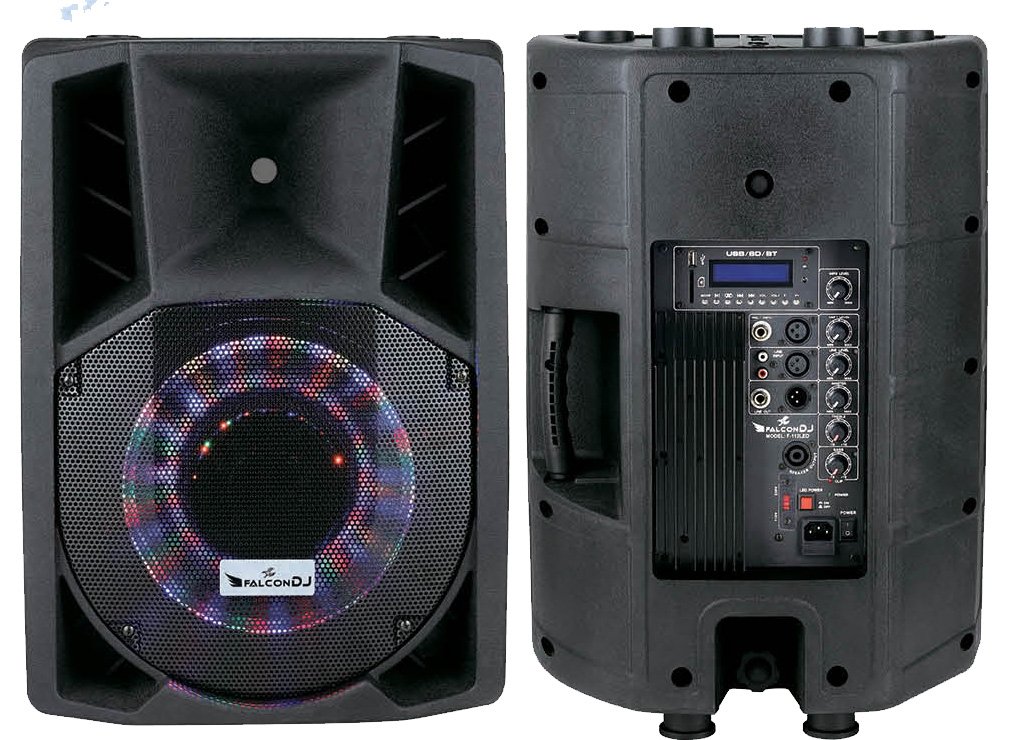
Figure 1: Front and Rear Panel Overview of the Audster F112 LED Speaker.
- Input Cards: Refers to the various audio input options available on the rear panel for connecting different audio sources.
- Connections: This area includes ports for microphones (XLR/6.35mm), line-level inputs, and potentially other audio connections.
- Stylish Design: Highlights the aesthetic appeal of the speaker's enclosure and LED lighting.
- Speaker Sound: Indicates the main audio output component, the 12-inch dynamic driver, responsible for producing sound.
- Stable & Steady: Refers to the speaker's base and construction, designed for stable placement.
The speaker is equipped with a 12-inch dynamic driver, providing a powerful 180-watt output. The rear panel houses all control interfaces and input/output ports.
5. Setup
Follow these steps to set up your Audster F112 LED speaker:
- Placement: Place the speaker on a stable, flat surface. Ensure there is adequate ventilation around the unit. Avoid placing it near heat sources or in direct sunlight.
- Power Connection:
- Ensure the speaker's power switch is in the "OFF" position.
- Connect the provided power cord to the AC input on the rear panel of the speaker.
- Plug the other end of the power cord into a suitable 110V/220V AC power outlet.
- Audio Input Connection:
- Microphone: For microphone input, connect an XLR or 6.35mm (1/4-inch) microphone cable to the designated MIC input port on the rear panel.
- Line-Level Devices: For connecting devices like laptops, smartphones, or tablets, use appropriate audio cables (e.g., RCA to 3.5mm, XLR to RCA) to connect to the line input ports.
- Bluetooth (if available): Refer to the operating instructions for Bluetooth pairing.
6. Operating Instructions
Once the speaker is set up, follow these steps to operate it:
- Power On: Flip the power switch on the rear panel to the "ON" position. The LED indicators should illuminate.
- Volume Adjustment:
- Start with the master volume control set to a low level.
- Adjust the individual input volume controls (e.g., MIC volume, Line volume) for your connected devices.
- Gradually increase the master volume to your desired listening level.
- Input Selection: If your speaker has multiple input modes (e.g., Line, USB, Bluetooth), use the input selector button or switch on the control panel to choose the desired source.
- Tone Control: Use the Bass and Treble controls (if available) to adjust the sound to your preference.
- Power Off: When finished, turn down the master volume, then flip the power switch to the "OFF" position. Unplug the power cord from the wall outlet if the speaker will not be used for an extended period.
7. Maintenance
Proper maintenance ensures the longevity and optimal performance of your speaker:
- Cleaning:
- Always unplug the speaker from the power outlet before cleaning.
- Use a soft, dry cloth to wipe the exterior surfaces.
- Do not use liquid cleaners, aerosols, or solvents, as they may damage the finish or internal components.
- Storage:
- If storing the speaker for an extended period, unplug it and store it in a cool, dry place, away from direct sunlight and extreme temperatures.
- Cover the speaker to protect it from dust.
- Ventilation: Ensure that the ventilation openings are not blocked by dust or debris. Periodically check and clean them if necessary.
8. Troubleshooting
If you encounter issues with your Audster F112 LED speaker, refer to the following common problems and solutions:
| Problem | Possible Cause | Solution |
|---|---|---|
| No power | Power cord not connected; Power outlet faulty; Speaker power switch off. | Ensure power cord is securely connected. Test outlet with another device. Turn speaker power switch to "ON". |
| No sound output | Volume too low; Incorrect input selected; Audio cable faulty or disconnected; Source device not playing. | Increase master and input volumes. Select correct input source. Check audio cables and connections. Ensure source device is playing audio. |
| Distorted sound | Volume too high (clipping); Input signal too strong; Faulty audio cable. | Reduce master and input volumes. Check source device output level. Try a different audio cable. |
| Microphone not working | Microphone not connected; Microphone volume too low; Microphone faulty. | Ensure microphone is securely connected to the MIC input. Increase microphone volume. Test with another microphone. |
If the problem persists after trying these solutions, please contact customer support.
9. Specifications
Below are the technical specifications for the Audster F112 LED 12-inch Professional Speaker:
- Model Name: AUDSTER F112
- Item Model Number: F112LED
- Speaker Type: Bookshelf (Active Speaker Cabinet)
- Special Feature: Portable
- Recommended Uses: For Parties, Events, Computers, Televisions, Music Players
- Compatible Devices: Laptop, Smartphone, Tablet
- Subwoofer Diameter: 12 Inches
- Surround Sound Channel Configuration: 1.0
- Color: Silver (Note: Product images show black, this might be a variant or error in data)
- Included Components: 2 x Speaker
- Is Waterproof: FALSE
- Control Method: Touch
- Speaker Size: 12 Inches
- Power Source: Corded Electric (110V/220V)
- Audio Driver Type: Dynamic Driver
- Audio Driver Size: 12 Inches
- Specific Uses: Party
- Manufacturer: Audster
- Speaker Maximum Output Power: 180 Watts
- Connectivity Technology: XLR (for microphone input)
- Audio Output Mode: Stereo
- Mounting Type: Freestanding
10. Warranty & Support
The Audster F112 LED speaker comes with a Limited Warranty. Please refer to the warranty card included with your purchase for specific terms and conditions, including coverage duration and claim procedures. For technical support, troubleshooting assistance, or warranty inquiries, please contact Audster customer service through the contact information provided on your warranty card or the official Audster website.
Manufacturer: Audster
Warranty Type: Limited