
Introduction
Thank you for choosing the Ferm TDM1025 Bench Pillar Corded Electric Drill. This manual provides essential information for the safe and efficient operation, maintenance, and troubleshooting of your new drill. Please read these instructions carefully before use and keep them for future reference.
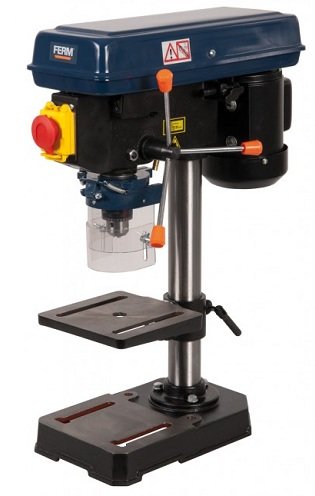
Image: Ferm TDM1025 Bench Pillar Corded Electric Drill. This image shows the complete drill press assembly, including the base, column, motor head, and work table.
Safety Instructions
Always follow basic safety precautions to reduce the risk of fire, electric shock, and personal injury when operating power tools.
General Safety Rules:
- Work Area Safety: Keep the work area clean and well-lit. Cluttered or dark areas invite accidents.
- Electrical Safety: Do not expose power tools to rain or wet conditions. Avoid body contact with earthed or grounded surfaces.
- Personal Safety: Stay alert, watch what you are doing, and use common sense. Do not operate tools while tired or under the influence of drugs, alcohol, or medication.
- Personal Protective Equipment: Always wear eye protection. Use dust masks, non-skid safety shoes, hard hats, or hearing protection as appropriate for the conditions.
- Tool Use and Care: Do not force the power tool. Use the correct power tool for your application. Disconnect the plug from the power source before making any adjustments, changing accessories, or storing power tools.
- Secure Workpiece: Always clamp or secure the workpiece to prevent movement during drilling.
- Guard Usage: Ensure the transparent guard is always in place and properly adjusted for safe working.
Setup
Unpacking:
Carefully remove all components from the packaging. Inspect for any damage that may have occurred during transit. Retain packaging materials for future transport or storage.
Assembly:
- Base and Column: Securely attach the column to the cast iron base using the provided fasteners. Ensure it is stable and upright.
- Drill Head: Mount the drill head assembly onto the top of the column. Tighten all securing bolts.
- Work Table: Slide the work table onto the column and secure it at a comfortable working height. Ensure the table locking mechanism functions correctly.
- Chuck Installation: Insert the chuck into the spindle taper. Tap it firmly with a soft mallet to ensure a secure fit.
- Guard Attachment: Attach the transparent guard to the drill head, ensuring it can be easily adjusted and provides adequate protection.
Power Connection:
Connect the drill to a standard 230V AC power outlet. Ensure the power switch is in the "OFF" position before plugging in the tool.
Operating Instructions
Installing Drill Bits:
- Ensure the drill is unplugged.
- Open the chuck jaws using the chuck key.
- Insert the drill bit into the chuck, ensuring it is centered and fully seated.
- Tighten the chuck jaws firmly with the chuck key. Remove the chuck key immediately after tightening.
Adjusting Work Table:
- Height Adjustment: Loosen the table locking handle, adjust the table to the desired height, and then firmly tighten the handle.
- Angle Adjustment: The table can be tilted from 0 to 45 degrees. Loosen the tilt locking bolt, set the desired angle, and re-tighten the bolt.
Speed Settings:
The drill features 5 speed settings (580-2650 RPM) for optimal performance across various materials. Adjust the belt position on the pulleys inside the drill head to change the speed. Refer to the speed chart inside the pulley cover for recommended settings.
Laser Guidance:
Activate the cross laser guidance system for precise drilling alignment. The laser projects a crosshair onto the workpiece, indicating the exact drilling point.
Drilling Procedure:
- Secure the workpiece firmly to the work table using clamps.
- Adjust the table height and angle as needed.
- Select the appropriate drilling speed.
- Turn on the drill.
- Slowly lower the drill bit into the workpiece using the feed handle, applying steady, even pressure.
- Once drilling is complete, retract the drill bit from the workpiece before turning off the drill.
Maintenance
Regular maintenance ensures the longevity and safe operation of your drill.
- Cleaning: After each use, clean the drill thoroughly to remove dust, chips, and debris. Use a soft brush or compressed air. Do not use solvents that may damage plastic parts.
- Lubrication: Periodically apply a light machine oil to moving parts, such as the column and spindle, to ensure smooth operation.
- Cord Inspection: Regularly inspect the power cord for any signs of damage, cuts, or fraying. Replace damaged cords immediately.
- Chuck Maintenance: Keep the chuck jaws clean and free of debris to ensure proper grip on drill bits.
- Belt Tension: Check the drive belt tension periodically. Adjust if necessary to prevent slippage and ensure consistent speed.
Troubleshooting
| Problem | Possible Cause | Solution |
|---|---|---|
| Drill does not start. | No power supply. Power switch is off. Damaged power cord. | Check power outlet and circuit breaker. Turn power switch to "ON". Inspect and replace power cord if damaged. |
| Excessive vibration during operation. | Loose drill bit. Unbalanced workpiece. Loose mounting bolts. | Ensure drill bit is securely tightened in chuck. Secure workpiece firmly. Check and tighten all assembly bolts. |
| Poor drilling performance or burning wood. | Dull drill bit. Incorrect speed setting. Insufficient feed pressure. | Replace or sharpen drill bit. Adjust speed according to material. Apply steady, appropriate feed pressure. |
| Laser guidance not working. | Laser switch off. Batteries (if applicable) depleted. | Ensure laser switch is on. Check and replace batteries if necessary. |
Specifications
| Model Number | TDM1025 |
| Brand | Ferm |
| Power Source | Corded Electric |
| Voltage | 230 V |
| Amperage | 6 Amps |
| No Load Speed | 580-2650 RPM (5 settings) |
| Chuck Capacity | 13 mm |
| Special Feature | Variable Speed, Laser Guidance |
| Work Table Adjustment | Height adjustable, 0-45 degree angle adjustment |
Warranty and Support
Warranty Information:
Ferm products are manufactured to high quality standards and are guaranteed against defects in materials and workmanship. Please refer to the warranty card included with your product for specific terms and conditions, including warranty period and coverage details. Keep your purchase receipt as proof of purchase.
Customer Support:
For technical assistance, spare parts, or warranty claims, please contact your local Ferm dealer or authorized service center. You can also visit the official Ferm website for more information and support resources.
Note: Specific contact details are not provided in this manual. Please refer to your product packaging or the manufacturer's website for the most current support information.
