
Introduction
This manual provides essential information for the proper installation, operation, and maintenance of your Excalibur 433MHz Keyless Entry Remote Start system, model RS370. This 1-Way paging remote start/keyless entry/vehicle security system comes with a 4-button remote and a Sidekick remote, designed to enhance your vehicle's convenience and security.
Please read this manual thoroughly before attempting any installation or operation to ensure safe and effective use of the system.
What's in the Box
Upon opening the package, please verify that all components are present:
- Alarm Module
- Wiring Harnesses
- Main Transmitter (4-button)
- Sidekick Remote Transmitter
- User Manual (this document)
Key Features
The Excalibur RS370 system offers a range of features for enhanced vehicle control and security:
- 1-Way keyless entry/remote start car alarm system with 4-button transmitter
- Up to 1,500 foot operating range
- Includes a 4-Button Sidekick remote control transmitter
- Echo compatible for smart home integration
- Dual data ports with auto-detect protocol for independent operation
Product Overview
Familiarize yourself with the main components of your Excalibur system:
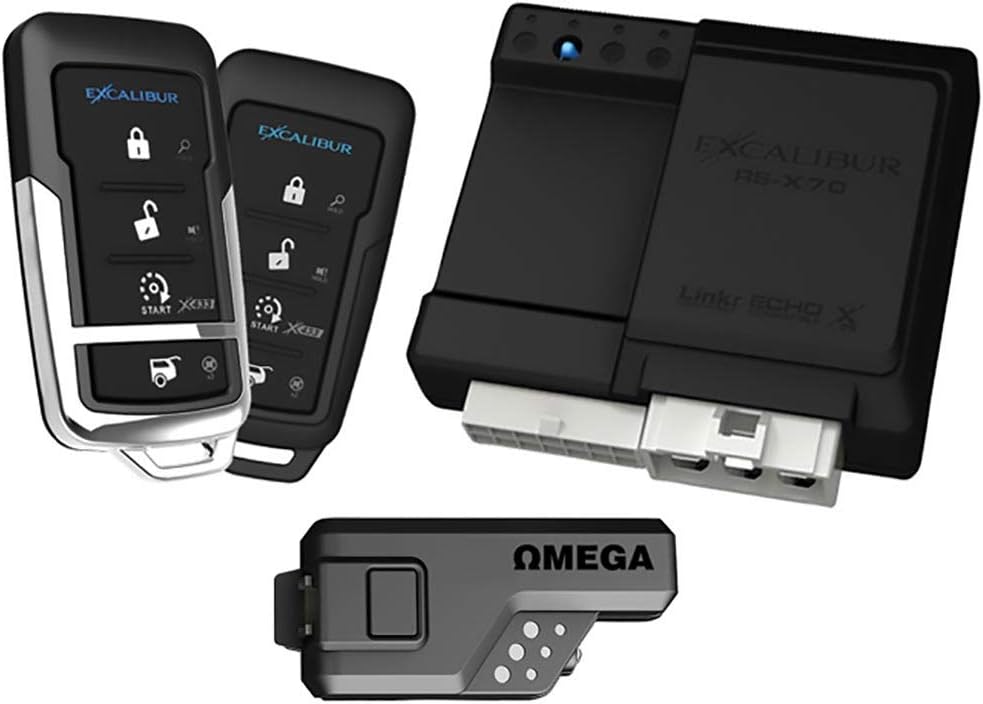
Image 1: Overview of the Excalibur RS370 system components, showing the main 4-button remote, the Sidekick remote, the central control module labeled 'EXCALIBUR RS-X70', and an 'OMEGA' interface module.
Image 2: A closer view of the main 4-button remote, the central control module, and an additional round remote control, highlighting the primary user interfaces.
Setup and Installation
Installation of the Excalibur RS370 system requires technical knowledge of vehicle electrical systems. It is highly recommended that this system be installed by a qualified professional installer to ensure proper functionality and to avoid damage to your vehicle or the system.
Key considerations for professional installation include:
- Wiring Connections: Proper connection to vehicle's ignition, power, ground, and various signal wires.
- Module Placement: Secure and discreet placement of the main control module and Omega interface.
- Antenna Installation: Optimal placement of the antenna for maximum remote range.
- Programming: Initial programming of the system and remote transmitters to your vehicle. The dual data ports with auto-detect protocol simplify integration with many modern vehicle systems.
Operating Instructions
This section outlines the basic functions of your Excalibur remote start and security system.
Remote Start
- Ensure the vehicle is in Park (automatic transmission) or neutral with parking brake engaged (manual transmission, if applicable).
- Press and hold the Start button on your 4-button remote for approximately 3 seconds.
- The vehicle's engine should start. The system will typically run the engine for a preset duration (e.g., 15 minutes) before shutting off.
- To turn off the engine remotely, press and hold the Start button again for 3 seconds.
Keyless Entry (Lock/Unlock)
- To Lock your vehicle's doors, press the Lock button on your remote once. The vehicle's lights may flash and/or horn may chirp to confirm.
- To Unlock your vehicle's doors, press the Unlock button on your remote once. The vehicle's lights may flash twice to confirm.
Security System Arming/Disarming
- The security system typically arms automatically when you lock the doors using the remote.
- To disarm the security system, unlock the doors using the remote.
- In case of an alarm trigger, the system will sound the siren and flash the lights. To silence the alarm, press any button on your remote.
Sidekick Remote
The Sidekick remote provides a compact alternative for basic lock, unlock, and remote start functions. Refer to its specific instructions for button assignments, which typically mirror the main remote's primary functions.
Maintenance
The Excalibur RS370 system is designed for minimal maintenance. However, consider the following:
- Remote Battery Replacement: If the remote's range decreases significantly or it stops responding, the battery may need replacement. Refer to the remote's casing for battery type (e.g., CR2032 coin cell) and replacement instructions.
- System Cleaning: Keep the main control module and remotes free from excessive dust and moisture. Wipe with a soft, dry cloth if necessary.
- Professional Check-ups: If you experience persistent issues, consult with your professional installer or an authorized service center.
Troubleshooting
If you encounter issues with your Excalibur system, try these common troubleshooting steps:
- Remote Not Responding: Check the remote battery. Ensure you are within the 1,500-foot operating range. Obstructions or strong radio interference can affect range.
- Remote Start Fails: Ensure the vehicle's doors are closed, hood is closed, and the parking brake is engaged. Check if the vehicle's battery is low. Some vehicles require specific conditions (e.g., gear in Park) for remote start to activate.
- Alarm Triggers Randomly: Check for loose wiring connections (professional inspection recommended). Ensure sensors are not overly sensitive (if adjustable).
- Vehicle Does Not Lock/Unlock: Verify the vehicle's central locking system is functioning correctly with the factory remote or manually. Check remote battery.
For persistent or complex issues, it is advisable to contact a professional installer or Excalibur customer support.
Specifications
Technical details for the Excalibur RS370 system:
| Attribute | Detail |
|---|---|
| Brand | Excalibur |
| Model Number | RS370 |
| Item Weight | 1.26 pounds |
| Product Dimensions | 6.89 x 4.72 x 3.7 inches |
| Compatible Devices | Echo |
| Maximum Range | 457.2 Meters (approx. 1,500 feet) |
| Noise Level (Alarm) | 125 dB |
| Remote Control Included | Yes (Main and Sidekick) |
Important Information
WARNING: This product contains chemicals known to the State of California to cause cancer and birth defects or other reproductive harm.
Warranty and Support
For warranty information, please refer to the documentation provided with your purchase or visit the official Excalibur website. Warranty terms and conditions may vary.
For technical support, installation inquiries, or further assistance, please contact your authorized Excalibur dealer or the manufacturer's customer service department. Contact details can typically be found on the Excalibur brand website or within your product packaging.


