
Introduction
This manual provides essential information for the assembly, operation, maintenance, and troubleshooting of your Omnirax Nova Compact Audio/Video Workstation. Please read these instructions carefully before beginning assembly or use to ensure proper function and longevity of your workstation.
Setup and Assembly
Unpack all components and verify that all parts are present. Refer to the diagram below for component identification and assembly sequence. It is recommended to assemble the workstation on a soft, clean surface to prevent scratches.
- Attach the main support legs to the primary desktop surface using the provided hardware. Ensure all screws are tightened securely.
- Mount the upper shelf to the main desktop using the designated risers and hardware.
- Install the 2-space rack rails into the designated slots on the main desktop.
- If using the optional KMSNV Keyboard Shelf, attach it to the underside of the main desktop as per its separate instructions.
- Place the workstation in its desired location, ensuring it is level and stable.
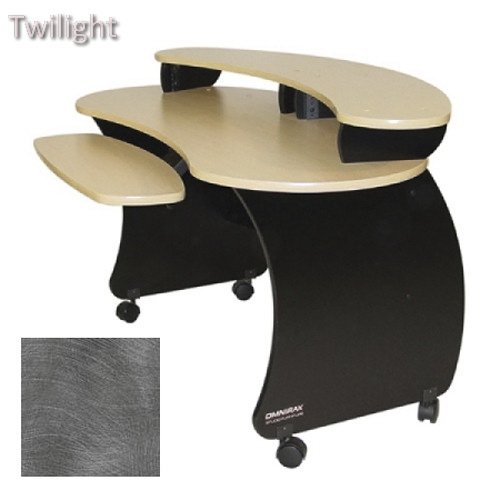
Figure 1: Workstation Dimensions and Components. This diagram illustrates the overall dimensions of the Omnirax Nova Compact Audio/Video Workstation, including its height (32-1/2 inches), width (53-1/2 inches), and depth (28 inches). It also highlights the 2-space rack rails, the upper shelf (12 inches deep), and the main desktop (13-3/4 inches deep), along with the optional KMSNV Keyboard Shelf. The upper shelf is elevated 4 inches above the main desktop.
Operating Instructions
The Omnirax Nova Compact Workstation is designed to accommodate various audio and video equipment. Utilize the 2-space rack rails for standard rack-mountable gear. The upper shelf is suitable for monitors, speakers, or other smaller devices, while the main desktop provides ample space for mixers, control surfaces, or keyboards. The optional keyboard shelf offers an ergonomic solution for keyboard and mouse placement.
- Equipment Placement: Distribute equipment weight evenly across the surfaces. Place heavier items on the main desktop or within the rack spaces.
- Cable Management: Utilize cable ties or clips (not included) to organize and secure cables, preventing tangles and ensuring a tidy workspace.
- Ergonomics: Adjust your chair and monitor height to maintain a comfortable and ergonomic posture while working.
Maintenance
Regular maintenance will help preserve the appearance and structural integrity of your workstation.
- Cleaning: Wipe surfaces with a soft, damp cloth. For stubborn marks, use a mild, non-abrasive cleaner. Avoid harsh chemicals or abrasive materials that could damage the finish.
- Hardware Check: Periodically check all screws and fasteners to ensure they remain tight. Re-tighten if necessary to maintain stability.
- Environmental Conditions: Avoid exposing the workstation to extreme temperatures, humidity, or direct sunlight, which can cause warping or discoloration.
Troubleshooting
If you encounter issues with your workstation, refer to the following common solutions:
- Wobbling Workstation:
- Ensure all assembly screws are fully tightened.
- Verify that the workstation is placed on a level surface. Adjust floor glides if present.
- Difficulty with Rack Equipment Installation:
- Confirm that your equipment is standard 19-inch rack-mountable.
- Ensure rack screws are properly aligned with the rack rails. Do not overtighten.
Specifications
| Feature | Detail |
|---|---|
| Overall Dimensions (W x D x H) | 53-1/2" x 28" x 32-1/2" |
| Main Desktop Depth | 13-3/4" |
| Upper Shelf Depth | 12" |
| Upper Shelf Clearance | 4" above main desktop |
| Rack Spaces | 2-space (standard 19-inch) |
| Optional Accessories | KMSNV Keyboard Shelf |
| Material | Wood laminate, metal frame |
Warranty and Support
Omnirax products are manufactured to high standards. For specific warranty details, please refer to the warranty card included with your purchase or visit the official Omnirax website. For technical support, assembly assistance, or to inquire about replacement parts, please contact Omnirax customer service through their official channels.
Please retain your proof of purchase for warranty claims.