
1. Introduction and Overview
The Panasonic KX-TGE110 JTB is a cordless phone designed for ease of use, featuring large backlit keys and clearly visible characters, making it ideal for users who benefit from enhanced visibility and tactile feedback. This phone offers essential communication functionalities with user-friendly controls.
Key features include instant pre-defined numbers with shortcut keys, quick volume control during conversations, and compatibility with hearing aids (HAC support). It also incorporates a call blocking function and a handset key lock to prevent accidental operations. Furthermore, the phone operates with zero emission in standby mode, minimizing radio wave transmission when not in use.
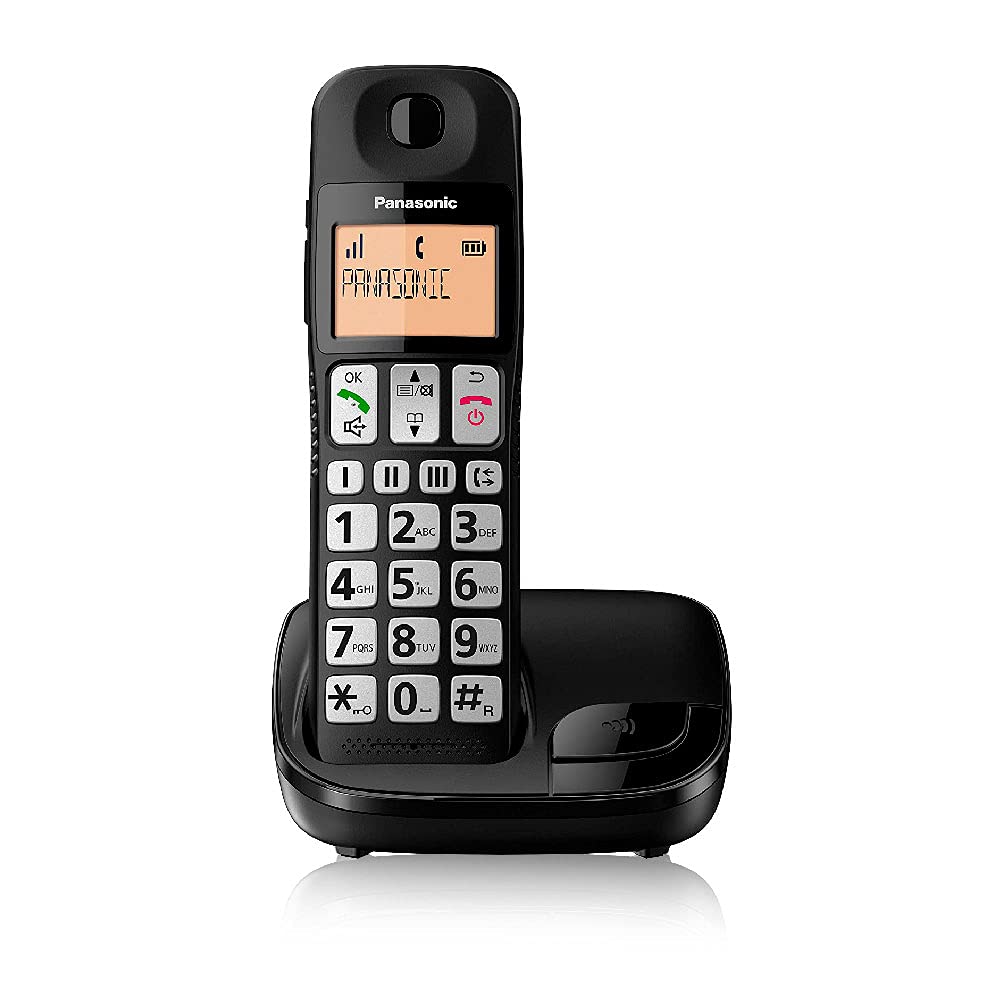
Figure 1: The Panasonic KX-TGE110 JTB cordless phone, showcasing its large, easy-to-read buttons, clear display, and compact charging base. The handset is black with a silver keypad, and the base unit is also black.
2. Safety Information
Please read these safety instructions carefully before using your phone to ensure safe and proper operation.
- Use only the supplied power adapter and batteries. Using unauthorized components may damage the unit and void your warranty.
- Do not expose the phone to water or excessive moisture. If the phone gets wet, disconnect it immediately and contact customer support.
- Avoid placing the base unit or handset near heat sources such as radiators, heat registers, stoves, or other appliances that produce heat.
- Do not attempt to disassemble or repair the phone yourself. Refer all servicing to qualified service personnel.
- Keep the phone out of reach of small children.
- Dispose of batteries properly according to local regulations. Do not incinerate batteries.
3. Package Contents
Verify that all items are included in the package:
- Panasonic KX-TGE110 JTB Handset
- Base Unit
- AC Power Adapter for Base Unit
- Telephone Line Cord
- Rechargeable NiMH AAA Batteries (2 included)
- User Manual (this document)
4. Setup
4.1. Battery Installation
- Open the battery compartment cover on the back of the handset.
- Insert the two supplied AAA NiMH rechargeable batteries, observing the correct polarity (+ and -).
- Close the battery compartment cover securely.
- Place the handset on the base unit to charge for at least 7 hours before initial use. The charge indicator on the handset display will show charging status.
4.2. Base Unit Connection
- Connect the AC power adapter to the "AC ADAPTER" jack on the back of the base unit.
- Plug the other end of the AC power adapter into a standard electrical outlet.
- Connect one end of the telephone line cord to the "LINE" jack on the base unit.
- Plug the other end of the telephone line cord into your telephone wall jack.
- Place the base unit on a flat, stable surface, away from other electronic devices that may cause interference.
4.3. Handset Registration
Your handset is typically pre-registered to the base unit. If for any reason it becomes unregistered or you purchase an additional handset, follow these steps:
- On the base unit, press and hold the LOCATOR/INTERCOM button (usually located on the side or back of the base unit) until the registration tone sounds (approximately 5 seconds).
- On the handset, press the MENU/OK button.
- Navigate to "Handset Registration" or a similar option using the navigation keys.
- Press MENU/OK to select.
- Enter the base unit PIN (default is usually "0000").
- Press MENU/OK. The handset will display "Registering..." and then "Registered" upon successful completion.
5. Operating Instructions
5.1. Making and Receiving Calls
- To Make a Call:
- Lift the handset from the base unit or press the TALK/GREEN button.
- Dial the phone number using the large numeric keypad.
- Press the TALK/GREEN button again if you lifted the handset first, or the call will connect automatically after dialing.
- To Receive a Call:
- When the phone rings, lift the handset from the base unit or press the TALK/GREEN button.
- To End a Call:
- Place the handset back on the base unit or press the OFF/RED button.
5.2. Volume Control
During a call, use the dedicated volume control keys located on the side of the handset to adjust the earpiece or speakerphone volume. Press the UP arrow to increase volume and the DOWN arrow to decrease volume.
5.3. Speed Dial (One-Touch Dialing)
The handset features three dedicated speed dial keys (M1, M2, M3) for quick access to frequently called numbers.
- To Program a Speed Dial Number:
- Press and hold the desired speed dial key (M1, M2, or M3) until the display prompts you to enter a number.
- Enter the phone number you wish to store.
- Press MENU/OK to save.
- To Use Speed Dial:
- Press the desired speed dial key (M1, M2, or M3). The stored number will appear on the display.
- Press the TALK/GREEN button to dial the number.
5.4. Call Blocking Function
This feature allows you to block unwanted calls. Refer to the handset menu for detailed instructions on adding numbers to the call block list.
- Press MENU/OK.
- Navigate to "Call Block" or similar.
- Follow the on-screen prompts to add numbers from the Caller ID list or manually.
5.5. Handset Key Lock
To prevent accidental dialing or setting changes, you can lock the handset keypad.
- To Lock: Press and hold the # key until "Keypad Locked" appears on the display.
- To Unlock: Press and hold the # key again until "Keypad Unlocked" appears.
6. Maintenance
6.1. Cleaning
Wipe the phone and base unit with a soft, damp cloth. Do not use abrasive cleaners or solvents. Ensure the phone is disconnected from power before cleaning.
6.2. Battery Care
- Always use the specified rechargeable NiMH batteries.
- If the phone will not be used for an extended period, remove the batteries to prevent leakage.
- Battery life may vary depending on usage and environmental conditions. Replace batteries when they no longer hold a charge effectively.
7. Troubleshooting
If you experience issues with your Panasonic KX-TGE110 JTB, refer to the following common problems and solutions:
| Problem | Possible Cause / Solution |
|---|---|
| No dial tone. |
|
| Handset display is blank or shows "No Link". |
|
| Cannot hear caller or caller cannot hear me. |
|
| Keys are unresponsive. |
|
8. Specifications
| Feature | Detail |
|---|---|
| Brand | Panasonic |
| Model Number | KX-TGE110JTB |
| Color | Black |
| Phone Type | Cordless |
| Screen Size | 1.8 Inches |
| Special Features | Wireless, Large Buttons, HAC Support, Call Blocking, Keypad Lock, Zero Emission Mode |
| Compatible Devices | DECT Networks |
| Battery Type | 2 x AAA NiMH Rechargeable Batteries (Included) |
| Material | Plastic |
| Power Source | Battery Powered (Handset), AC Adapter (Base Unit) |
| Dialer Type | Simple Keypad |
| Item Dimensions (L x W x H) | 11.3 x 10.1 x 20 cm (approximate) |
| Answering System | Digital |
9. Warranty and Support
9.1. Limited Warranty
Panasonic warrants this product against defects in material and workmanship under normal use and service for a period specified by your regional Panasonic distributor. This warranty does not cover damage caused by accident, misuse, abuse, improper installation or operation, lack of reasonable care, or unauthorized modification.
Please retain your purchase receipt as proof of purchase for warranty claims.
9.2. Customer Support
For technical assistance, troubleshooting beyond this manual, or warranty service, please contact Panasonic customer support in your region. You can typically find contact information on the official Panasonic website or on the product packaging.
When contacting support, please have your product model number (KX-TGE110JTB) and serial number (if applicable) ready.