
Bosch GBH2-26
Bosch GBH2-26 1" SDS-plus Bulldog Xtreme Rotary Hammer User Manual
Model: GBH2-26 | Brand: Bosch
1. Introduction
The Bosch GBH2-26 1 inch SDS-plus Bulldog Xtreme Rotary Hammer is engineered for durability and powerful performance. This versatile tool is equipped with an 8.0-Amp motor, delivering 2.0 ft.-Lbs. of impact energy and up to 5,100 BPM, making it suitable for a variety of drilling and hammering applications. Its lightweight design at 6.4 lbs. ensures user comfort during extended use.
Key Features:
- Upgraded 8.0 Amp Motor: Delivers 2.0 ft.-Lbs. of impact energy for demanding tasks.
- Three Modes of Operation: Offers versatility with drilling only, hammer drilling, and chiseling modes.
- Rotating Brush Plate: Ensures equal power in reverse and extends the life of the carbon brushes.
- Variable-Speed Reversing Trigger: Allows for precise bit starting and control.
- SDS-Plus System: Provides quick, tool-free bit changes with automatic bit locking.
- Vario-Lock Positioning: Enables users to rotate chisels to the optimal angle for chiseling applications.
- Ergonomic Pistol-Grip Handle: Designed for comfort, especially in hard-to-reach areas or during prolonged use.
2. General Safety Information
Always read and understand all safety warnings, instructions, illustrations, and specifications provided with this power tool. Failure to follow all instructions listed below may result in electric shock, fire, and/or serious injury.
Work Area Safety:
- Keep work area clean and well lit. Cluttered or dark areas invite accidents.
- Do not operate power tools in explosive atmospheres, such as in the presence of flammable liquids, gases, or dust. Power tools create sparks which may ignite the dust or fumes.
- Keep children and bystanders away while operating a power tool. Distractions can cause you to lose control.
Electrical Safety:
- Power tool plugs must match the outlet. Never modify the plug in any way.
- Avoid body contact with grounded surfaces, such as pipes, radiators, ranges, and refrigerators. There is an increased risk of electric shock if your body is grounded.
- Do not expose power tools to rain or wet conditions. Water entering a power tool will increase the risk of electric shock.
Personal Safety:
- Always wear eye protection. Use safety glasses or goggles.
- Wear hearing protection when operating the tool for extended periods.
- Dress properly. Do not wear loose clothing or jewelry. Keep your hair and clothing away from moving parts.
- Stay alert, watch what you are doing, and use common sense when operating a power tool.
3. Included Components
The Bosch GBH2-26 Rotary Hammer comes with the following components:
- (1) GBH2-26 Rotary Hammer
- (1) Auxiliary Handle
- (1) Depth Gauge
- (1) Carrying Case

Figure 3.1: Front view of the Bosch GBH2-26 Rotary Hammer.

Figure 3.2: Side view of the Bosch GBH2-26 Rotary Hammer with auxiliary handle and depth gauge attached.
4. Setup and Assembly
4.1 Attaching the Auxiliary Handle
- Loosen the auxiliary handle by twisting it counter-clockwise.
- Slide the handle over the chuck and onto the tool's collar.
- Adjust the handle to a comfortable and secure position.
- Tighten the handle by twisting it clockwise until it is firmly secured.
4.2 Installing the Depth Gauge
- Insert the depth gauge into the hole on the auxiliary handle.
- Adjust the depth gauge to the desired drilling depth by sliding it in or out.
- Ensure the depth gauge is securely positioned before operation.
4.3 Inserting SDS-Plus Bits
- Clean the shank of the SDS-plus bit.
- Pull back the chuck collar on the rotary hammer.
- Insert the bit into the chuck until it clicks into place.
- Release the chuck collar. The bit should have a slight amount of play (in-and-out movement) which is normal for the SDS-plus system.
- Pull on the bit to ensure it is securely locked before starting work.
5. Operating Instructions
The Bosch GBH2-26 Rotary Hammer features a multifunction mode selector for various applications.

Figure 5.1: Available operating modes for the Bosch GBH2-26.
5.1 Mode Selection
Rotate the mode selector switch to choose the desired operating mode:
- Drilling Only (Rotary Only): For drilling in wood, metal, and plastic without hammer action.
- Hammer Drilling (Rotary Hammer): For drilling in concrete, masonry, and stone with simultaneous rotation and hammer action.
- Chiseling (Hammer Only): For light chiseling, chipping, and demolition work without rotation.
5.2 Variable Speed Trigger
The tool is equipped with a variable-speed reversing trigger. Press the trigger lightly for lower speeds and increased pressure for higher speeds. This allows for accurate bit starting and controlled operation.
5.3 Vario-Lock Positioning for Chiseling
When in Chiseling (Hammer Only) mode, the Vario-Lock system allows you to rotate the chisel bit to the optimal working angle. Simply rotate the bit to the desired position and it will lock in place.
5.4 Application Examples

Figure 5.2: Drilling into a concrete wall using the hammer drilling mode.
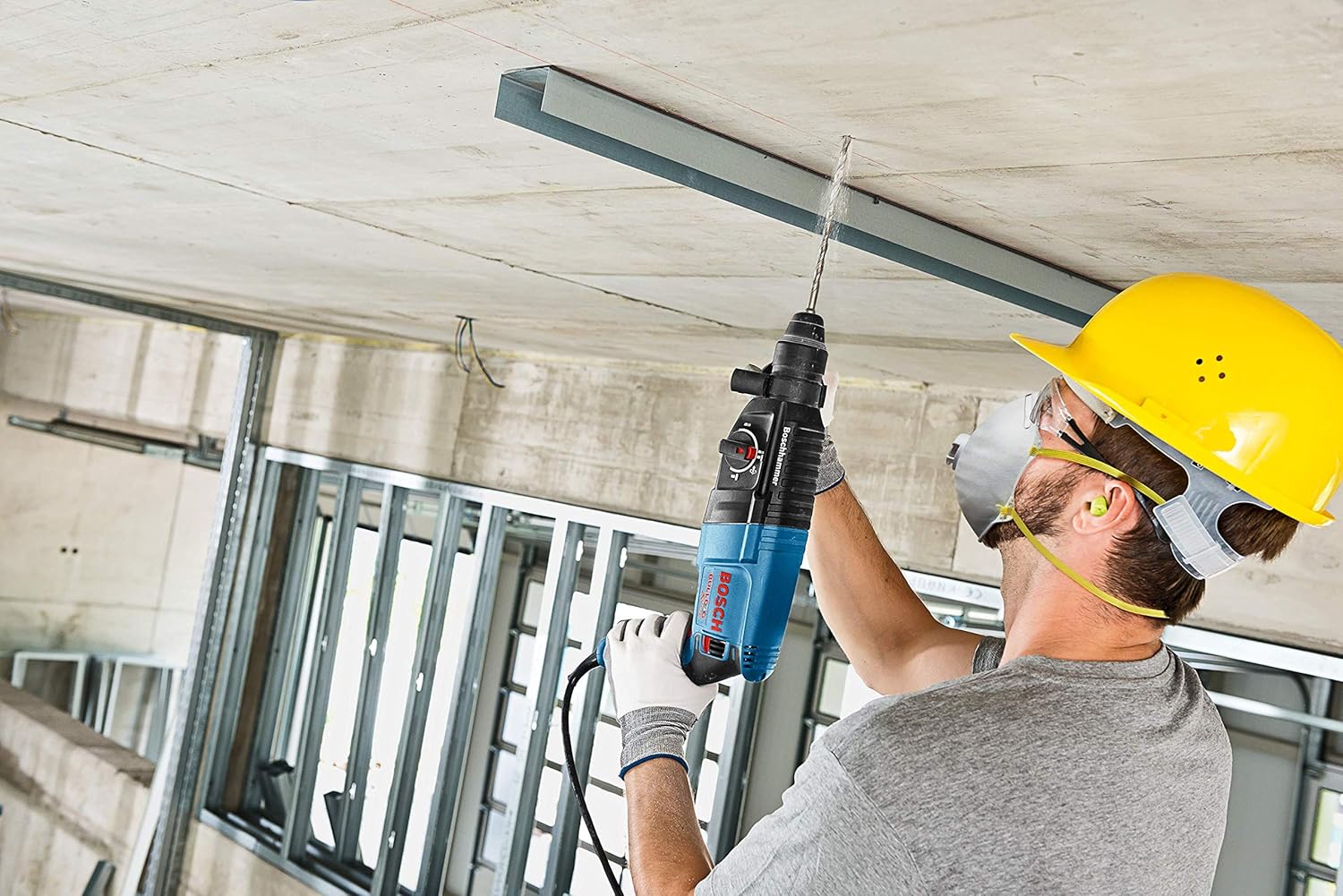
Figure 5.3: Drilling into a concrete ceiling, demonstrating overhead use.

Figure 5.4: Chiseling tiles from a wall using the hammer only mode.

Figure 5.5: Chiseling concrete from a wall, showcasing demolition capabilities.
6. Maintenance
Regular maintenance ensures the longevity and optimal performance of your Bosch GBH2-26 Rotary Hammer.
6.1 Cleaning
- Always disconnect the tool from the power source before cleaning.
- Keep the ventilation openings clean to prevent overheating.
- Clean the tool regularly with a soft cloth, preferably after each use. Do not use harsh chemicals or abrasive cleaners.
- Periodically clean the SDS-plus chuck to remove dust and debris, which can affect bit insertion and retention.
6.2 Carbon Brushes
The rotating brush plate feature helps extend brush life. However, carbon brushes are wear parts and should be checked periodically. If sparks are excessive or the motor performance decreases, have the carbon brushes inspected and replaced by a qualified service technician.
6.3 Lubrication
The internal components of the rotary hammer are factory-lubricated. Do not attempt to lubricate internal parts yourself. Refer to authorized service centers for any internal maintenance.
7. Troubleshooting
This section addresses common issues you might encounter with your rotary hammer.
| Problem | Possible Cause | Solution |
|---|---|---|
| Tool does not start | No power supply; Faulty power cord/plug; Damaged switch | Check power outlet and connections; Inspect power cord for damage; Contact service center if switch is faulty. |
| Reduced power/performance | Worn carbon brushes; Overheating; Incorrect mode selection | Have carbon brushes checked/replaced; Allow tool to cool down; Ensure correct mode is selected for the task. |
| Bit not locking in chuck | Chuck is dirty; Bit shank is dirty/damaged; Chuck mechanism faulty | Clean chuck and bit shank; Use a clean, undamaged bit; Contact service center if chuck is faulty. |
| Excessive sparking from motor | Worn carbon brushes; Motor overload | Have carbon brushes checked/replaced; Reduce load on the tool. |
8. Technical Specifications
| Specification | Value |
|---|---|
| Model Number | GBH2-26 |
| Brand | Bosch |
| Power Source | Corded Electric |
| Voltage | 120 Volts |
| Amperage | 8 Amps |
| Maximum Rotational Speed | 1300 RPM |
| No-Load BPM | 0-5,100 BPM |
| Impact Energy | 2.0 ft.-Lbs. |
| Item Weight | 6.4 Pounds |
| Product Dimensions | 15 x 3.5 x 8.3 inches |
| Drilling Capacity Metal | 0.5 Inches |
| Maximum Hole Diameter in Wood | 1-1/4 inches |
| Included Components | Rotary Hammer, Auxiliary Handle, Depth Gauge, Carrying Case |
9. Warranty Information
This Bosch GBH2-26 Rotary Hammer comes with a Limited 1 Year Warranty. For detailed terms and conditions, please refer to the warranty card included with your product or visit the official Bosch website.
10. Customer Support
For technical assistance, service, or replacement parts, please contact Bosch Customer Service. You can find contact information on the official Bosch website or in the documentation provided with your tool.
Online Resources: Visit the official Bosch website for FAQs, product registration, and additional support materials.