
Atosa MPF8203
Atosa MPF8203 93-inch Pizza Prep Table Refrigerator User Manual
Model: MPF8203
Introduction
This manual provides essential instructions for the safe and efficient operation, installation, and maintenance of your Atosa MPF8203 93-inch Pizza Prep Table Refrigerator. Please read this manual thoroughly before installation and use to ensure proper function and longevity of the unit. Retain this manual for future reference.
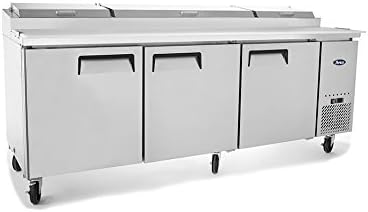
Image: Front view of the Atosa MPF8203 Pizza Prep Table with all three doors closed and the top lids closed, showcasing its stainless steel exterior and casters.
Important Safety Instructions
WARNING: Failure to follow these safety instructions may result in fire, electric shock, property damage, or personal injury.
- Always disconnect power before cleaning, servicing, or moving the unit.
- Ensure the unit is connected to a properly grounded electrical outlet with the correct voltage as specified on the rating plate.
- Do not use extension cords or adapter plugs with this appliance.
- Keep ventilation openings in the appliance enclosure or in the built-in structure clear of obstruction.
- Do not store explosive substances such as aerosol cans with a flammable propellant in this appliance.
- This appliance is intended for commercial use only.
- Do not attempt to repair or replace any part of your appliance unless specifically recommended in this manual. All other servicing should be referred to a qualified technician.
Setup and Installation
1. Unpacking
Carefully remove all packaging materials, including tape and protective film. Inspect the unit for any shipping damage. Report any damage immediately to the carrier and your dealer. Do not discard packaging materials until the unit has been inspected.
2. Placement
- Place the unit on a strong, level surface capable of supporting its weight when fully loaded.
- Ensure adequate air circulation around the unit. Maintain a minimum of 6 inches (15 cm) clearance from walls or other obstructions for proper ventilation of the condenser.
- Avoid placing the unit near heat-generating appliances (e.g., ovens, fryers) or in direct sunlight, as this can affect performance and energy efficiency.
- Install the casters (if not pre-installed) and lock the front casters to prevent movement.

Image: Front view of the Atosa MPF8203 Pizza Prep Table with the rightmost door open, revealing interior shelving. The top lids are open, showing the food pan area.
3. Electrical Connection
Before connecting the unit, verify that the electrical supply matches the requirements specified on the unit's data plate (voltage, frequency, and amperage). The unit must be connected to a dedicated, grounded circuit with appropriate overcurrent protection.
- Do not plug into an outlet controlled by a wall switch or pull chain.
- Do not use a two-prong adapter.
4. Initial Cleaning
Before first use, clean the interior and exterior of the unit with a mild soap and water solution. Rinse thoroughly and dry completely. Allow the unit to sit for at least 2 hours after moving before plugging it in to allow refrigerants to settle.
Operating Instructions
1. Powering On
Plug the unit into the dedicated electrical outlet. The compressor will start, and the unit will begin to cool. Allow the unit to reach its set temperature before loading with food products.
2. Temperature Control
The unit is equipped with a digital temperature controller. Refer to the controller's specific instructions for detailed programming. Generally:
- Press the "SET" button to view the current set temperature.
- Press "SET" again, then use the up/down arrows to adjust the temperature.
- Press "SET" to confirm the new temperature.
The recommended operating temperature for food safety is between 33°F and 40°F (0.5°C and 4.4°C).
3. Food Preparation and Storage
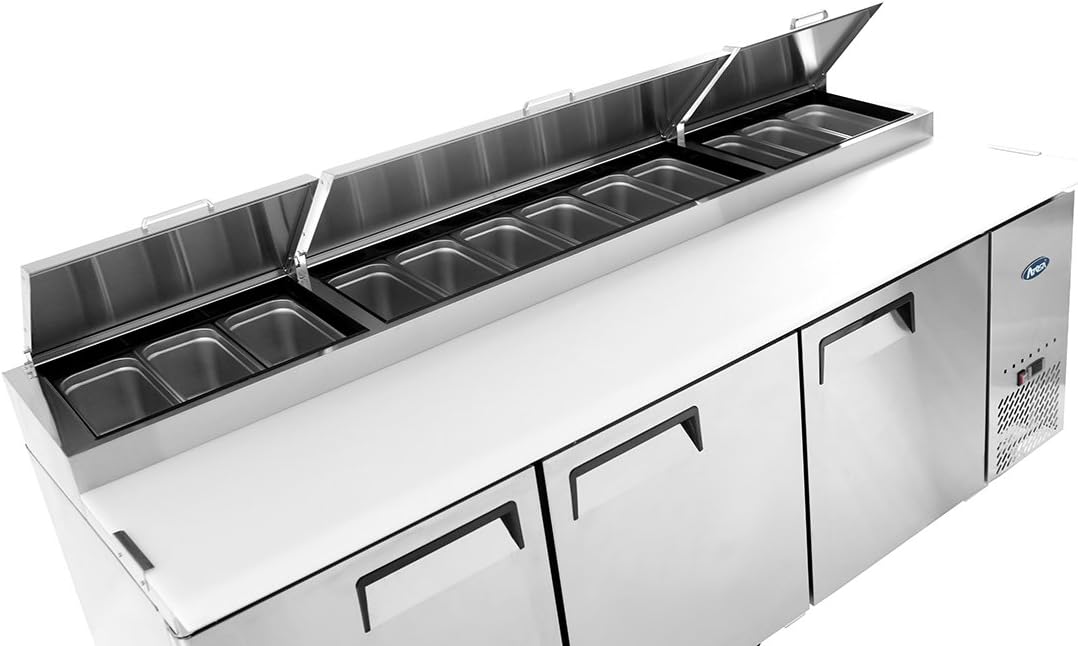
Image: Top-down view of the Atosa MPF8203 Pizza Prep Table with all three top lids open, revealing multiple stainless steel food pans for ingredients.
- Use appropriate food pans for the top section. Ensure lids are closed when not actively preparing food to maintain temperature and hygiene.
- Do not overload shelves in the refrigerated compartments. Allow for proper air circulation.
- Ensure doors are closed completely after each use to prevent temperature fluctuations and energy waste.
- The cutting board surface is designed for food preparation. Keep it clean and sanitized.

Image: Close-up view of the white cutting board surface edge, integrated into the stainless steel top of the Atosa MPF8203 Pizza Prep Table.
Maintenance
Regular maintenance is crucial for the efficient operation and longevity of your unit.
1. Daily Cleaning
- Interior: Wipe down interior surfaces with a mild soap and water solution. Rinse with clean water and dry thoroughly. Remove and clean shelves as needed.
- Exterior: Clean stainless steel surfaces with a soft cloth and a non-abrasive cleaner designed for stainless steel. Avoid harsh chemicals or abrasive pads.
- Cutting Board: Remove and sanitize the cutting board daily.
2. Condenser Coil Cleaning (Monthly/Quarterly)
The condenser coils, located near the compressor, accumulate dust and debris, which can reduce cooling efficiency and increase energy consumption. Clean them regularly:
- Disconnect power to the unit.
- Locate the condenser coil (usually behind a grille near the compressor).
- Use a stiff brush or vacuum cleaner with a brush attachment to remove dust and lint from the fins.
- Ensure the area is clear of obstructions before restoring power.
3. Door Gasket Inspection
Inspect door gaskets regularly for tears or damage. Damaged gaskets compromise sealing, leading to temperature loss and increased energy use. Replace worn gaskets promptly.
4. Automatic Defrost
This unit features an automatic defrost system. Ice buildup on the evaporator coil is periodically melted and drained. Ensure the drain line is clear and free of obstructions.
Troubleshooting Guide
Before calling for service, please check the following common issues and solutions:
| Problem | Possible Cause | Solution |
|---|---|---|
| Unit not cooling |
|
|
| Excessive noise |
|
|
| Water on floor (leak) |
|
|
If the problem persists after attempting these solutions, disconnect power and contact a qualified service technician.
Product Specifications
| Feature | Detail |
|---|---|
| Brand | Atosa |
| Model Number | MPF8203 |
| Capacity | 26 Cubic Feet |
| Installation Type | Tabletop |
| Number of Doors | 3 |
| Defrost System | Automatic |
| Form Factor | Side By Side |
| Special Feature | Compact |
| Certifications | CE, ETL |
Warranty Information
The Atosa MPF8203 Pizza Prep Table Refrigerator comes with a manufacturer's warranty:
- Parts and Labor: 2 Years
- Compressor: 5 Years
This warranty covers defects in materials and workmanship under normal use and service. Please retain your proof of purchase for warranty claims. For full terms and conditions, refer to the official warranty document provided with your purchase or contact Atosa customer service.
Customer Support
For technical assistance, parts, or service inquiries, please contact your authorized Atosa dealer or Atosa customer service directly. When contacting support, please have your model number (MPF8203) and serial number readily available.
You can typically find contact information on the Atosa official website or through your product documentation.
Related documentsMPF8203


Ask a question about this manual
Ask about setup, troubleshooting, compatibility, parts, safety, or missing instructions. Manuals+ will review the question and use this page’s manual context to help answer it.