
1. Introduction
The JOWAY H08 Bluetooth Earphone is a wireless stereo headset designed for audio playback and hands-free communication. It features Bluetooth V4.0 connectivity, CVC 6.0 noise reduction capabilities, and multi-point connection for simultaneous pairing with two devices.
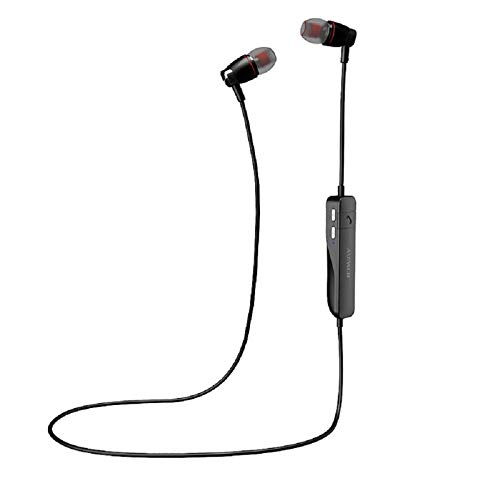
Figure 1: JOWAY H08 Bluetooth Earphone. This image displays the overall design of the JOWAY H08 Bluetooth Earphone, featuring two black earbuds connected by a cable with an inline control unit.
2. Package Contents
Please verify that all items are present in the package:
- JOWAY H08 Bluetooth Earphone
- USB Charging Cable
- User Manual (this document)
3. Product Overview
Familiarize yourself with the components and controls of your JOWAY H08 Bluetooth Earphone.
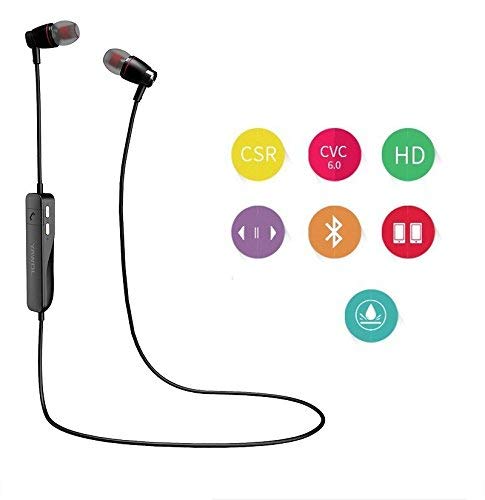
Figure 2: Earphone Components and Controls. This diagram illustrates the various parts of the earphone, including the handset (earbud), multifunction button, volume up/down buttons, indicator light, and the input/power switch.
- Handset (Earbud): Delivers audio.
- Multifunction Button: Controls power, pairing, calls, and music playback.
- Voice (+) Down Button: Increases volume.
- Voice (-) Up Button: Decreases volume.
- Indicator Light: Displays status (power, pairing, charging).
- Input OFF/ON Switch: Power switch for the earphone.
- Ear Clip: Provides secure fit.
- Overhand Hook: Additional support for wearing.

Figure 3: Detail of the Control Unit. A close-up view of the inline control unit, showing the "Bluetooth Model: H-08 Made in China" inscription and the indicator light.
4. Setup
4.1 Charging the Earphone
Before first use, fully charge the earphone. Use the provided USB charging cable and connect it to a standard USB power source (e.g., computer USB port, 1A or 2A mobile charger). The indicator light will show charging status.
- Charging Time: Approximately 1.5 hours.
- Indicator Light: Typically red during charging, turns blue or off when fully charged.
4.2 Bluetooth Pairing
To connect your JOWAY H08 earphone to a Bluetooth-enabled device:
- Ensure the earphone is fully charged.
- Turn on the earphone by sliding the Input OFF/ON Switch to the ON position. The indicator light will flash, usually blue and red, indicating it is in pairing mode.
- On your mobile device (smartphone, tablet, etc.), enable Bluetooth.
- Search for available Bluetooth devices. The earphone will appear as "JOWAY H08" or similar.
- Select "JOWAY H08" from the list to connect. Once connected, the indicator light will typically flash blue slowly or turn off.
- If prompted for a password, enter "0000".
The earphone will automatically attempt to reconnect to the last paired device when powered on.
5. Operating Instructions
5.1 Power On/Off
- Power On: Slide the Input OFF/ON Switch to the ON position.
- Power Off: Slide the Input OFF/ON Switch to the OFF position.
5.2 Call Management
- Answer Call: Press the Multifunction Button once.
- End Call: Press the Multifunction Button once during a call.
- Reject Call: Press and hold the Multifunction Button for approximately 2 seconds.
- Redial Last Number: Double-press the Multifunction Button.
- Voice Assistant: Press and hold the Multifunction Button for approximately 2 seconds (when not on a call) to activate your device's voice assistant (e.g., Siri, Google Assistant).
5.3 Music Playback
- Play/Pause: Press the Multifunction Button once.
- Next Track: Press and hold the Voice (+) Down Button.
- Previous Track: Press and hold the Voice (-) Up Button.

Figure 4: Earphone connected to a device displaying an equalizer. This image shows the JOWAY H08 earphone connected to a smartphone, illustrating its use for music listening with an on-screen equalizer.
5.4 Volume Control
- Increase Volume: Press the Voice (+) Down Button briefly.
- Decrease Volume: Press the Voice (-) Up Button briefly.
6. Multi-Point Connection
The JOWAY H08 earphone supports connecting to two Bluetooth-enabled mobile phones simultaneously. This allows you to receive calls from either phone without manually switching connections.
- Pair the earphone with the first device following the steps in Section 4.2.
- Once connected, disable Bluetooth on the first device.
- Put the earphone back into pairing mode (usually by turning it off and then on again, or holding the multifunction button until the indicator flashes blue and red).
- Pair the earphone with the second device.
- After the second device is connected, re-enable Bluetooth on the first device. The earphone should automatically connect to both devices.
Note: While connected to two devices, only one phone can be actively used for voice calls or music playback at any given time. The earphone will prioritize incoming calls.
7. Maintenance
To ensure the longevity and optimal performance of your JOWAY H08 earphone, follow these maintenance guidelines:
- Keep the earphone dry. Avoid exposure to moisture, rain, or liquids.
- Clean the earbuds and control unit with a soft, dry cloth. Do not use harsh chemicals or abrasive materials.
- Store the earphone in a cool, dry place when not in use.
- Avoid extreme temperatures.
- Do not attempt to disassemble or modify the earphone, as this will void the warranty.
8. Troubleshooting
If you encounter issues with your JOWAY H08 earphone, refer to the following common solutions:
| Problem | Possible Solution |
|---|---|
| Earphone does not power on. | Ensure the earphone is charged. Connect it to a power source using the USB cable. |
| Cannot pair with device. |
|
| No sound or low volume. |
|
| Intermittent connection or audio drops. |
|
9. Specifications
| Feature | Detail |
|---|---|
| Model | H-08 |
| Connectivity Technology | Bluetooth v4.0 |
| Wireless Communication Range | Up to 10 meters (without barriers) |
| Talk Time | Approximately 6 hours |
| Music Playback Time | Approximately 5 hours |
| Charging Time | Approximately 1.5 hours |
| Noise Cancellation | CVC 6.0 Echo and Noise Cancellation |
| Multi-Point Connectivity | Supports connection to two Bluetooth devices simultaneously |
| Control Type | Voice Control, Button Control |
| Material | Plastic |
| Form Factor | In-Ear |
| Color | Black |
| Batteries Included | No (internal rechargeable battery) |
10. Warranty Information
The JOWAY H08 Bluetooth Earphone comes with a 1 Year Warranty from the date of purchase. This warranty covers manufacturing defects. Please retain your proof of purchase for warranty claims. The warranty does not cover damage caused by misuse, accidents, unauthorized modifications, or normal wear and tear.
11. Support
For further assistance or inquiries not covered in this manual, please refer to the official JOWAY support channels or contact your retailer.