
1. Product Overview
The Sanitas SME 85 is a compact, mobile 1-channel ECG device designed for recording your heart rhythm. It offers an innovative connection to smartphones via Bluetooth Smart technology and also supports data transfer via USB. This device is compatible with both iOS and Android mobile devices, allowing for convenient evaluation of your heart data using the dedicated ECG Manager software or app.
Key features include:
- 1-channel ECG for heart rhythm recording.
- Automatic data transfer via Bluetooth Smart and USB.
- Compatibility with iOS and Android devices.
- Easy measurement with immediate feedback.
- Storage capacity for 36 readings.
- Detection of arrhythmias and altered waveforms.
- Compact and portable design.
- 30-second recording duration.
- Battery level indicator and automatic shut-off.
- Date and time display.
- Certified medical device.
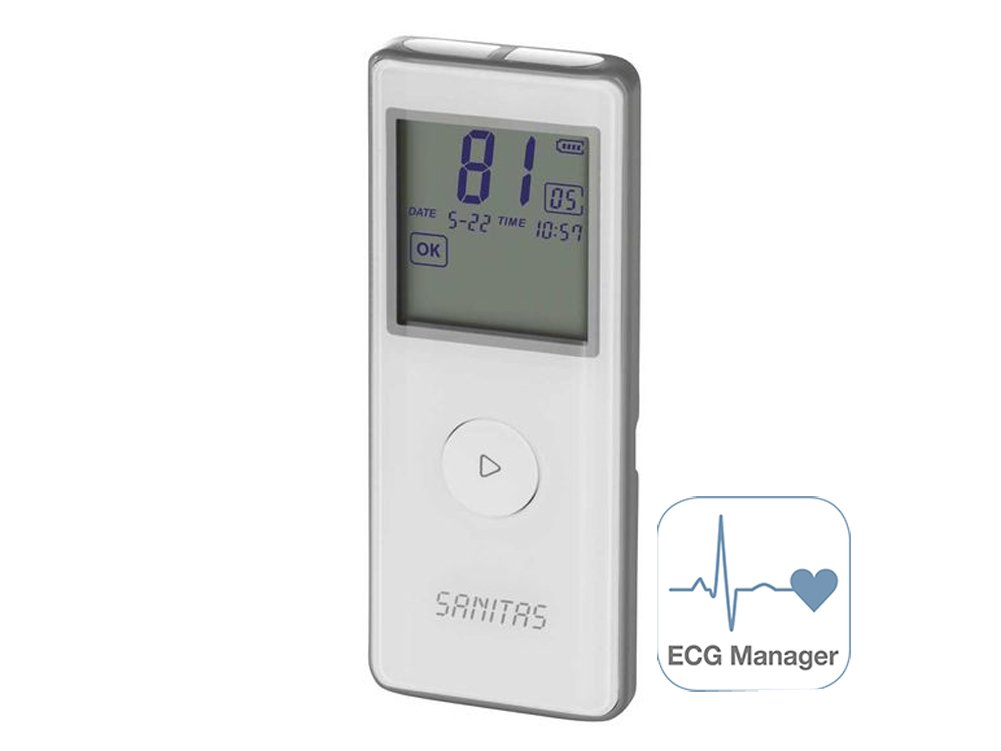
Figure 1.1: Front view of the Sanitas SME 85 Mobile ECG Device, showing the display and control button.
2. Setup and First Use
2.1. Battery Installation
The Sanitas SME 85 device operates on two CR2032 button cell batteries (included). To install or replace the batteries:
- Locate the battery compartment cover on the back of the device.
- Use a small coin or screwdriver to gently open the cover.
- Insert the two CR2032 batteries, ensuring the positive (+) side faces upwards as indicated inside the compartment.
- Close the battery compartment cover securely.
The device display should activate, showing the current date and time, or prompting for initial setup.
2.2. App Installation (ECG Manager)
To utilize the full functionality of the SME 85, including data transfer and detailed analysis, download the "ECG Manager" app on your smartphone or tablet. The app is available for both iOS and Android devices.
- For iOS devices, search for "ECG Manager" in the Apple App Store.
- For Android devices, search for "ECG Manager" in the Google Play Store.
Follow the on-screen instructions to install the app. Ensure your device meets the minimum system requirements for the app.

Figure 2.1: The icon for the ECG Manager application.
2.3. Connecting via Bluetooth Smart
The SME 85 uses Bluetooth Smart technology for wireless data transfer to your mobile device. No traditional pairing process is required through your phone's Bluetooth settings.
- Ensure Bluetooth is enabled on your smartphone or tablet.
- Open the "ECG Manager" app.
- Turn on your Sanitas SME 85 device.
- Within the app, navigate to the "Connect Device" or "Data Transfer" section. The app will automatically detect and connect to your SME 85 device when it is nearby and active.
2.4. Connecting via USB
For data transfer to a computer, use the provided USB cable.
- Install the ECG Manager software on your computer (available for download from the Sanitas website). Note: The software is typically for Windows only.
- Connect one end of the USB cable to the SME 85 device and the other end to an available USB port on your computer.
- Open the ECG Manager software. The software should detect the device and allow you to transfer stored readings.

Figure 2.2: The Sanitas SME 85 device connected to a laptop via its USB cable for data transfer.
3. Operating the Device
3.1. Performing an ECG Measurement
The SME 85 is designed for quick and easy 30-second ECG measurements. For accurate readings, ensure you are relaxed and still during the measurement.
- Turn on the device by pressing the main button.
- Hold the device firmly with both hands, ensuring your thumbs are placed on the metal electrodes on the top surface of the device. Alternatively, you can place the device against your chest, ensuring good skin contact with the electrodes.
- Press the main button again to start the 30-second recording. The display will show a countdown or progress indicator.
- Remain still and avoid talking during the measurement.
- After 30 seconds, the device will provide immediate feedback on the display, indicating the heart rate and any detected irregularities.
- The measurement will be automatically saved in the device's memory.

Figure 3.1: Proper hand placement on the Sanitas SME 85 electrodes for an ECG measurement.

Figure 3.2: An alternative method for measurement, placing the device against the chest.

Figure 3.3: Another example of chest placement for an ECG measurement.
3.2. Interpreting Immediate Feedback
After each 30-second measurement, the device display will show your heart rate and may indicate if any arrhythmias or altered waveforms were detected. For a detailed interpretation and graphical representation of your ECG, transfer the data to the ECG Manager app or software.
3.3. Data Storage and Transfer
The SME 85 can store up to 36 measurements internally. To view historical data or get a comprehensive analysis, transfer the data to your connected smartphone/tablet via Bluetooth Smart or to your computer via USB. The ECG Manager app/software allows you to review, track, and export your ECG recordings (e.g., as PDF files).
4. Care and Maintenance
4.1. Cleaning the Device
To ensure optimal performance and hygiene, clean your SME 85 regularly:
- Wipe the device, especially the electrodes, with a soft, slightly damp cloth after each use.
- Do not use abrasive cleaners, solvents, or immerse the device in water.
- Ensure the device is completely dry before storage or next use.
4.2. Battery Replacement
When the battery level indicator on the display shows low power, replace both CR2032 batteries as described in Section 2.1. Always replace both batteries simultaneously with new ones of the same type.
4.3. Storage
Store the device in a cool, dry place, away from direct sunlight, extreme temperatures, and humidity. Keep it out of reach of children.
5. Troubleshooting
If you encounter issues with your Sanitas SME 85, refer to the table below for common problems and solutions.
| Problem | Possible Cause | Solution |
|---|---|---|
| Device does not turn on. | Batteries are depleted or incorrectly inserted. | Check battery orientation and replace if necessary (see Section 2.1). |
| Cannot connect to the ECG Manager app via Bluetooth. | Bluetooth is off on the mobile device; app not open; device too far; device not active. | Ensure Bluetooth is enabled on your phone, open the app, turn on the SME 85, and keep devices close. Do not attempt to pair via phone's Bluetooth settings. |
| Poor or no ECG signal during measurement. | Insufficient skin contact with electrodes; movement or talking during measurement; dry skin. | Ensure firm and consistent contact with electrodes. Remain still and silent. Lightly moisten skin if it is very dry. |
| Data transfer via USB fails. | USB cable faulty; ECG Manager software not installed or running; incorrect USB port. | Try a different USB port or cable. Ensure the ECG Manager software is correctly installed and open on your computer. |
| Inaccurate readings or unexpected results. | Improper measurement technique; external interference. | Review Section 3.1 on performing a measurement. Ensure you are in a quiet environment away from strong electromagnetic fields. Consult a medical professional for interpretation of results. |
6. Technical Specifications
| Feature | Detail |
|---|---|
| Model Name | SME 85 |
| Item Model Number | 454.59 |
| Brand | SANITAS |
| ECG Channels | 1-channel |
| Recording Duration | 30 seconds |
| Memory Capacity | 36 measurements |
| Connectivity | Bluetooth Smart, USB |
| Compatibility | iOS (via ECG Manager app), Android (via ECG Manager app), Windows (via ECG Manager software) |
| Power Source | 2 x CR2032 button cell batteries |
| Medical Device Classification | Yes |
| First Available Date | May 18, 2017 |
7. Warranty and Customer Support
For detailed information regarding the warranty period and terms for your Sanitas SME 85 device, please refer to the warranty card included with your product or visit the official Sanitas website.
If you require technical assistance, have questions about the device's operation, or need to report a defect, please contact Sanitas customer support. Contact details can typically be found on the manufacturer's website or in the product packaging.
Always ensure you have your product model number (SME 85) and item number (454.59) ready when contacting support.