
1. Introduction and Overview
The Famidoc FDES108 is an FDA-cleared portable dual-channel digital electrotherapy unit designed for pain management and muscle stimulation. It offers 5 modes for Transcutaneous Electrical Nerve Stimulation (TENS) and 5 modes for Electrical Muscle Stimulation (EMS). This device utilizes electrical therapeutic waves to stimulate nerves and muscles, providing relief from acute or chronic pain symptoms and aiding in muscle strengthening and performance.
The unit is versatile for various body areas including the back, knee, shoulder, ankles, wrist, elbow, and waist. It features 20 levels of output intensity and dual-channel versatility, allowing independent intensity adjustment for two or four electrodes to surround the pain area effectively.

Image: Famidoc TENS/EMS Unit with included electrode pads and leads.
2. Package Contents
Please verify that all items listed below are included in your package:
- 1 × Electrical stimulator device
- 2 × Electrodes Leads
- 4 × Adhesive Electrodes
- 3 × 1.5V AAA Battery
- 1 × Instruction Manual

Image: All components included in the Famidoc TENS/EMS Unit retail package.
3. Setup
3.1 Battery Installation
- Locate the battery compartment on the back of the device.
- Open the battery compartment cover.
- Insert three 1.5V AAA batteries, ensuring correct polarity (+/-).
- Close the battery compartment cover securely.
3.2 Connecting Electrode Leads
- Insert the pin connectors of the electrode leads into the output jacks (CH1 and CH2) on the top of the device.
- Connect the other end of the electrode leads to the adhesive electrode pads. Ensure a secure connection.
3.3 Applying Electrode Pads
Before applying, ensure the skin is clean, dry, and free of lotions or oils for optimal adhesion and conductivity.
- Peel the electrode pads from their protective film.
- Place the adhesive side of the pads firmly onto the desired treatment area on your skin.
- For TENS mode, place two pads from the same channel in a wider range around the pain area for better results.
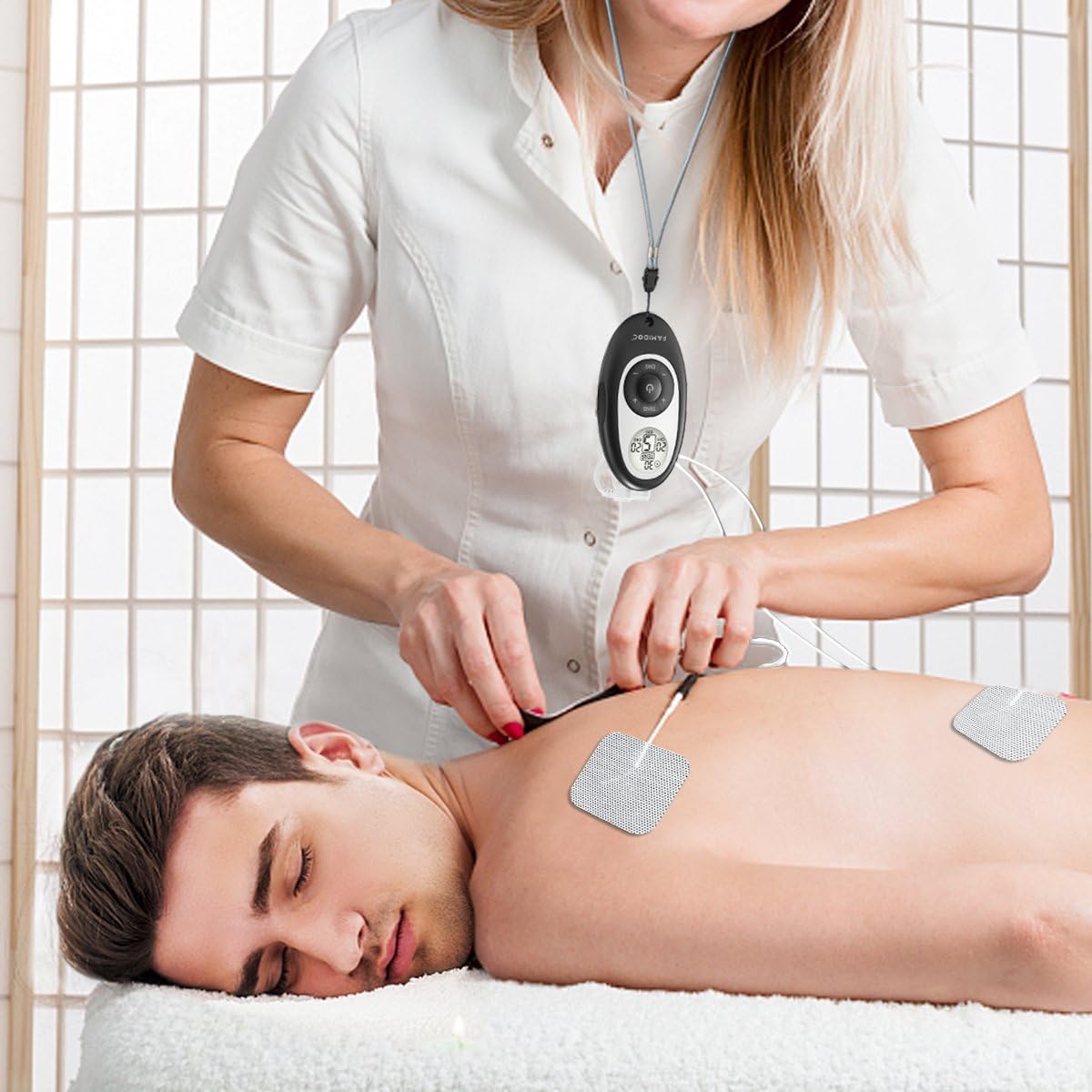
Image: Proper application of electrode pads to the lower back for pain relief.

Image: Proper application of electrode pads to the abdominal area for muscle stimulation.
4. Operating Instructions
4.1 Understanding TENS and EMS Modes
The Famidoc unit combines two distinct electrotherapy functions:
- TENS (Transcutaneous Electrical Nerve Stimulation): Used for temporary relief of pain associated with sore and aching muscles due to strain from exercise or normal household work activities. It stimulates nerves for therapeutic purposes.
- EMS (Electrical Muscle Stimulation): Used to stimulate healthy muscle in order to improve and facilitate muscle performance. It elicits muscle contraction using electrical impulses.

Image: Visual representation of TENS application for nerve pain and EMS for muscle stimulation.
4.2 Device Controls
Familiarize yourself with the device's buttons and display:
- Power Button: Press and hold to turn the device on or off.
- TENS/EMS Button: Toggles between TENS and EMS modes.
- CH1 Up/Down Buttons: Adjust intensity for Channel 1.
- CH2 Up/Down Buttons: Adjust intensity for Channel 2.
- LCD Display: Shows current mode, intensity levels for each channel, and remaining treatment time.
4.3 Electrode Placement for Various Body Areas
The unit can be used on various parts of the body for targeted relief and stimulation. Refer to the diagrams for suggested electrode placement:

Image: Suggested electrode placement for common pain and muscle areas.

Image: Additional electrode placement examples for various body parts.
4.4 Using the Device
- Ensure batteries are installed and electrode leads are connected to both the device and the pads.
- Apply the electrode pads to the desired treatment area on clean, dry skin.
- Press and hold the Power button to turn on the device.
- Select your desired mode (TENS or EMS) by pressing the TENS/EMS button.
- Adjust the intensity for Channel 1 using the CH1 Up/Down buttons. Start with a low intensity and gradually increase until you feel a comfortable sensation.
- If using Channel 2, adjust its intensity independently using the CH2 Up/Down buttons.
- The device typically has a preset treatment time. Monitor the display for remaining time.
- After the session, turn off the device by pressing and holding the Power button. Carefully remove the electrode pads from your skin.
4.5 Instructional Video
For a visual guide on setting up and using your Famidoc TENS/EMS unit, please watch the official product video below:
Video: Official Famidoc TENS and EMS Combo Unit demonstration, showing setup, controls, and application for pain relief and muscle stimulation.
5. Maintenance
5.1 Cleaning the Device and Pads
- Device: Wipe the unit with a soft, damp cloth. Do not use abrasive cleaners or immerse the device in water.
- Electrode Pads: After each use, place the pads back on their protective film to maintain adhesion. If pads lose stickiness, gently wipe the adhesive surface with a damp cloth and let air dry. Do not use soap or harsh chemicals.
5.2 Storage
- Store the device and pads in a cool, dry place, away from direct sunlight and extreme temperatures.
- Keep out of reach of children.
5.3 Replacing Electrode Pads
Electrode pads are consumable items and will need to be replaced periodically as their adhesive properties diminish. Replace pads when they no longer stick firmly to the skin or when the electrical sensation becomes uneven or uncomfortable.
6. Troubleshooting
If you experience issues with your Famidoc TENS/EMS unit, please refer to the following common problems and solutions:
| Problem | Possible Cause | Solution |
|---|---|---|
| Device does not turn on. | Low or dead batteries; Incorrect battery installation. | Replace with new AAA batteries; Check battery polarity. |
| No sensation or weak sensation. | Electrode pads not adhering well; Leads not properly connected; Intensity too low; Pads are worn out. | Ensure pads are firmly applied to clean skin; Check all lead connections; Increase intensity gradually; Replace electrode pads. |
| Sensation is uncomfortable or stinging. | Intensity too high; Pads are not fully adhering; Skin is too dry. | Decrease intensity; Re-apply pads firmly; Lightly moisten skin before application. |
| Only one channel is working. | Lead connection issue for one channel; Worn out pads on one channel. | Check lead connections for the non-working channel; Replace pads on the non-working channel. |
7. Specifications
Key technical specifications for the Famidoc TENS/EMS Unit:
| Feature | Detail |
|---|---|
| Model Number | BD15654 |
| Product Dimensions | 4.33 x 1.18 x 2.36 inches |
| Weight | 5.11 ounces |
| Power Source | 3 AAA batteries (required) |
| Output Intensity | 20 Levels (or 80 mAh) |
| Channels | Dual Channel |
| TENS Modes | 5 Pre-set Programs |
| EMS Modes | 5 Pre-set Programs |
| Manufacturer | FAMIDOC |
| First Available Date | January 6, 2017 |
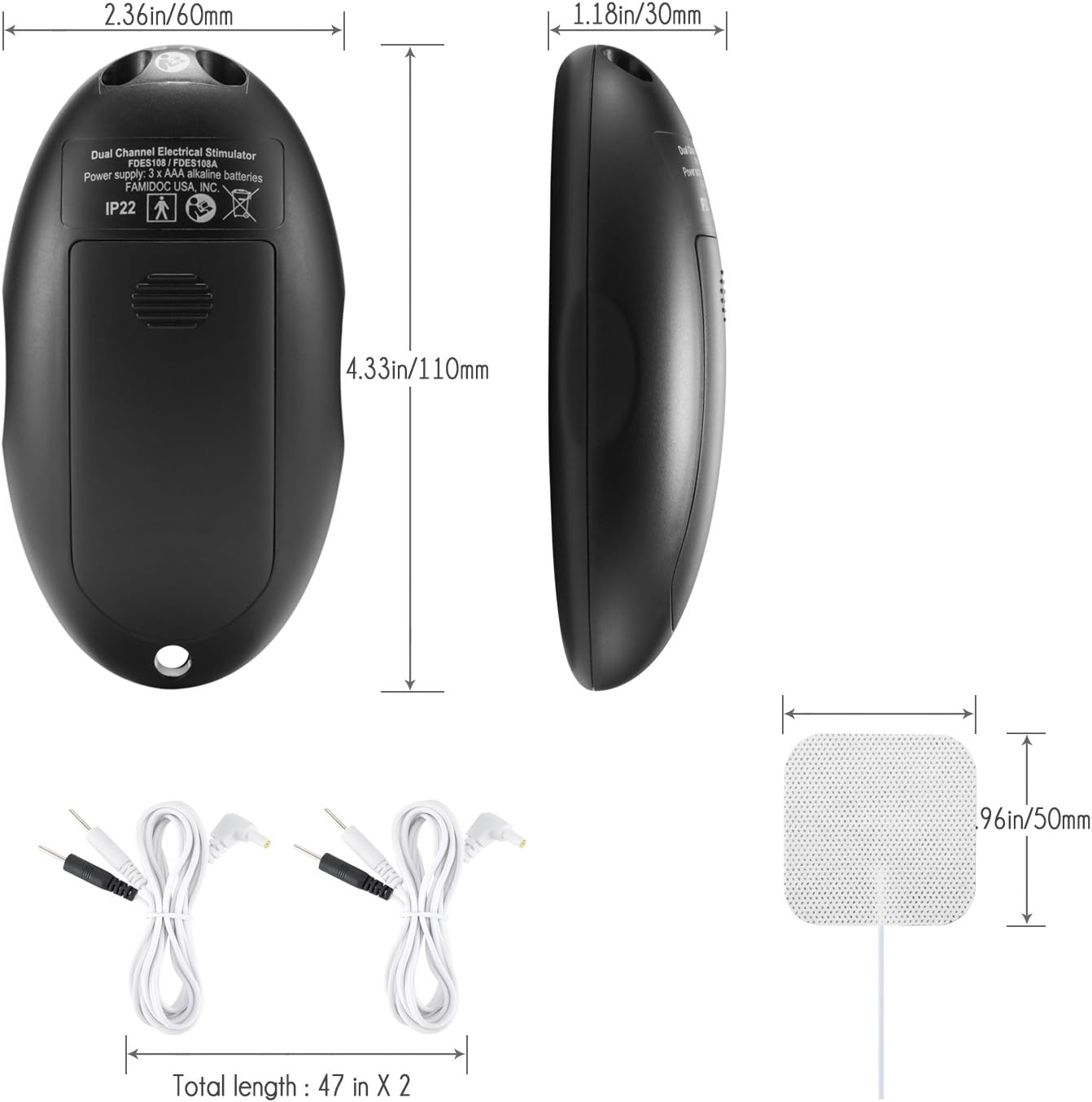
Image: Detailed dimensions of the Famidoc TENS/EMS Unit and its electrode leads.
8. Important Safety Information
WARNING:
- This therapy is not suitable for pregnant women.
- This therapy is not suitable for hypertension patients.
- Do not apply electrodes directly over the heart area.
- Do not apply electrodes over infected skin areas or open wounds.
- Consult a healthcare professional before use if you have any pre-existing medical conditions or concerns.
Legal Disclaimer: Statements regarding dietary supplements have not been evaluated by the FDA and are not intended to diagnose, treat, cure, or prevent any disease or health condition.
9. Warranty and Support
Famidoc is committed to providing high-quality products. For information regarding warranty coverage, product support, or to purchase replacement parts (such as electrode pads or leads), please refer to the contact information provided on the product packaging or visit the official Famidoc website. Keep your purchase receipt for warranty claims.