
Brickhouse Security SNPC
Brickhouse Spark Nano 7 GPS Tracker User Manual
Model: SNPC | Brand: Brickhouse Security
1. Product Overview
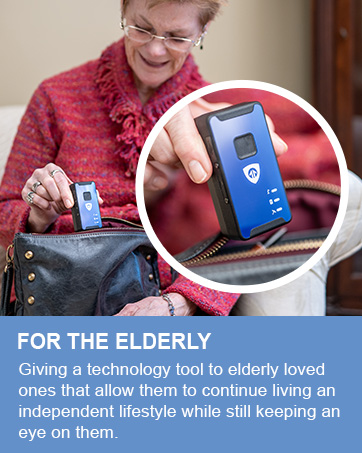
The Brickhouse Spark Nano 7 is a compact and powerful GPS tracking device designed for real-time monitoring of vehicles, assets, and individuals. It offers global 4G LTE cellular coverage, ensuring seamless tracking capabilities wherever you are. Its discreet design and magnetic waterproof case make it versatile for various applications, providing peace of mind through continuous location updates and comprehensive reporting features.


2. What's in the Box
- Spark Nano 7.0 GPS Tracker
- Magnetic Case
- Wall Charger
- User's Guide
- SIM card (included and pre-installed)
3. Setup Guide
- Charge the Device: Before first use, fully charge your Spark Nano 7 using the provided wall charger. Ensure the device is powered off during charging.
- Activate Subscription: A subscription plan is required for operation. Visit the Brickhouse Security website or contact customer support to activate your preferred plan (Basic, Plus, or Premium).
- Download the App: Download the official Brickhouse Security tracking application from the Apple App Store (for iOS devices) or Google Play Store (for Android devices). The tracking platform is also accessible via any web browser.
- Log In: Use your subscription credentials to log into the mobile app or web platform.
- Placement: Place the Spark Nano 7 in the desired location. The magnetic waterproof case allows for discreet and secure attachment to vehicles or other assets.

4. Operating Instructions
The Spark Nano 7 provides real-time GPS tracking and a suite of features accessible through the dedicated mobile application or web platform.
- Real-Time Tracking: View the current location of your device on a map with frequent updates. The update frequency depends on your subscription plan (e.g., 60-second or 5-second updates).
- Historical Reports: Access detailed travel logs, including routes taken, speeds, and stops, for a specified period (e.g., 30, 90, or 180 days depending on plan).
- Geofencing: Set up virtual boundaries (geofences) on the map. Receive instant alerts when the tracker enters or exits these predefined areas.
- Speed Alerts: Configure alerts to be notified if the device exceeds a set speed limit.
- Access Anywhere: Monitor and manage your tracker from any web browser or through the mobile application on your iOS or Android device.


5. Maintenance
- Battery Life: The Spark Nano 7 has a battery life of approximately 8-15 days, depending on usage and tracking frequency settings.
- Charging: Recharge the device using the provided wall charger when the battery indicator shows low power.
- Waterproof Case: The included magnetic case is waterproof, protecting the device from impact and harsh weather conditions. Ensure the case is properly sealed when used in wet environments.
- Cleaning: Wipe the device and case with a soft, dry cloth. Avoid using harsh chemicals or abrasive materials.
6. Troubleshooting
- Device Not Tracking: Ensure the device is charged and powered on. Verify that your subscription is active and in good standing. Check for cellular signal in the device's location.
- Inaccurate Location: GPS accuracy can be affected by environmental factors such as dense urban areas, heavy tree cover, or indoor placement. Move the device to an open area for better signal.
- App Issues: If the mobile app is not functioning correctly, try restarting the app, clearing its cache, or reinstalling it. Ensure your smartphone's operating system is up to date.
- No Alerts: Double-check your alert settings (geofences, speed alerts) within the tracking platform to ensure they are correctly configured and enabled.
7. Specifications
| Feature | Detail |
|---|---|
| Product Dimensions | 5.5 x 5 x 4.1 inches |
| Item Weight | 1.15 pounds |
| Item Model Number | SNPC |
| Batteries | 1 Lithium Polymer batteries required |
| Connectivity Technology | Cellular (4G LTE) |
| Supported Application | Alexa, Web App, iOS, Android |
| Special Feature | GPS Tracking Device with Magnetic Case and Extended Battery |
| First Available Date | February 2, 2017 |

8. Subscription Plans
The Spark Nano 7 requires an active subscription plan to function. Various plans are available to suit different tracking needs, billed annually for the best value. Monthly and quarterly options may also be available.

- Basic Plan: Starting at $17.99/unit/month (billed annually). Includes unlimited cellular data, cloud software, mobile application, 30 days of tracking history, 60-second location updates, 60 SMS alerts, 5 geofences, and North America coverage.
- Plus Plan: Starting at $27.99/unit/month (billed annually). Includes all Basic features plus 90 days of tracking history, 30-second location updates, 200 SMS alerts, 60 geofences, up to 3 user logins, and North America & Europe coverage.
- Premium Plan: Starting at $34.99/unit/month (billed annually). Includes all Plus features plus 180 days of tracking history, 5-second location updates, unlimited SMS alerts, unlimited geofences, unlimited user logins, and worldwide coverage.
No long-term contracts are required, and you can cancel anytime for a hassle-free experience.
9. Warranty and Support
The Brickhouse Spark Nano 7 GPS Tracker comes with a lifetime warranty, ensuring long-term reliability and support for your device.
For further assistance, please refer to the official user guides:
You can also visit the Brickhouse Security Store on Amazon for more information and support resources.
Related documentsSNPC


Ask a question about this manual
Ask about setup, troubleshooting, compatibility, parts, safety, or missing instructions. Manuals+ will review the question and use this page’s manual context to help answer it.