
ENJOY-UNIQUE ENJOY380
User Manual
ENJOY-UNIQUE Retro Phone Handset
Model: ENJOY380
1. Introduction
Thank you for purchasing the ENJOY-UNIQUE Retro Phone Handset. This device combines classic telephone aesthetics with modern Bluetooth technology, allowing you to make and receive calls comfortably using your mobile phone or other Bluetooth-enabled devices. This manual provides detailed instructions on how to set up, operate, and maintain your new handset.
Key features include:
- Bluetooth 3.0 connectivity for stable wireless communication.
- Up to 15 meters (approximately 49 feet) communication distance in accessible areas.
- Long standby time of up to 36 hours.
- Integrated volume control and call answer/hang-up buttons.
- Compatible with any mobile phone or computer that supports Bluetooth.

2. Setup
2.1 Charging the Handset
Before first use, fully charge the handset. The charging time is approximately 4 hours.
- Connect the provided charging cable to the handset's charging port.
- Connect the other end of the cable to a DC 5V, 300mA charger (not included) or a compatible USB port.
- The indicator light will show charging status (refer to the specific light behavior in your product's quick start guide, if available).
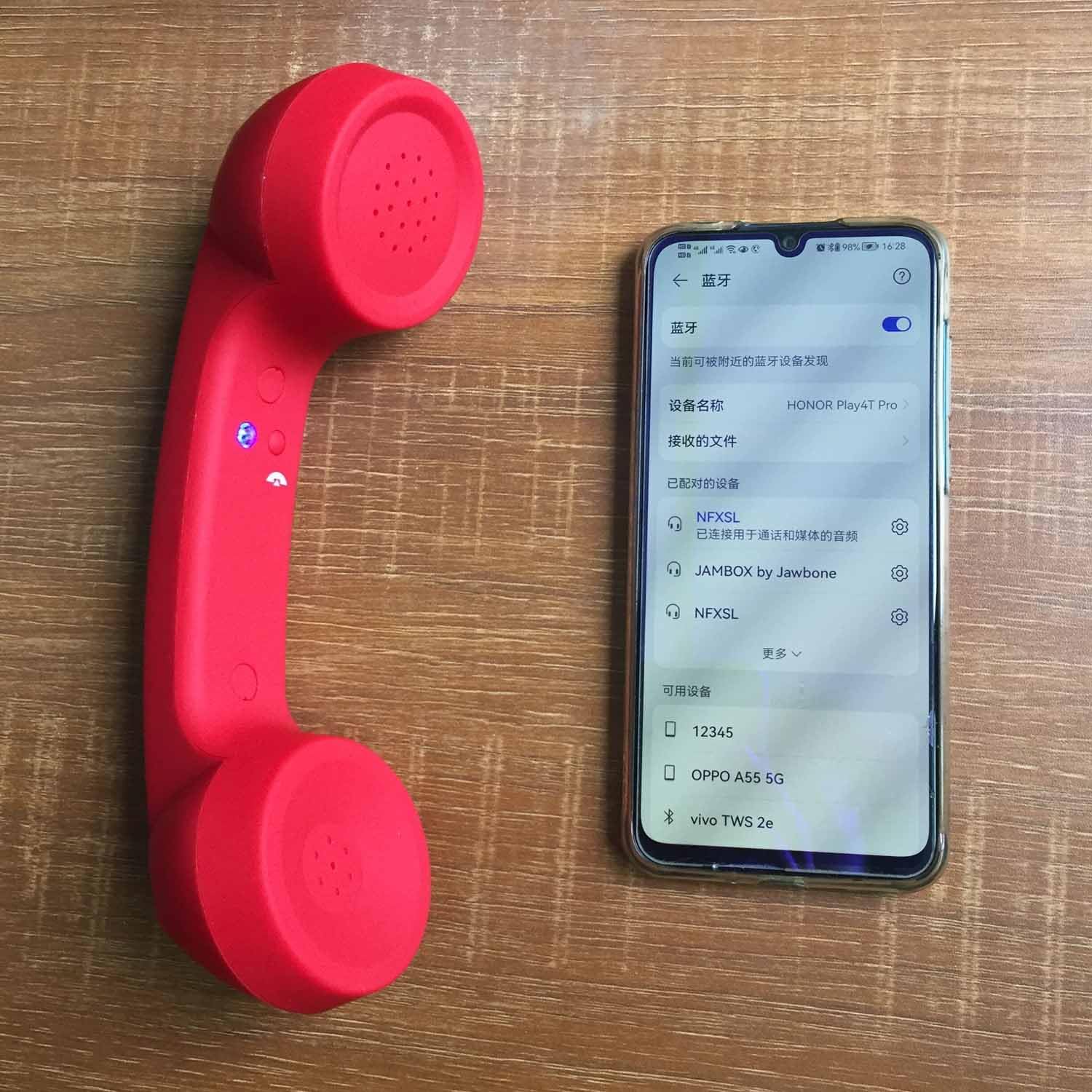
2.2 Bluetooth Pairing
To use the handset, you must pair it with your Bluetooth-enabled device (e.g., smartphone, tablet, computer).
- Ensure the Retro Phone Handset is charged and powered on.
- Activate Bluetooth on your mobile phone or device.
- Search for new Bluetooth devices. The handset should appear as "Retro Handset" or a similar name.
- Select the handset from the list to initiate pairing. If prompted for a passcode, enter "0000" (four zeros).
- Once paired, the handset's indicator light will confirm a successful connection.
The communication distance is typically 10 meters (33 feet), with an accessible range of up to 15 meters (49 feet) in open environments.
3. Operating Instructions
3.1 Making and Receiving Calls
- Receiving a Call: When your paired phone rings, press the Answer button on the handset to answer the call.
- Ending a Call: During a call, press the Answer button again to hang up.
- Making a Call: Dial the number on your paired phone. The audio will automatically route to the handset once the call connects.

3.2 Volume Control
The handset features dedicated volume buttons to adjust the call volume.
- Press the "+" button to increase the volume.
- Press the "-" button to decrease the volume.

4. Maintenance
Proper care will ensure the longevity and optimal performance of your Retro Phone Handset.
- Cleaning: Wipe the handset with a soft, dry cloth. Do not use abrasive cleaners, solvents, or strong chemicals, as these may damage the surface.
- Storage: Store the handset in a cool, dry place away from direct sunlight and extreme temperatures.
- Avoid Moisture: Keep the handset away from water and high humidity. It is not waterproof.
- Handle with Care: Avoid dropping the handset or subjecting it to strong impacts.
5. Troubleshooting
If you encounter issues with your Retro Phone Handset, please refer to the following common solutions:
| Problem | Possible Cause | Solution |
|---|---|---|
| Handset does not power on. | Battery is low or depleted. | Charge the handset for at least 4 hours. |
| Cannot pair with phone. | Bluetooth is off on phone; handset is not in pairing mode; too far from phone. | Ensure Bluetooth is enabled on your phone. Make sure the handset is discoverable. Move closer to the phone (within 10 meters). Try restarting both devices. |
| No sound during calls. | Volume is too low; handset not properly connected; phone audio output not set to Bluetooth. | Increase volume using the handset's volume buttons. Re-pair the handset. Check your phone's audio settings to ensure output is directed to the Bluetooth device. |
| Poor call quality or disconnections. | Interference; too far from phone; low battery. | Move closer to your phone. Avoid areas with strong electromagnetic interference. Ensure the handset is fully charged. |
6. Specifications
Detailed technical specifications for the ENJOY-UNIQUE Retro Phone Handset:
| Connectivity Technology | Wireless |
| Wireless Communication Technology | Bluetooth |
| Bluetooth Version | 3.0 |
| Operating Voltage | DC 4V |
| Battery Capacity | 200mAH |
| Corresponding Time | 12 hours |
| Standby Time | 36 hours |
| Charger Input | DC 5V, 300mA |
| Charging Time | 4 hours |
| Frequency | 2404-2479MHZ |
| Communication Distance | Accessible 15M (normal 10M) |
| Material | ABS Plastic |
| Product Dimensions | 8.27 x 2.36 x 1.97 inches |
| Item Weight | 7 ounces |
| Model Number | ENJOY380 |
| UPC | 700686052132 |

7. Warranty and Support
For any questions, technical support, or warranty inquiries, please contact ENJOY-UNIQUE customer service. Refer to the product packaging or the retailer's website for specific contact information.
You can also visit the ENJOY-UNIQUE brand page on Amazon for more information and product updates.
Ask a question about this manual
Ask about setup, troubleshooting, compatibility, parts, safety, or missing instructions. Manuals+ will review the question and use this page’s manual context to help answer it.