
Introduction
This manual provides detailed instructions for the operation and maintenance of your SKMEI 1220 Multi-functional Sports Watch. This timepiece features both analog and digital displays, a Japanese quartz movement, and is designed for durability with 50M water resistance. Key functions include dual time zones, chronograph, alarm, date display, and an LED backlight.

Image: Front view of the SKMEI 1220 watch, showcasing its square dial with both analog hands and a digital display, along with the brand logo and water resistance rating.
Watch Components

Image: Diagram illustrating the functions of the buttons on the SKMEI 1220 watch. The left side features the "EL LIGHT Button" at the top and the "MODE Button" at the bottom. The right side includes the "Resize pointer Button" at the top and the "RESET Button" at the bottom.
- EL LIGHT Button: Activates the electroluminescent backlight for the digital display.
- MODE Button: Cycles through different display modes (Time, Chronograph, Alarm, Date).
- Resize Pointer Button: Used for adjusting the analog time hands.
- RESET Button: Used for resetting values or confirming settings in various modes.
Setup and Time Setting
Setting Analog Time:
- Locate the "Resize pointer Button" on the upper right side of the watch.
- Press and hold the "Resize pointer Button" until the analog hands begin to move.
- Release the button when the hands are close to the desired time.
- Press the "Resize pointer Button" repeatedly to advance the hands minute by minute until the correct analog time is set.
- The hands will automatically stop after a few seconds of inactivity, or you can press the "MODE Button" to exit setting mode.
Setting Digital Time and Date:
- Press the "MODE Button" repeatedly until the digital time display starts flashing, indicating setting mode.
- Use the "RESET Button" to adjust the flashing digit (hours, minutes, seconds).
- Press the "MODE Button" to move to the next setting item (e.g., minutes, 12/24-hour format, month, date, day of week).
- Repeat steps 2 and 3 until all desired digital time and date settings are configured.
- Press the "MODE Button" one last time to exit the setting mode and save changes.
Operating Instructions
Display Modes:
Press the "MODE Button" to cycle through the following display modes:
- Time Display: Shows current digital time (hours, minutes, seconds) and date.
- Chronograph (Stopwatch):
- In Chronograph mode, press the "RESET Button" to start/stop the stopwatch.
- To reset, press the "MODE Button" while the stopwatch is stopped, then press "RESET Button".
- Alarm Mode:
- In Alarm mode, press the "RESET Button" to toggle the alarm ON/OFF.
- To set the alarm time, press and hold the "MODE Button" until the alarm time flashes. Use the "RESET Button" to adjust hours and minutes. Press "MODE Button" to confirm.
- Date Display: Shows the current month and day.
EL Backlight:
Press the "EL LIGHT Button" (upper left) to illuminate the digital display for approximately 3 seconds, enhancing visibility in low-light conditions.
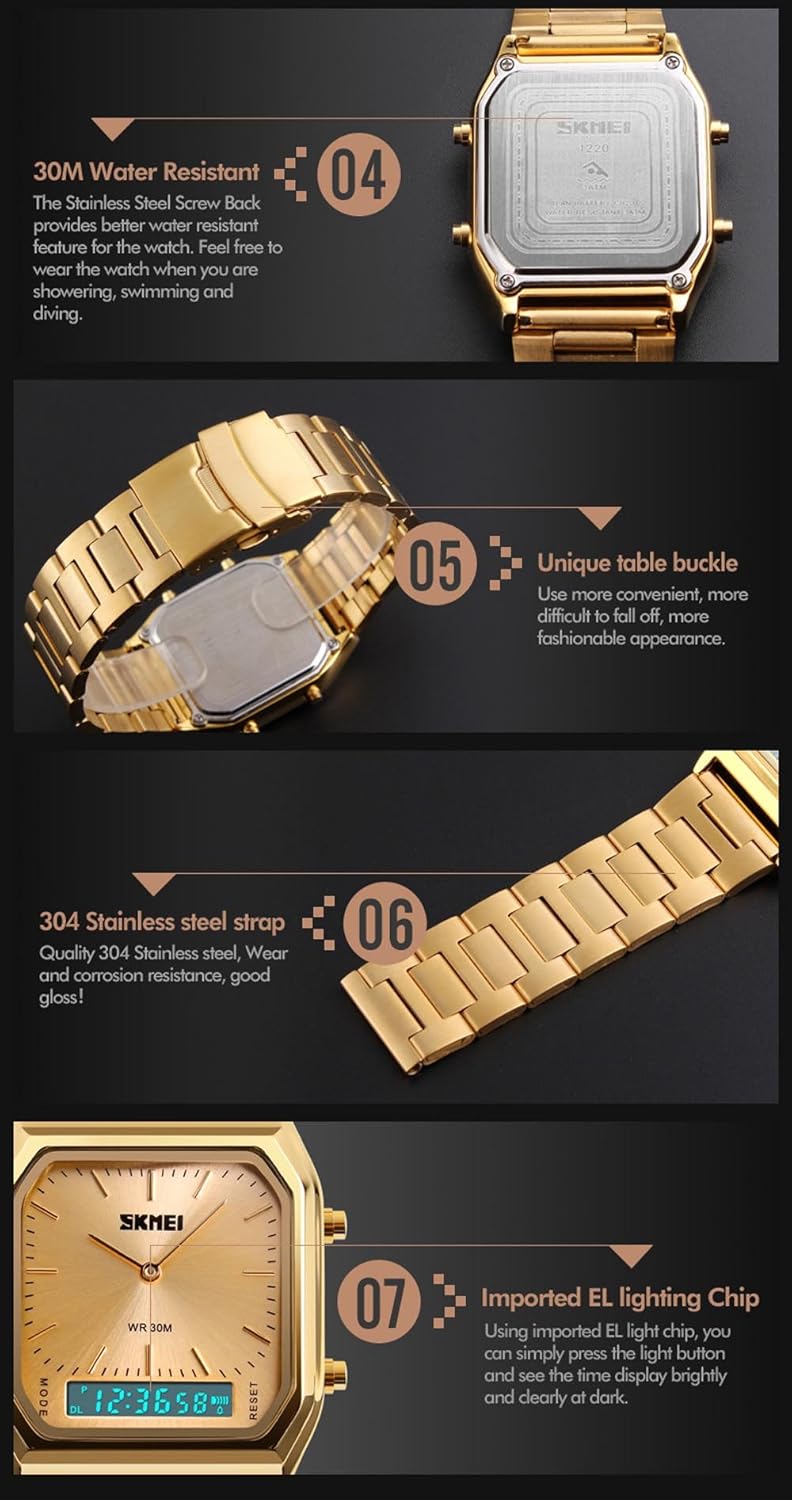
Image: Comparison of the SKMEI 1220 watch in normal display mode versus EL light display mode, demonstrating the activated backlight for improved visibility.
Maintenance
Water Resistance:
The SKMEI 1220 watch is rated for 50 meters (5 ATM) water resistance. This means it is suitable for daily use, splashes, rain, and short periods of recreational swimming. Important: Do not press any buttons while the watch is submerged in water. Pressing buttons underwater can compromise the water resistance seals and lead to water ingress.

Image: Close-up of the SKMEI 1220 watch's case back, showing a "30M Water Resistant" engraving. Note that the product description specifies 50M water resistance. The image also displays the stainless steel strap and unique buckle design.
Cleaning:
To clean your watch, wipe it gently with a soft, damp cloth. Avoid using harsh chemicals, solvents, or abrasive cleaners, as these can damage the watch's finish or internal components. For stainless steel bands, a soft brush can be used to clean between links.
Battery Replacement:
The watch uses an unknown battery type (as per specifications). Battery replacement should ideally be performed by a qualified watch technician to ensure proper sealing and water resistance integrity. Attempting to replace the battery yourself may void any implied warranty and could damage the watch.
Troubleshooting
- Watch Not Functioning:
Check if the battery needs replacement. If the watch is new, ensure any protective plastic tabs have been removed from the crown or buttons.
- Digital Display is Dim or Blank:
This usually indicates a low battery. Replace the battery as per the maintenance section.
- Analog Hands Not Moving or Incorrect:
Ensure the "Resize pointer Button" is not stuck. Re-set the analog time as described in the "Setup" section.
- Water Inside the Watch:
If water appears inside the watch, immediately take it to a professional watch repair service. Do not attempt to dry it yourself, as this can cause further damage.
Specifications
| Brand Name | SKMEI |
| Model Number | 1220 |
| Movement | Japanese Quartz |
| Display Type | LED and Pointer (Analog & Digital) |
| Case Material | Zinc Alloy |
| Band Material | Stainless Steel Strap |
| Buckle Type | Bracelet Clasp |
| Dial Shape | Square |
| Dial Diameter | 33mm |
| Case Thickness | 11mm |
| Band Width | 22mm |
| Water Resistance Depth | 50M (5ATM) |
| Functions | Dual Display, EL Light, Date, Chronograph, Alarm |
| Battery | 1 Unknown battery required |
| Department | Unisex-adult |

Image: Visual representation of key quality features of the SKMEI 1220 watch, including its quality movement, high hardness glass, and zinc alloy plating.
Warranty and Support
Specific warranty information for the SKMEI 1220 watch is not provided in this manual. For warranty claims, technical support, or service inquiries, please refer to the retailer where the product was purchased or visit the official SKMEI website for contact information.