
Proster PST050
Proster Wood Moisture Meter User Manual
Brand: Proster | Model: PST050
1. Product Overview
The Proster Wood Moisture Meter is a digital, pin-type device designed for accurately measuring moisture content in various wood types, firewood, paper, and cardboard. Its ergonomic design and clear LCD display make it easy to use for both professionals and DIY enthusiasts.

Figure 1: Proster Wood Moisture Meter, 9V battery, and protective case.
Key Features:
- Wide Use: Integrated electrode pins (10mm length) suitable for wood, firewood, logs, cardboard, and paper.
- High Accuracy: Measures wood moisture from 0% to 99.9% with 0.1% resolution and ±0.5% accuracy.
- 4 Wood Modes: Select from four pre-calibrated modes for approximately 28 species of wood, ensuring more accurate results.
- Convenient Features: Large HD LCD, Data Hold function, Auto Power Off (after approx. 15 minutes), Low battery display.
- Durable Construction: Impact-proof housing for long-lasting use.
2. Package Contents
Ensure all items are present in the package:
- 1 x Proster Digital Wood Moisture Meter
- 1 x 9V Battery (included)
- 1 x Instruction Manual (this document)
- 1 x Protective Case

Figure 2: Contents typically found in the Proster Wood Moisture Meter package.
3. Setup
3.1 Battery Installation
- Locate the battery compartment cover on the back of the meter.
- Slide the cover open.
- Connect the 9V battery to the battery clip, ensuring correct polarity.
- Place the battery inside the compartment.
- Slide the battery compartment cover back into place until it clicks securely.
Video 1: This video demonstrates the process of installing the 9V battery into the Proster Wood Moisture Meter and powering it on.
3.2 Device Components
Familiarize yourself with the main components of the moisture meter:

Figure 3: Labeled diagram showing the Protection Cap, Measurement Pins, Large LCD Screen, Power Button, MODE Button, and HOLD Button.
- Protection Cap: Covers the measurement pins when not in use to prevent damage and injury.
- Measurement Pins: Two sharp pins used to penetrate the material for moisture measurement.
- Large LCD Screen: Displays moisture readings, wood group selection, and other indicators.
- Power Button: Turns the device ON/OFF.
- MODE Button: Cycles through the four wood species groups (A, B, C, or D).
- HOLD Button: Freezes the current reading on the display.
4. Operating Instructions
Follow these steps to accurately measure moisture content:

Figure 4: Step-by-step guide for operating the moisture meter.
- Step 1: Take off the protection cap of the meter and press the "POWER" button to turn it on.
- Step 2: Press the "MODE" button to select the matching wood group (A, B, C, or D) for the material you are testing. Refer to the "Wood Species Groups" section for details.
- Step 3: Carefully push the measurement pins into the wood or material. The display will show the moisture reading.
- Step 4: To hold the current reading on the display, press the "HOLD" button. Press it again to release.
- Step 5: Press the "POWER" button to close the device. The meter also features an automatic power-off function after approximately 15 minutes of inactivity to save battery power.
4.1 Measurement Examples
The meter is designed for wood, firewood, paper, and cardboard. Here are examples of its application:
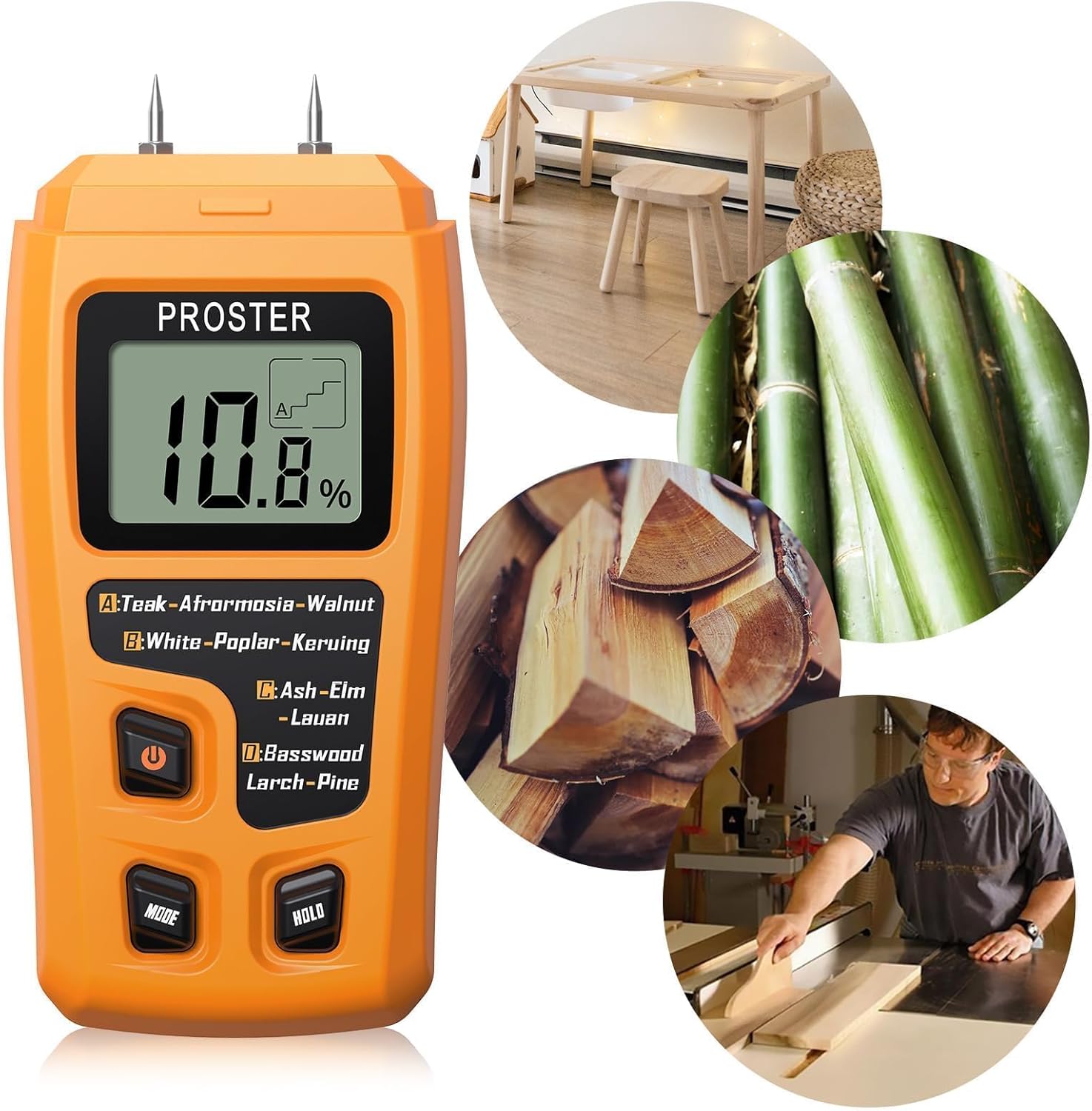
Figure 5: Examples of the meter being used on wood, bamboo, and furniture.

Figure 6: The meter can also be used to measure moisture in paper and cardboard.
Video 2: This video demonstrates the practical application of the Proster Digital Wood Moisture Meter for measuring moisture in various materials like paper, cardboard, and wood.
5. Wood Species Groups
The meter features four wood species groups (A, B, C, D) to ensure accurate readings for different wood densities and characteristics. Select the appropriate group using the "MODE" button before taking a measurement.
| Group | Wood Species |
|---|---|
| A | Teak, Walnut, Afromosia, Rubber tree |
| B | Keruing, White poplar, Beech, Cedar, Tola |
| C | Lauan, Ash, Elm, Fir, Maple, Padauk, Tola |
| D | Basswood, Larch, Pine, Birch |
Table 1: Wood Species Group Table for accurate moisture measurement.
6. Maintenance
- Always replace the protective cap over the measurement pins when the meter is not in use to prevent injury and damage to the pins.
- Clean the meter with a soft, dry cloth. Do not use abrasive cleaners or solvents.
- If the meter will not be used for an extended period, remove the battery to prevent leakage and damage to the device.
- Store the meter in its protective case in a cool, dry place, away from direct sunlight and extreme temperatures.
7. Troubleshooting
| Problem | Possible Cause | Solution |
|---|---|---|
| Meter does not turn on. | Battery is dead or incorrectly installed. | Check battery installation. Replace with a new 9V battery if necessary. |
| Inaccurate readings. | Incorrect wood group selected; pins not fully inserted; pins are dirty or damaged. | Ensure correct wood group is selected. Push pins firmly into the material. Clean pins or contact support if damaged. |
| Display shows "Low Battery". | Battery power is low. | Replace the 9V battery. |
8. Specifications
| Specification | Value |
|---|---|
| Measuring Range (Wood) | 0% to 99.9% |
| Resolution | 0.1% |
| Accuracy | ±0.5% |
| Electrode Length | 10mm (0.4") |
| Auto Power Off | After approx. 15 minutes |
| Power Supply | 1 x 9V Battery (included) |
| Operating Temperature | 0°C to 40°C (32°F to 104°F) |
| Operating Humidity | 10% to 90% RH |
| Dimensions | Approx. 5.71"W x 2.64"H |
| Weight | Approx. 230 Grams (8.1 ounces) |
| Material | ABS |
9. Warranty & Support
The Proster Wood Moisture Meter comes with a 1-year warranty from the date of purchase. For technical support, warranty claims, or any inquiries, please contact Proster customer service through their official website or the retailer where the product was purchased.
Visit the official Proster Store for more information and products: Proster Store on Amazon
Related documentsPST050

Ask a question about this manual
Ask about setup, troubleshooting, compatibility, parts, safety, or missing instructions. Manuals+ will review the question and use this page’s manual context to help answer it.