
Introduction
This manual provides essential instructions for the safe and effective use of your POWSEED Universal AC Adapter. This versatile power supply is designed to power a wide range of household electronic devices requiring various DC voltages and connector types. Please read this manual thoroughly before use and retain it for future reference.
Safety Information
To prevent damage to your devices and ensure safe operation, observe the following:
- Select Correct Voltage: Small household appliances typically lack circuit protection. Selecting an incorrect voltage may damage your device. Always verify the required voltage for your device before connecting the adapter.
- DC Plug Power Polarity: This adapter features a Central Positive (+) and Outer Negative (-) polarity. Polarity cannot be reversed. Some devices require Central Negative (-) and Outer Positive (+), which is the opposite. Carefully check your device's polarity requirements before purchasing and connecting. Connecting with incorrect polarity will damage your device.
- Ensure the adapter's wattage (45W max) and amperage (3A max) meet or exceed your device's requirements.
- Do not expose the adapter to water, moisture, or extreme temperatures.
- Do not disassemble or attempt to repair the adapter.
Package Contents
Verify that all items are present in your package:
- 1 x POWSEED 45W Universal Multi-Voltage AC/DC Adapter
- 1 Set x DC Plugs (various sizes)
- 1 x LED Terminal Plug
- 1 x Voltage Adjustment Key (Iron Sheet)
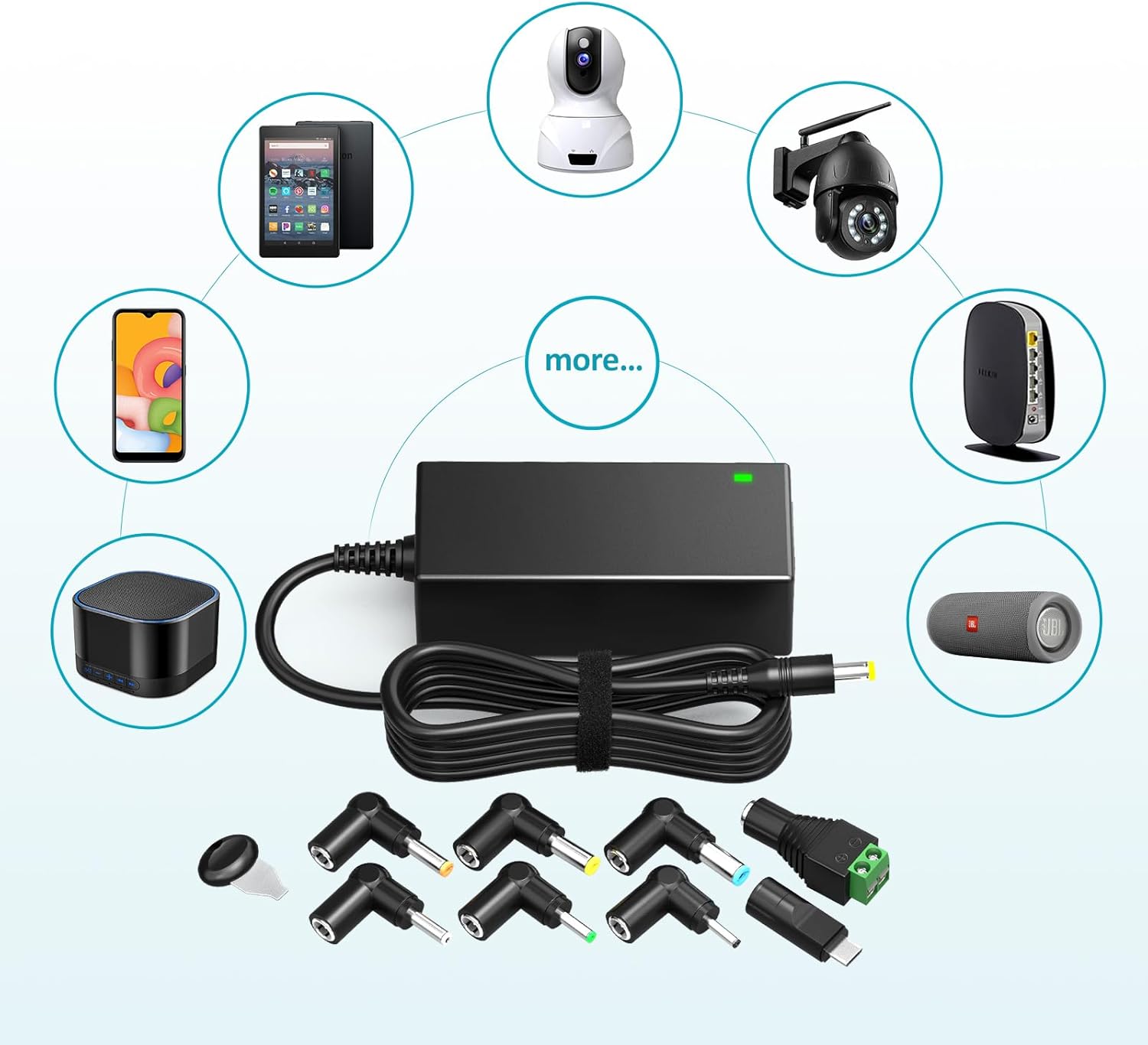
Image: The POWSEED Universal AC Adapter shown with its main unit, power cord, and a selection of interchangeable DC connector tips. Several compatible electronic devices such as routers, cameras, and speakers are depicted around the adapter, illustrating its versatility.
Setup Instructions
- Determine Required Voltage: Identify the correct voltage (V) and current (A) requirements for your electronic device. This information is usually found on the device itself, its original power adapter, or in its user manual.
- Select Correct Voltage on Adapter: Locate the voltage selector dial on the adapter. Use the provided voltage adjustment key (iron sheet) to rotate the dial to the desired voltage (5V, 6V, 7.5V, 9V, 12V, 13.5V, or 15V).

Image: A close-up view of the adapter's side, highlighting the orange rotary switch for voltage selection. A small black key is shown being used to turn the dial, which displays voltage options from 5V to 15V.
- Choose Appropriate DC Plug: Select the DC connector tip that matches your device's power input port. The package includes various sizes (e.g., 6.5x4.4mm, 5.5x2.5mm, 3.5x1.35mm, LED Terminal).

Image: A visual guide displaying ten different DC connector tips with their corresponding dimensions (e.g., 6.5*4.4mm, 5.5*2.1mm). An illustration of a DC plug also indicates the central positive (+) and outer negative (-) polarity.
- Connect DC Plug to Adapter Cable: Firmly attach the selected DC plug to the end of the adapter's output cable. Ensure a secure connection.
Video: A short demonstration showing how to connect a DC plug to the adapter cable, ensuring a secure fit. This video illustrates the physical connection process for the interchangeable tips.
- Verify Polarity: Confirm that your device requires Central Positive (+) polarity. This adapter is designed for Central Positive (+) devices only. Connecting to a Central Negative (-) device will cause damage.

Image: A clear diagram showing a DC plug with an arrow pointing to the center indicating 'Central +' and another arrow pointing to the outer barrel indicating 'Outside -'. Below, two icons confirm 'Central Positive (+)' as correct and 'Central Negative (-)' as incorrect for this adapter.
- Connect to Device: Plug the DC connector into your electronic device's power input port.
- Connect to Power Outlet: Plug the AC power cord into a standard 110-240V wall outlet. The adapter features an extra-long 5ft AC cord and 4ft DC cord for convenience.

Image: The POWSEED AC adapter with its attached AC and DC cords. Labels indicate the AC cord length as 5ft and the DC cord length as 4ft, emphasizing the extended reach.
Operating Instructions
Once properly connected, the adapter will supply power to your device. The adapter is equipped with multi-safety protection features including over-current, over-temp, over-voltage, and over-circuit protection to ensure safe operation.

Image: A graphic illustrating the 'Multi Safety Protection' features of the adapter, including icons for Over-Current Protection, Over-Temp Protection, Over-Voltage Protection, and Over-Circuit Protection.
Maintenance
Keep the adapter clean and free from dust. Disconnect from power when not in use for extended periods. Store in a cool, dry place.
Troubleshooting
- Device not powering on:
- Check if the correct voltage is selected on the adapter.
- Ensure the DC plug is securely connected to both the adapter cable and the device.
- Verify the power outlet is functional.
- Confirm the device's polarity matches the adapter's Central Positive (+).
- Check if the device's current (A) requirement exceeds the adapter's 3A maximum.
- Adapter is hot: It is normal for the adapter to become warm during operation. If it becomes excessively hot, disconnect it immediately and check for proper ventilation or an overloaded connection.
- Intermittent power: Ensure all connections are firm and there are no loose cables.
Specifications
| Model Number | PA-30450H-ZMX |
| Input Voltage | 110-240V |
| Output Voltage | 5V, 6V, 7.5V, 9V, 12V, 13.5V, 15V |
| Output Current | 1A, 2A, 3A (Max) |
| Max Wattage | 45W |
| DC Plug Dimensions | 6.5x4.4mm, 6.3x3.0mm, 5.5x2.5mm, 5.5x2.1mm, 5.0x3.0mm, 4.8x1.7mm, 4.0x1.7mm, 3.5x1.35mm, 3.0x1.1mm, 2.5x0.7mm, LED Terminal |
| Power Polarity | Central Positive (+), Outer Negative (-) |
| Cord Length | AC 5ft, DC 4ft |
| Item Weight | 9.6 ounces |
| Product Dimensions | 0.22 x 0.1 x 0.01 inches |
Warranty and Support
This product is typically covered by a 30-day money-back offer. For further support or inquiries, please refer to the retailer where the product was purchased.