1. Introduction
The Quicklynks BM2 Bluetooth 4.0 12V Battery Monitor is a compact device designed to provide real-time monitoring of your vehicle's 12V lead-acid battery status via a mobile application. It offers essential functions such as battery monitoring, trip tracking, charging system tests, and cranking system tests, helping you maintain optimal battery health and prevent unexpected issues.
2. Key Features
- Wireless Battery Monitoring: Monitor your 12V lead-acid battery wirelessly via a Bluetooth 4.0 connection to your smartphone.
- Multi-Battery Management: Monitor multiple batteries using a single application.
- Real-time Data: Receive real-time battery status notifications, including voltage, State of Charge (SOC), and temperature.
- Alerts: Get alerts on your mobile phone for abnormal battery data.
- Diagnostic Tests: Perform charging system tests and cranking system tests.
- Data Logging: Data is saved on the device for up to 31 days if not synced, with unlimited storage on your smartphone. Review and save historical data.
- Safety Protections: Features short-circuit and reverse connection protection.
- Trip Recording: Records travel time.
- Wide Compatibility: Compatible with all 12V vehicle lead-acid batteries (Flooded, GEL, AGM).
3. Compatibility
The Quicklynks BM2 is compatible with all 12V lead-acid batteries, including those found in cars, motorcycles, solar power systems, and yachts. It supports Flooded, GEL, and AGM battery types. The mobile application is available for both iOS (version 7.1 and above) and Android (version 4.3 and above) smartphones.
Supported languages for the application include Arabic, Czech, German, English, Spanish, French, Italian, Norwegian, Polish, Romanian, Russian, Slovak, and Chinese.
4. Setup and Installation
Follow these steps to correctly install your Quicklynks BM2 Battery Monitor:
- Prepare the Battery: Ensure your vehicle's engine is off and the battery terminals are clean and free of corrosion.
- Connect the Positive Terminal: Loosen the nut on the positive (+) battery terminal. Connect the red U-shaped terminal of the BM2 monitor to the positive (+) battery post. Tighten the nut securely.
- Connect the Negative Terminal: Loosen the nut on the negative (-) battery terminal. Connect the black U-shaped terminal of the BM2 monitor to the negative (-) battery post. Tighten the nut securely.
- Verify Connection: Once connected, the device should power on, and a red light will typically indicate a successful connection.

For a visual guide on installation and app usage, please refer to the video below. Note that this video demonstrates a similar Quicklynks model (BM6), but the installation and app operation principles are largely the same.
Video 4.1: Installation and App Usage for a similar Quicklynks Battery Monitor (BM6). This video demonstrates how to connect the monitor to a 12V battery and navigate the features of the companion mobile application, including real-time monitoring and diagnostic tests.
5. App Installation and Operation
5.1 App Download
To download the "Battery Monitor BM2" application, scan the QR code located on the device or its packaging, or visit the official app download page: http://bmapp.quicklynks.com. Alternatively, search for "Battery Monitor BM2" in the Apple App Store (for iOS) or Google Play Store (for Android).

5.2 Initial Setup and Connection
- Launch the App: Open the "Battery Monitor BM2" app on your smartphone.
- Enable Bluetooth: Ensure Bluetooth is enabled on your smartphone. The app will prompt you to enable it if it's not already active.
- Pair Device: The app should automatically detect the BM2 monitor. Select the device from the list to pair. No pairing code is typically required.
- Grant Permissions: The app may request permissions for notifications or location services. Grant these permissions for full functionality, especially for features like location-based trip recording or background monitoring.
5.3 App Functions
The app provides several functions to monitor and test your battery:
- Battery Monitoring: Displays real-time battery voltage, State of Charge (SOC), and temperature. Historical data can be viewed in graph format.
- Cranking Test: Tests the vehicle's cranking system to assess battery performance during engine start-up.
- Charging Test: Evaluates the charging system, including idle charging voltage, high-speed charging voltage, and diode ripple voltage.
- Trip Monitor: Records and displays data for each trip, including duration and battery performance during the journey.


6. Specifications
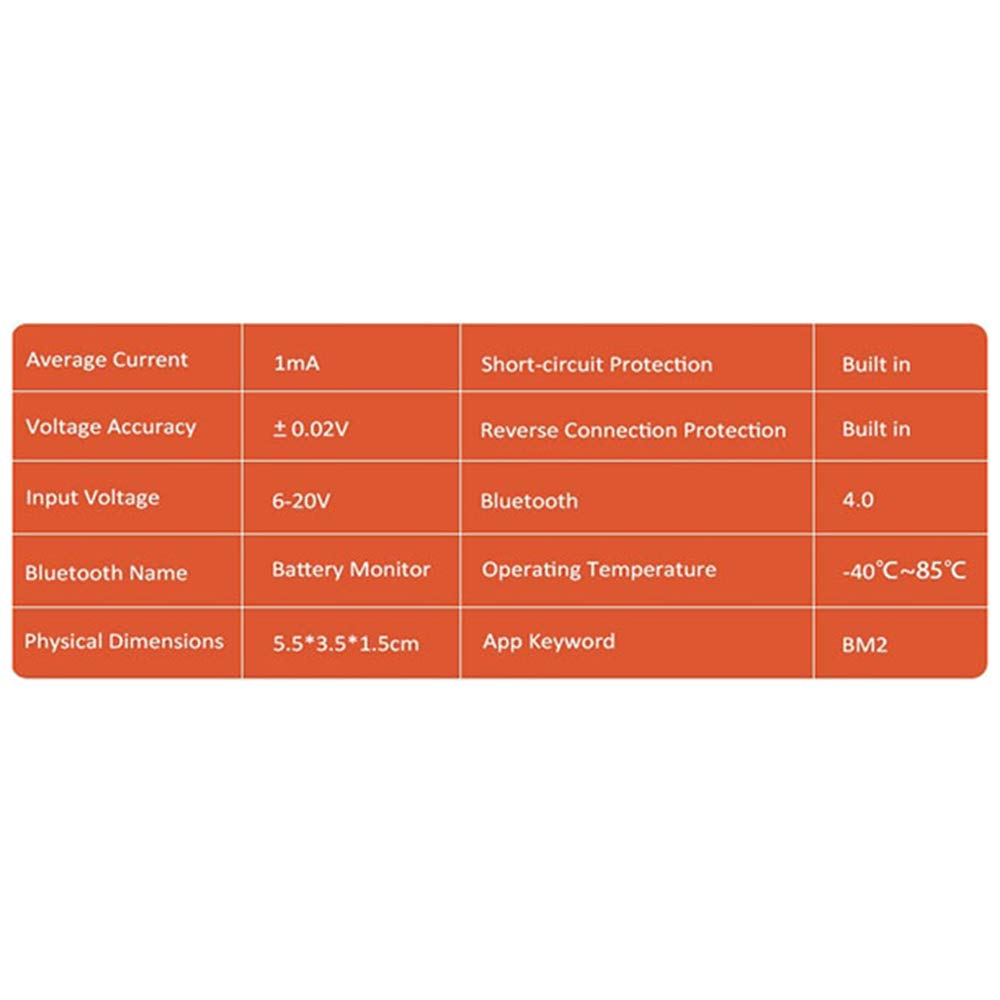
| Feature | Specification |
|---|---|
| Model | BM2 |
| Input Voltage | 6V-20V |
| Average Current | 1.5mA |
| Voltage Accuracy | ±0.03V (9-16V) |
| Bluetooth Version | 4.0 |
| Bluetooth Range | 10 meters |
| Operating System Support | iOS 7.1 and above, Android 4.3 and above |
| Data Storage (Device) | 31 days (if not synced) |
| Operating Temperature | -40°C to 85°C (-40°F to 185°F) |
| Storage Temperature | -20°C to 70°C (-4°F to 158°F) |
| Dimensions (L*W*H) | 5.5 x 3.5 x 1.6 cm (2.17 x 1.38 x 0.63 inches) |
| Weight | 100g (3.53 oz) |
| Certifications | CE, FCC, ROHS, PAHS, REACH |
| Protection Features | Short-circuit protection, Reverse connection protection |
7. Troubleshooting
- Device Not Powering On:
- Check that the red and black terminals are securely connected to the correct positive (+) and negative (-) battery posts.
- Ensure the battery voltage is within the operating range (6V-20V).
- App Not Connecting to Device:
- Verify Bluetooth is enabled on your smartphone.
- Ensure the BM2 device is powered on and within Bluetooth range (approx. 10 meters).
- Close and restart the app.
- If issues persist, try unpairing and re-pairing the device in your phone's Bluetooth settings.
- Inaccurate Readings:
- Ensure battery terminals and BM2 connections are clean and tight. Loose or corroded connections can affect readings.
- Confirm the battery type selected in the app matches your actual battery (e.g., AGM, Flooded, GEL).
- No Notifications:
- Check your smartphone's app settings to ensure notifications are enabled for "Battery Monitor BM2".
- Verify that location permissions are granted, as some background monitoring features may rely on this.
8. Maintenance
The Quicklynks BM2 Battery Monitor requires minimal maintenance. To ensure optimal performance and longevity:
- Keep Connections Clean: Periodically inspect the battery terminals and the monitor's connections for any signs of corrosion or looseness. Clean as necessary.
- Secure Mounting: Ensure the device is securely mounted in a location where it is not exposed to excessive heat, moisture, or physical damage.
- Software Updates: Regularly check for updates to the "Battery Monitor BM2" app to benefit from new features and performance improvements.
9. Package Contents
The Quicklynks BM2 Bluetooth 4.0 12V Battery Monitor package includes:
- Quicklynks BM2 Battery Monitor x 1
- User Manual x 1
10. Warranty and Support
For warranty information and technical support, please refer to the documentation included with your product or visit the official Quicklynks website. Keep your purchase receipt for warranty claims.