
1. Introduction
This manual provides essential information for the safe and effective use of the HY High Voltage 80W Flyback Transformer. This component is specifically designed for integration with CO2 laser power supplies, facilitating the high voltage output required for laser engraving and cutting applications. Please read this manual thoroughly before installation and operation to ensure proper functionality and safety.
2. Safety Information
Working with high voltage components requires extreme caution. Failure to follow safety guidelines can result in serious injury or death. Always adhere to the following:
- Disconnect Power: Always ensure the main power supply to the laser system is disconnected and locked out before performing any installation, maintenance, or troubleshooting.
- Qualified Personnel: Installation and servicing should only be performed by qualified and experienced personnel familiar with high voltage electrical systems.
- Insulation: Ensure all connections are properly insulated to prevent accidental contact with high voltage.
- Grounding: Verify that the laser system and all associated components are correctly grounded.
- Avoid Contact: Never touch high voltage terminals or wires when the system is powered on or recently powered off, as residual charge may be present.
- Ventilation: Ensure adequate ventilation around the power supply and transformer to prevent overheating.
3. Product Components and Features
The HY 80W Flyback Transformer consists of two primary modules connected by a high-voltage cable, designed to convert lower voltage input into the high voltage necessary for CO2 laser tube operation.
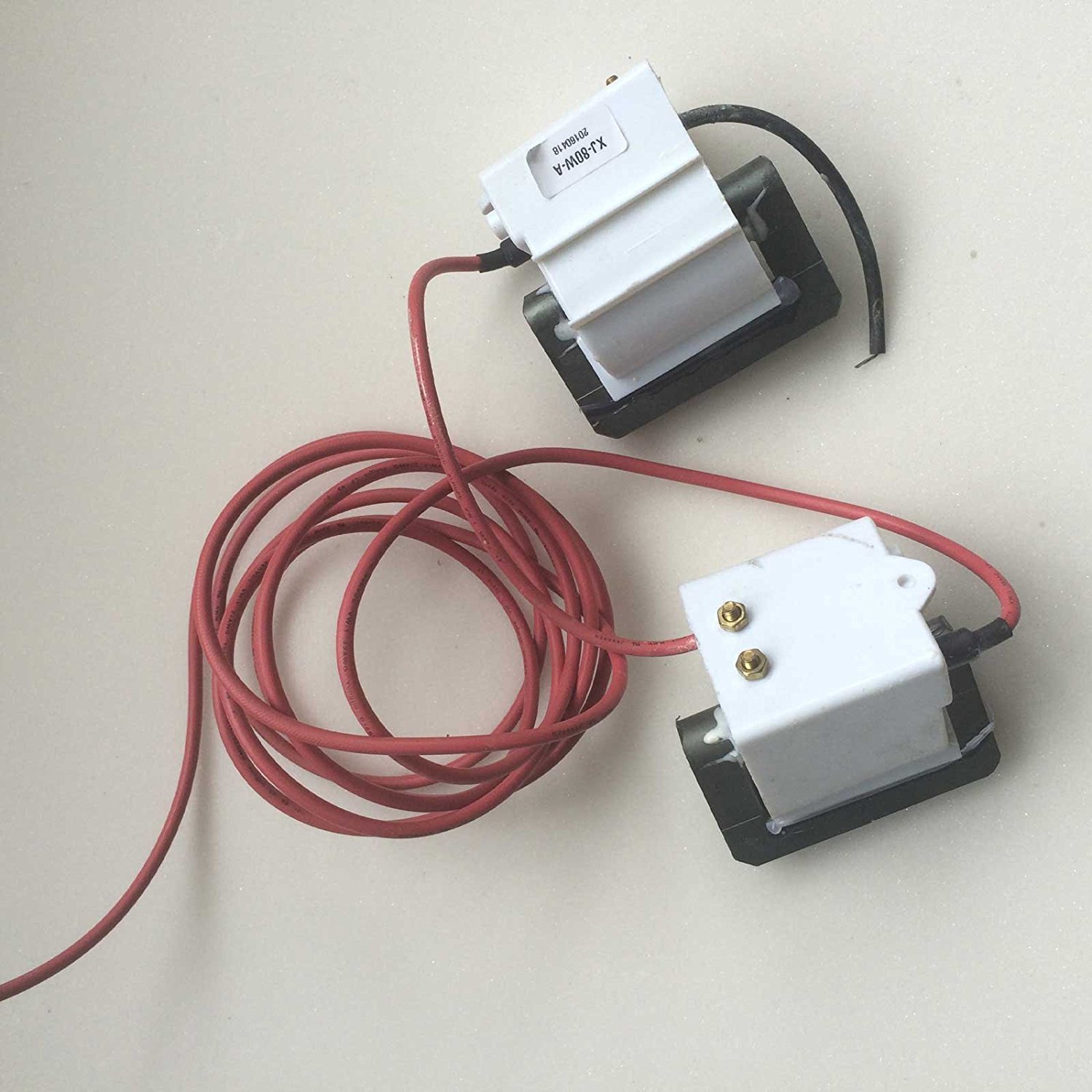
Image: The HY 80W Flyback Transformer, showing its two main components connected by a red high-voltage cable. One component is labeled 'XJ-80W-A', indicating its model or specification. This transformer is crucial for providing the high voltage required by CO2 laser tubes.
- High Voltage Output: Provides the necessary high voltage for CO2 laser tube ignition and sustained operation.
- Compact Design: Engineered for integration into existing laser power supply units.
- Durable Construction: Built to withstand the demands of laser system environments.
4. Setup and Installation
Proper installation is critical for the performance and safety of the flyback transformer. Refer to your CO2 laser power supply's manual for specific wiring diagrams and ensure compatibility.
- Power Disconnection: Ensure all power to the laser system is completely off and verified with a voltmeter.
- Mounting: Securely mount the flyback transformer within the laser power supply enclosure, ensuring adequate clearance for ventilation and connections.
- Input Connection: Connect the input terminals of the flyback transformer to the designated output terminals of your CO2 laser power supply. Pay close attention to polarity if specified.
- High Voltage Output Connection: Connect the high voltage output cable from the transformer to the anode (+) terminal of the CO2 laser tube. Ensure this connection is robust and well-insulated.
- Grounding: Verify that the laser tube's cathode (-) terminal is properly connected to the power supply's ground, and the power supply itself is grounded to the system chassis.
- Insulation Check: Double-check all high voltage connections for proper insulation and ensure no bare wires are exposed.
- System Reassembly: Close and secure all covers of the laser power supply and laser system before restoring power.
5. Operating Instructions
The flyback transformer operates in conjunction with your CO2 laser power supply. Its function is largely automatic once correctly installed and integrated into the laser system's electrical circuit.
- Power On Sequence: Follow the recommended power-on sequence for your specific CO2 laser system. Typically, this involves powering on the main system, then the laser power supply.
- Laser Firing: When the laser power supply receives a firing signal (e.g., from a controller board), the flyback transformer will generate the high voltage pulse required to ignite the laser tube and maintain the discharge.
- Monitoring: Observe the laser tube's operation. A stable, consistent beam indicates proper function. Fluctuations or failure to fire may indicate an issue with the transformer or other components.
- Power Off Sequence: Always power off the laser power supply first, then the main system, allowing sufficient time for any residual high voltage to dissipate.
6. Maintenance
The HY Flyback Transformer is designed for reliability and requires minimal routine maintenance. However, periodic inspection is recommended to ensure optimal performance and safety.
- Visual Inspection: Regularly inspect the transformer and its connections for any signs of damage, such as cracks, discoloration, or loose wiring.
- Cleanliness: Ensure the transformer and surrounding area are free from dust and debris, which can impede heat dissipation. Use a soft, dry cloth or compressed air for cleaning. Always disconnect power before cleaning.
- Connection Integrity: Periodically check that all electrical connections are secure and free from corrosion.
- Environmental Conditions: Ensure the operating environment remains within specified temperature and humidity ranges to prevent premature component degradation.
7. Troubleshooting
If you experience issues with your laser system's high voltage output, consider the following troubleshooting steps. Always ensure power is disconnected before inspecting components.
| Problem | Possible Cause | Solution |
|---|---|---|
| No laser output / Laser not firing |
|
|
| Unstable laser output |
|
|
| Sparking or arcing |
|
|
If problems persist after attempting these steps, it is recommended to consult with a qualified technician or contact the product manufacturer/seller for further assistance.
8. Specifications
| Attribute | Value |
|---|---|
| Brand | HY |
| Model Number (ASIN) | B01MT2UP77 |
| UPC | 642337971860 |
| Manufacturer | HY |
| Minimum Frequency | 50 Hz |
| Package Dimensions | 13.39 x 9.45 x 0.79 inches |
| Package Weight | 2.12 Pounds |
| Country of Origin | China |
9. Warranty and Support
For specific warranty terms and conditions, please refer to the documentation provided at the time of purchase or contact the seller directly. HY provides quality components, and any support inquiries should be directed to your point of purchase or the official HY customer service channels if available.
For technical support or further assistance, please contact your product vendor or the manufacturer.