
SKMEI SKMEI 1189
SKMEI 1189 Multi-Functional Sports Watch User Manual
Japanese-Quartz LED and Pointer Display, 50M Waterproof
Introduction
This manual provides comprehensive instructions for the operation, maintenance, and troubleshooting of your SKMEI 1189 Multi-Functional Sports Watch. Please read this manual carefully to ensure proper use and to maximize the lifespan of your watch.

Front view of the SKMEI 1189 Multi-Functional Sports Watch, featuring a black case with gold accents and a digital display.
Key Features
- Japanese-Quartz Movement for precise timekeeping.
- LED and Pointer Dual Display.
- 50M Water Resistance, suitable for swimming and showering.
- Multi-Functional capabilities: 3 Time Zones, Chronograph, Alarm, Date, EL Backlight.
- Durable PC material shell with PU shock resistance.
- Highly transparent resin glass.
- Stainless Steel Buckle and Germany imported PU Resin Strap.

An overview of the SKMEI 1189 watch, highlighting its key features and the functions of its various buttons.
Setup and Initial Configuration
Button Functions
Familiarize yourself with the watch's buttons:
- SET Button (Top Left): Used to enter setting modes and confirm selections.
- ADJ. Button (Top Right): Used to adjust values during setting.
- MODE Button (Bottom Left): Used to cycle through different modes (Time, Alarm, Chronograph).
- LIGHT Button (Bottom Right): Activates the EL backlight.
Setting Time and Date
- In normal time display mode, press and hold the SET button until the seconds start flashing. This indicates you are in setting mode.
- Press the MODE button to cycle through the settings: Seconds → Hour → Minute → Year → Month → Day.
- Use the ADJ. button to increase the flashing value. Hold the ADJ. button for faster adjustment.
- Once all settings are correct, press the SET button again to exit the setting mode.
Operating Instructions
Using the Chronograph (Stopwatch)
- From normal time display, press the MODE button repeatedly until "CH" (Chronograph) appears on the display.
- Press the ADJ. button to start the stopwatch.
- Press the ADJ. button again to pause the stopwatch.
- To reset the stopwatch, while paused, press the SET button.
- Press the MODE button to return to normal time display.
Setting and Using the Alarm
- From normal time display, press the MODE button repeatedly until "AL" (Alarm) appears on the display.
- Press and hold the SET button until the alarm hour starts flashing.
- Use the ADJ. button to set the desired alarm hour.
- Press the MODE button to switch to setting the alarm minute. Use the ADJ. button to set the desired alarm minute.
- Press the SET button to confirm and exit alarm setting mode.
- To turn the alarm ON/OFF, in alarm mode, press the ADJ. button. An alarm icon will appear/disappear to indicate status.
- When the alarm sounds, press any button to stop it.
Using the EL Backlight
Press the LIGHT button (bottom right) to illuminate the display for easy viewing in low-light conditions. The light will stay on for a few seconds.

The SKMEI 1189 watch display illuminated by its EL backlight, showing clear visibility in dark environments.
Care and Maintenance
Water Resistance (50M)
Your SKMEI 1189 watch is designed with 50 meters (5ATM) water resistance. This means it is suitable for:
- Washing hands.
- Rain and showering.
- Swimming.
Important Note:
- DO NOT press any buttons while the watch is submerged in water.
- Avoid exposing the watch to hot water or steam, as this can compromise the water seals.
- After exposure to saltwater, rinse the watch with fresh water and dry it thoroughly.

Visual guide illustrating the 50M water resistance of the watch, suitable for daily activities like hand washing, showering, and swimming.
General Care
- Clean the watch regularly with a soft, dry cloth. For stubborn dirt, use a slightly damp cloth and mild soap, then dry thoroughly.
- Avoid exposing the watch to extreme temperatures (hot or cold) or direct sunlight for prolonged periods.
- Keep the watch away from strong magnetic fields, as they can affect timekeeping accuracy.
- Avoid contact with chemicals, solvents, or detergents, which can damage the watch case, strap, or seals.
Troubleshooting
| Problem | Possible Cause | Solution |
|---|---|---|
| Watch not displaying time/blank screen. | Battery depleted. | Replace the battery. Contact a qualified watch technician if unsure. |
| Time is inaccurate. | Incorrect time setting; exposure to strong magnetic fields. | Reset the time according to "Setting Time and Date" section. Keep watch away from magnets. |
| Buttons are unresponsive or stuck. | Dirt/debris lodged in buttons; internal mechanism issue. | Clean around buttons carefully. Do not force buttons. If issue persists, seek professional service. |
| Condensation inside the watch. | Water resistance compromised (e.g., buttons pressed underwater, exposure to hot water/steam, seal degradation). | Stop using the watch immediately. Take it to a professional watch repair service to prevent further damage. |
Product Specifications
| Feature | Detail |
|---|---|
| Model Number | SKMEI 1189 |
| Movement | Japanese-Quartz Digital Movement |
| Display Type | LED Digital and Pointer (Analog) |
| Water Resistance | 50M (5ATM) - Suitable for swimming, showering, hand washing. Do not press buttons underwater. |
| Case Material | PC (Polycarbonate) with PU shock resistance |
| Glass Material | Highly transparent resin glass |
| Strap Material | Germany imported PU Resin |
| Buckle Material | Stainless Steel |
| Functions | 3 Time Zones, Chronograph, Alarm, Date, EL Backlight |
| Case Dimensions (approx.) | 52mm (Length) x 50mm (Width) x 17mm (Height) |
| Strap Perimeter (approx.) | Min: 170mm, Max: 225mm |
| Manufacturer | sdssg |
| ASIN | B01MSN09A8 |
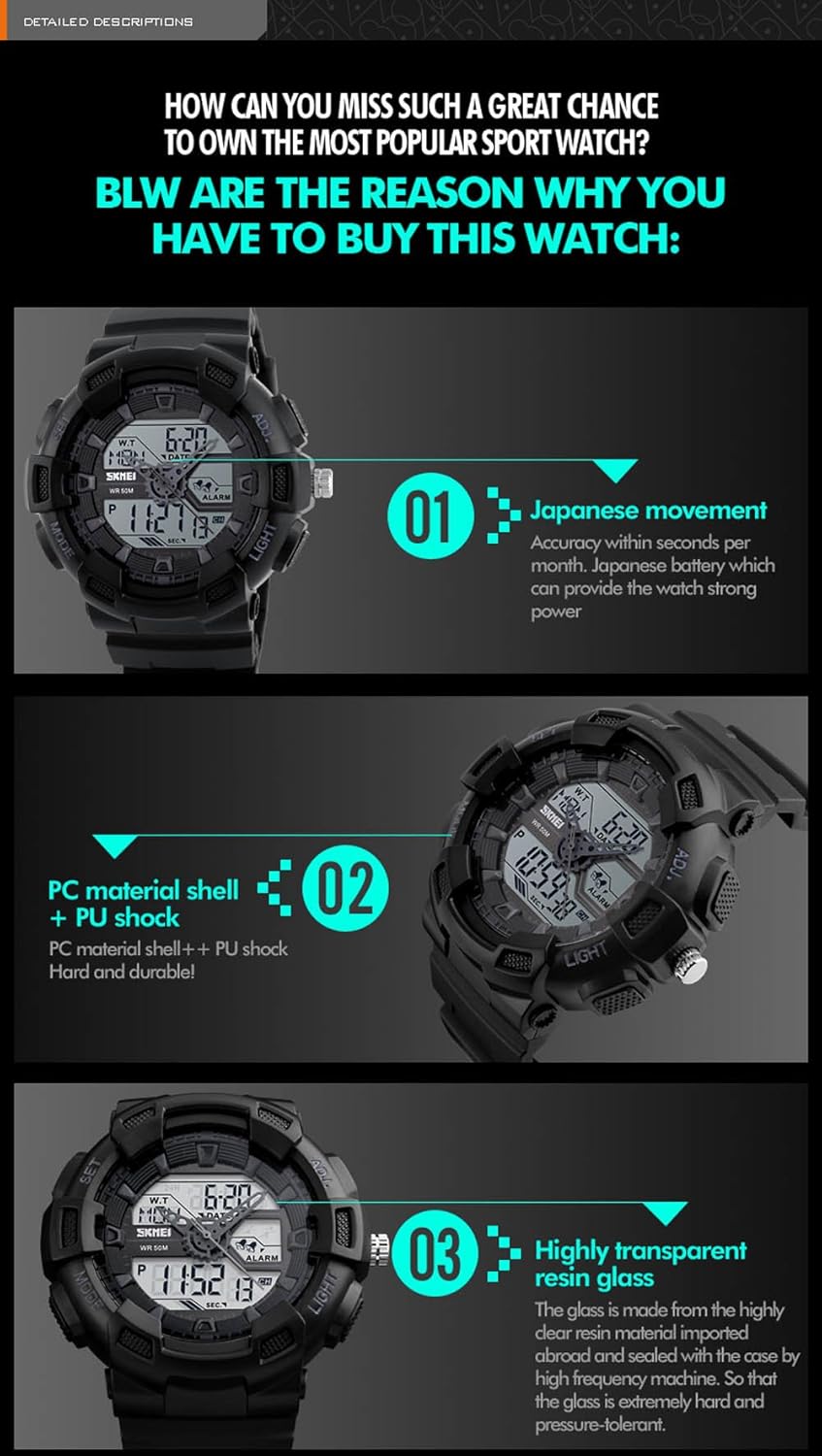
Detailed breakdown of the watch's internal components and materials, including the Japanese movement, PC material shell, and highly transparent resin glass.

Further details on the watch's construction, including 50M water resistance, stainless steel buckle, PU resin strap, and imported EL lighting chip.
Warranty and Support
For warranty information and customer support, please refer to the documentation provided at the time of purchase or contact the manufacturer directly. The manufacturer of this product is sdssg.
Please note that damage caused by improper use, unauthorized repairs, or failure to follow the instructions in this manual may void your warranty.
Ask a question about this manual
Ask about setup, troubleshooting, compatibility, parts, safety, or missing instructions. Manuals+ will review the question and use this page’s manual context to help answer it.