
Konica C35
Konica C35 35MM Film Camera User Manual
Model: C35
Introduction
This manual provides detailed instructions for the proper use and care of your Konica C35 35MM Film Camera. Please read this manual thoroughly before operating the camera to ensure optimal performance and longevity.
The Konica C35 is a compact 35mm rangefinder camera known for its Konica Hexanon 38mm F2.8 lens and automatic exposure capabilities, making it an excellent choice for everyday photography.
Camera Components
Familiarize yourself with the main parts of your Konica C35 camera.

Figure 1: Front view of the Konica C35 camera, showing the Konica Hexanon 38mm F2.8 lens, viewfinder, and "automatic" badge.

Figure 2: Close-up of the Konica Hexanon 38mm F2.8 lens, showing aperture blades and lens coatings.

Figure 3: Side view of the Konica C35 camera, highlighting the focus ring with distance markings in meters and feet.

Figure 4: Top view of the Konica C35 camera, showing the hot shoe for external flash, film advance lever, and shutter button.
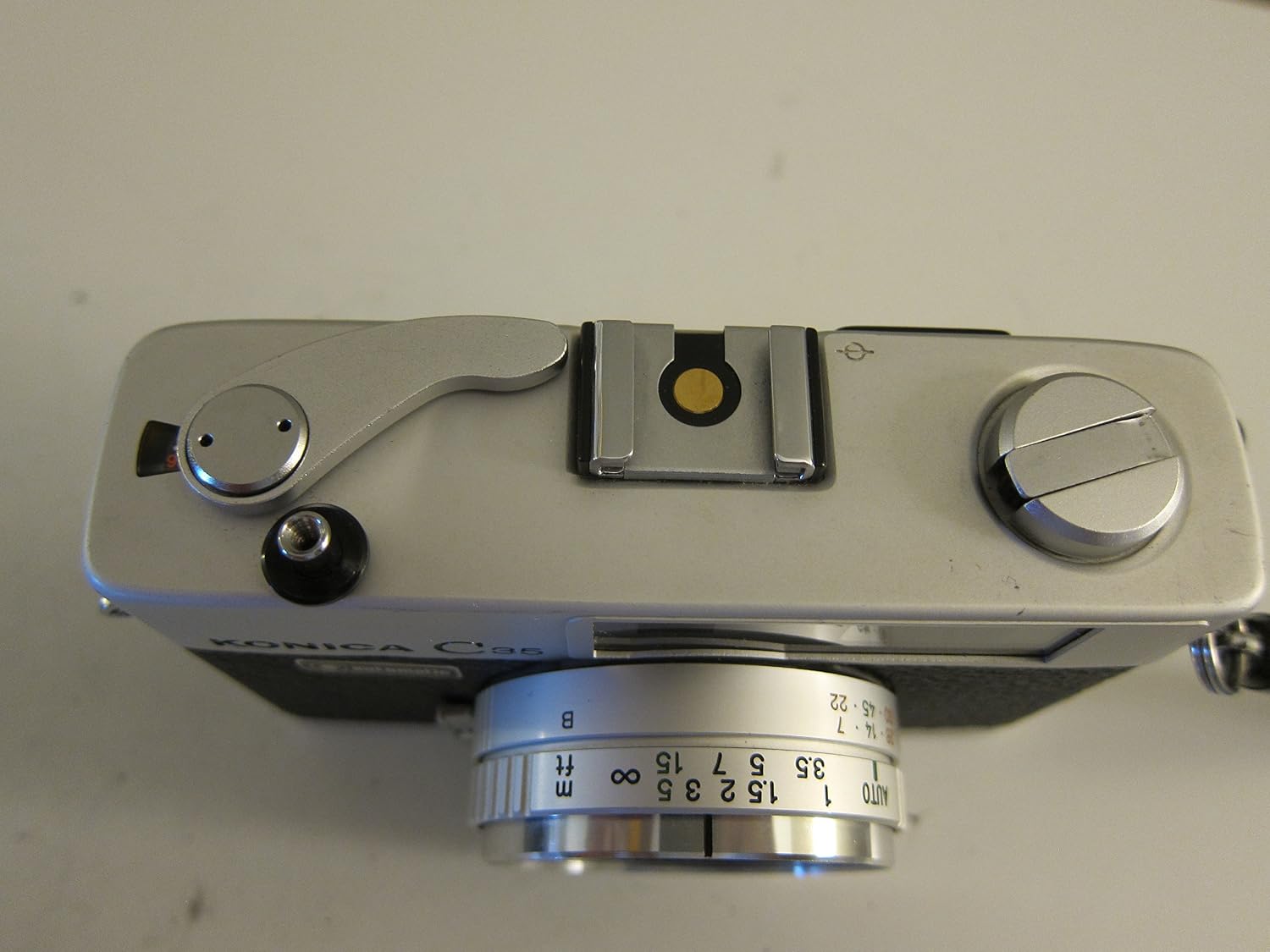
Figure 5: Bottom view of the Konica C35 camera, indicating the battery compartment and tripod socket. Note the "IMPORTANT" sticker regarding battery type.

Figure 6: Open film compartment of the Konica C35 camera, showing the film take-up spool and film pressure plate.
Setup
1. Battery Installation
The Konica C35 requires a PX-675 mercury battery for its light meter. Due to environmental concerns, these batteries are no longer manufactured. Modern alternatives include:
- Zinc-air batteries (e.g., hearing aid batteries): These provide the correct voltage (1.35V) but have a shorter lifespan once activated.
- Alkaline batteries (e.g., LR44 with adapter): These are 1.5V, which can lead to inaccurate meter readings (overexposure). An adapter or recalibration may be necessary.
- Silver oxide batteries (e.g., SR44 with adapter): These are 1.55V, also requiring compensation for accurate metering.
To install the battery:
- Locate the battery compartment on the bottom of the camera (refer to Figure 5).
- Use a coin to unscrew the battery compartment cover.
- Insert the new battery with the positive (+) side facing up.
- Replace the cover and tighten it securely.
2. Loading Film
The Konica C35 uses standard 35mm film cartridges.
- Open the camera back by pulling up the film rewind knob (located on the top left of the camera).
- Insert the film cartridge into the film chamber on the left side, ensuring the film leader points towards the take-up spool on the right.
- Pull the film leader across to the take-up spool and insert the tip into one of the slots.
- Advance the film slightly using the film advance lever (on the top right) to ensure the film sprockets engage with the perforations.
- Close the camera back firmly until it clicks shut.
- Advance the film two more times, pressing the shutter button after each advance, until the frame counter shows "1". This ensures the exposed film leader is wound onto the take-up spool.
3. Setting Film Speed (ISO/ASA)
The Konica C35 has a custom ASA/ISO setting ring around the lens. This setting informs the camera's light meter about the film's sensitivity.
- Locate the ASA/DIN ring on the front of the lens barrel (refer to Figure 1).
- Rotate the ring to align the arrow with the ISO/ASA speed of your loaded film (e.g., 100, 200, 400).
Note: Incorrect ASA/ISO setting will result in incorrect exposures.
Operating the Camera
1. Focusing
The Konica C35 is a rangefinder camera. To focus:
- Look through the viewfinder. You will see a bright rectangle in the center with a double image.
- Rotate the focusing ring on the lens until the two images within the central rectangle merge into a single, clear image.
- The distance scale on the lens (in meters and feet) will indicate the approximate focus distance.
2. Exposure (Automatic)
The Konica C35 features an automatic exposure system. The camera will automatically set the correct shutter speed and aperture based on the light conditions and the set ISO/ASA.
- The light meter is located on the front of the camera, next to the lens. Ensure it is not obstructed.
- When you half-press the shutter button, the needle in the viewfinder will indicate if the exposure is within the acceptable range.
- If the needle points to the red zone, the light is either too dim or too bright for a proper exposure. Consider using flash in low light or moving to a different lighting condition.
3. Taking a Picture
- Frame your subject through the viewfinder.
- Focus the lens as described above.
- Gently press the shutter button all the way down to take the picture.
- Advance the film using the film advance lever for the next shot. The frame counter will increment.
4. Using Flash
The Konica C35 has a hot shoe on top for attaching an external flash unit. When using flash, the camera's automatic exposure system will adjust accordingly.
- Mount a compatible flash unit onto the hot shoe.
- Refer to your flash unit's manual for specific settings and guide numbers.
- The camera will typically set a fixed shutter speed (e.g., 1/30s) when flash is detected.
5. Rewinding Film
Once you have taken all exposures on your roll of film:
- Press the film rewind release button located on the bottom of the camera (near the tripod socket).
- Fold out the crank on the film rewind knob (top left of the camera) and turn it clockwise until you feel the tension release, indicating the film is fully rewound into its cartridge.
- Open the camera back and remove the film cartridge.
Maintenance and Care
- Cleaning the Lens: Use a soft, lint-free cloth or a lens brush to gently remove dust. For smudges, use a specialized lens cleaning solution applied to the cloth, not directly to the lens.
- Cleaning the Camera Body: Wipe the camera body with a soft, dry cloth. Avoid using harsh chemicals or abrasive materials.
- Storage: Store the camera in a cool, dry place away from direct sunlight, extreme temperatures, and high humidity. If storing for extended periods, remove the battery to prevent leakage.
- Light Seals: Over time, the foam light seals around the film door may degrade. If you notice light leaks on your negatives, these seals may need to be replaced by a qualified technician.
Troubleshooting
| Problem | Possible Cause | Solution |
|---|---|---|
| Camera not firing / Shutter not releasing | Film not advanced; Battery dead/low; Shutter mechanism jammed. | Advance film completely; Replace battery; Seek professional repair if jammed. |
| Light meter not working | Dead battery; Corroded battery contacts; Faulty meter. | Check/replace battery; Clean contacts; Professional repair. |
| Pictures are too dark (underexposed) or too bright (overexposed) | Incorrect ASA/ISO setting; Metering error; Light leaks. | Verify ASA/ISO setting; Ensure meter is not obstructed; Check light seals. |
| Film advance lever stuck | Film not properly loaded; Mechanism jam. | Check film loading; Do not force; Seek repair. |
Specifications
- Model Name: Konica C35
- Lens: Konica Hexanon 38mm F2.8
- Film Format Type: 35mm
- Exposure Control Type: Automatic
- Shutter Type: Leaf Shutter
- Special Feature: Compact
- Item Weight: 14.4 ounces
- Package Dimensions: 10.91 x 4.53 x 3.19 inches
- ASIN: B01MSK03KE
- UPC: 646791817504
- Manufacturer: Konica
- Date First Available: November 11, 2016
Support
For further assistance or inquiries regarding your Konica C35 camera, please refer to the original manufacturer's support channels or consult with a reputable camera repair specialist.
While this product is no longer actively manufactured, online communities and vintage camera enthusiasts can be valuable resources for tips, tricks, and troubleshooting.
Related documentsC35


Ask a question about this manual
Ask about setup, troubleshooting, compatibility, parts, safety, or missing instructions. Manuals+ will review the question and use this page’s manual context to help answer it.