
LEGO 10428
LEGO DUPLO Big Interactive Community Train
Model: 10428
Instruction Manual
Product Overview
The LEGO DUPLO Big Interactive Community Train is an engaging and educational toy set designed for children aged 3 years and up. This interactive train set encourages creative play and problem-solving through its Push&Go train, interactive bricks, and various play areas including a train station, loading zone, and washing area.
The set includes a buildable train, 16 track pieces, 4 LEGO DUPLO figures, and a cat figure, along with imaginative accessories to inspire storytelling. The train features lights and sounds, activated by special interactive bricks placed on the tracks.

Image: The complete LEGO DUPLO Big Interactive Community Train set, showcasing the interactive train, various track configurations, the train station, loading area, and washing station, along with the included figures.
Safety Information
Warning! Choking hazard. Small parts. Not suitable for children under 3 years.
Always supervise children during play. Ensure all parts are securely connected to prevent detachment during play.
Setup and Assembly
The LEGO DUPLO Big Interactive Community Train set requires assembly. Follow the included visual instructions for step-by-step guidance. The set consists of 103 pieces designed for easy handling by small hands.
Battery Installation
- The interactive train requires 4 AAA (LR03) batteries.
- Batteries are not included in the set and must be purchased separately.
- To install batteries, locate the battery compartment on the underside of the train.
- Use a small screwdriver to open the compartment.
- Insert the batteries, ensuring correct polarity (+/-).
- Close the compartment securely.
Track Layout
Connect the 16 track pieces to form a complete circuit. Experiment with different layouts to create unique play scenarios. Ensure all track pieces are firmly connected to allow the train to run smoothly.

Image: An overhead view of the assembled train set, demonstrating a possible track configuration and the placement of the station and other interactive elements.
Operating Instructions
Push&Go Functionality
Gently push the train forward or backward to activate its movement. The train will continue to move until it is lifted or encounters an obstacle.
Interactive Bricks
The set includes 5 colored interactive bricks that trigger specific actions when the train passes over them:
- Red Brick: Stops the train.
- Yellow Brick: Activates the horn sound.
- Green Brick: Turns on the headlights.
- Blue Brick: Triggers a refueling sound.
- Purple Brick: Changes direction of the train.
Place these bricks strategically on the tracks to create different interactive experiences and encourage problem-solving.

Image: The interactive train stopped at the station, demonstrating how figures can interact with the set elements.
Play Areas
- Train Station: Features a clock and a small shop area for figures to wait or purchase items.
- Loading Zone: Use the crane to load and unload cargo bricks into the train's wagon.
- Washing Area: Guide the train through the washing brushes for a pretend clean-up.
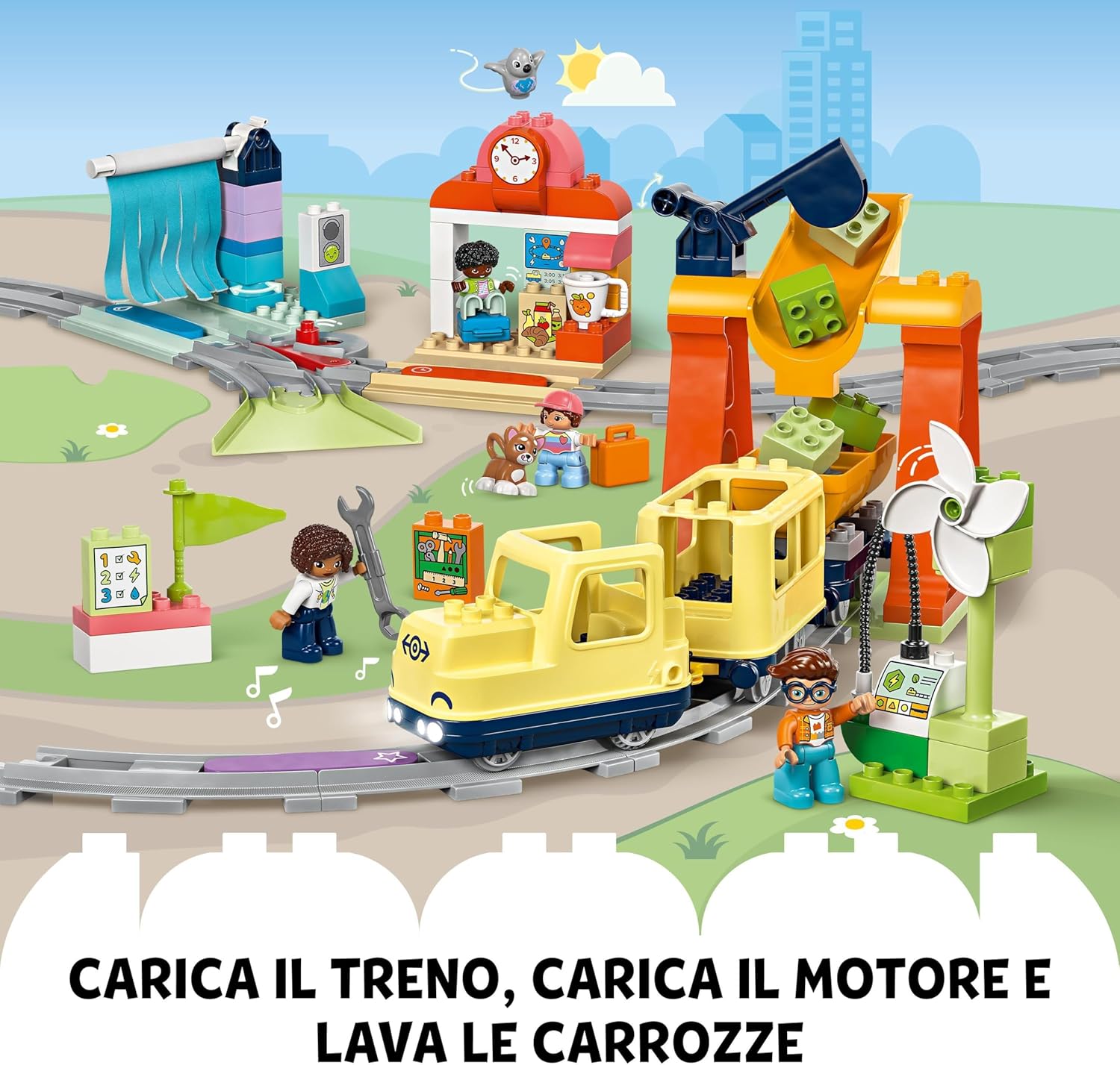
Image: The train positioned near the loading crane and the washing station, illustrating the interactive play features.
Maintenance
Cleaning
To clean your LEGO DUPLO set, wipe the bricks and figures with a damp cloth. For stubborn dirt, a mild soap solution can be used. Rinse thoroughly with clean water and air dry. Do not submerge the electronic train in water.
Battery Care
- Remove batteries from the train if it will not be used for an extended period to prevent leakage.
- Replace all batteries at the same time. Do not mix old and new batteries, or different types of batteries.
- Dispose of used batteries responsibly according to local regulations.
Troubleshooting
| Problem | Possible Cause | Solution |
|---|---|---|
| Train does not move or moves slowly. | Low or dead batteries; track pieces not connected properly. | Replace batteries; ensure all track connections are secure. |
| No sounds or lights from the train. | Low or dead batteries; interactive brick not correctly positioned. | Replace batteries; ensure the train passes directly over the interactive brick. |
| Train derails frequently. | Loose track connections; uneven surface. | Press down firmly on all track connections; play on a flat, stable surface. |
Specifications
- Model Number: 10428
- Number of Pieces: 103
- Recommended Age: 3 years and up
- Product Dimensions (LxWxH): 52.3 x 48 x 12.4 cm (20.6 x 18.9 x 4.9 inches)
- Item Weight: 2.41 kg (5.31 lbs)
- Material: Plastic
- Batteries Required: Yes, 4 x AAA (LR03)
- Batteries Included: No
- Educational Objectives: Creative thinking, emotional intelligence, imagination development, motor skills, social skills.
Expansion and Compatibility
The LEGO DUPLO Big Interactive Community Train set is designed to be compatible with other LEGO DUPLO train sets and track pieces, allowing for expanded play possibilities and larger railway systems. Explore other sets like the DUPLO Tunnel (10425), Bridge (10426), or Passenger Train (10427) to enhance your railway adventures.

Image: This image illustrates how the Big Interactive Community Train set can be combined with other LEGO DUPLO train sets (models 10425, 10426, 10427) to create an even larger and more diverse railway system.
For additional play ideas and skill development resources, visit the official LEGO DUPLO website:
Warranty and Support
LEGO products are manufactured to high-quality standards. For any issues, missing parts, or questions regarding your product, please contact LEGO Customer Service. Information on warranty and support can typically be found on the official LEGO website or by contacting their customer support channels.
Please retain your proof of purchase for any warranty claims.
Ask a question about this manual
Ask about setup, troubleshooting, compatibility, parts, safety, or missing instructions. Manuals+ will review the question and use this page’s manual context to help answer it.