
1. Introduction
Thank you for choosing the SKMEI 1189 Multi-Functional Sports Watch. This timepiece combines a Japanese Quartz analog movement with a digital LED display, offering multiple functions including time, date, alarm, stopwatch, and world time. It is designed for durability with 50-meter water resistance. This manual provides detailed instructions to help you set up, operate, and maintain your watch.
2. Watch Controls and Functions
Your SKMEI 1189 watch features four primary buttons and one crown for operation. Familiarize yourself with their locations and basic functions:
- SET Button (Top Left): Used to adjust values during setting modes (e.g., hours, minutes, date).
- MODE Button (Bottom Left): Cycles through different operational modes (Time, Alarm, Stopwatch, World Time).
- ADJ Button (Top Right): Used to select items or increment values during setting modes.
- LIGHT Button (Bottom Right): Activates the backlight for the digital display.
- Crown (Right Side): Used to set the analog time. Pull out to adjust, push in to lock.
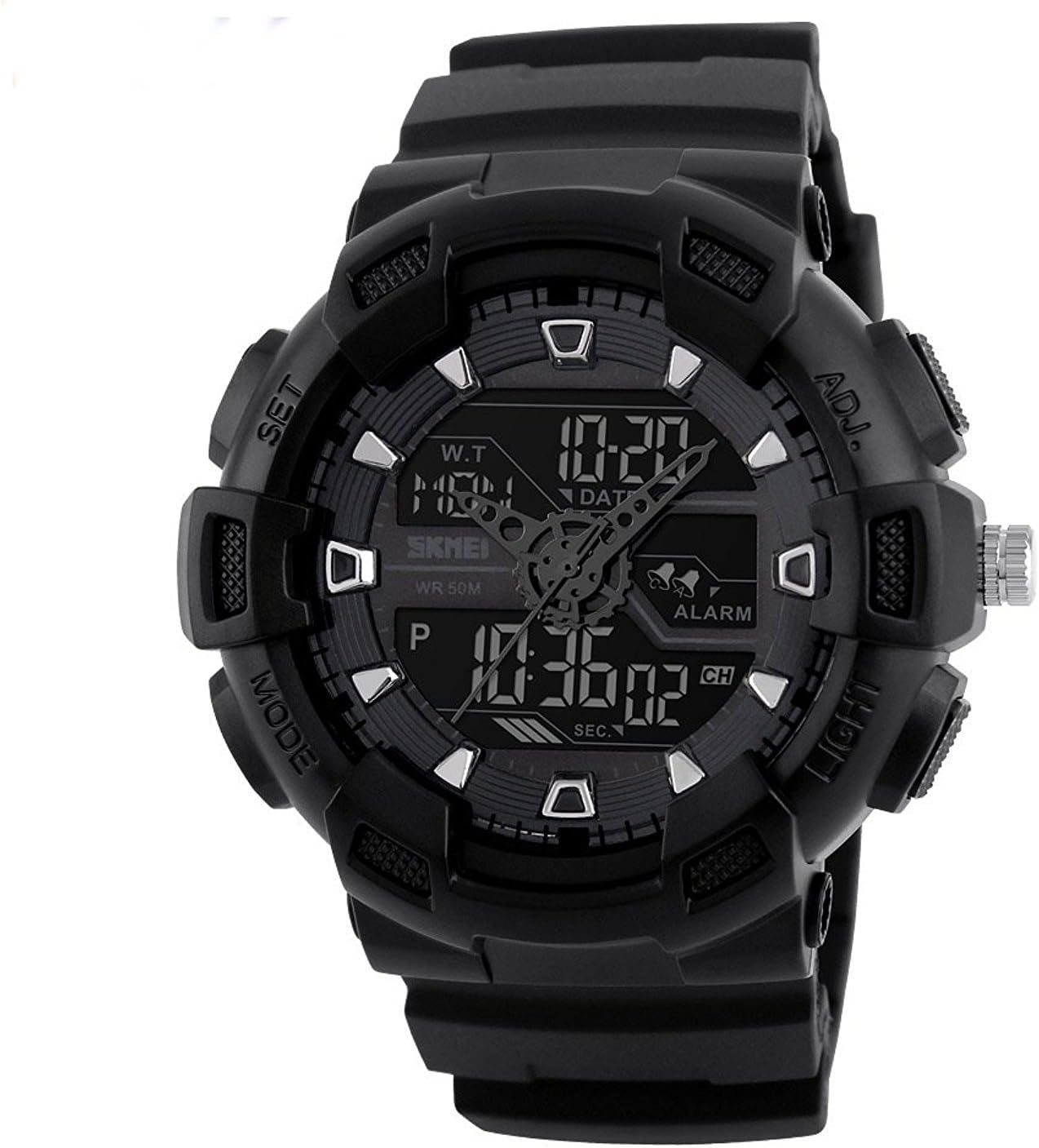
Image: Front view of the SKMEI 1189 watch, highlighting the four control buttons and the crown.
3. Initial Setup
3.1 Setting Analog Time
- Gently pull out the crown located on the right side of the watch.
- Rotate the crown clockwise or counter-clockwise to move the analog hands to the desired time.
- Once the time is set, push the crown back into its original position to secure the setting and start the analog movement.
3.2 Setting Digital Time, Date, and Day
- From the normal time display, press the MODE button repeatedly until the digital display shows flashing digits, indicating time setting mode.
- Press the ADJ button to cycle through the items to be set: seconds, hour, minute, 12/24-hour format, year, month, and day. The currently selected item will flash.
- While an item is flashing, press the SET button to adjust its value. Hold SET to change values more quickly.
- After setting all desired items, press the MODE button to exit the setting mode and return to the normal time display.
3.3 Setting the Alarm
- Press the MODE button until you reach the Alarm mode (usually indicated by 'AL' or an alarm icon).
- Press the ADJ button to select between setting the alarm hour and minute. The selected item will flash.
- Press the SET button to adjust the hour or minute.
- To activate or deactivate the alarm, press the SET and ADJ buttons simultaneously while in Alarm mode. An alarm icon will appear/disappear to indicate its status.
- Press the MODE button to exit Alarm mode.
3.4 Using the Stopwatch
- Press the MODE button until you reach the Stopwatch mode (usually indicated by 'STW' or 'CHR').
- Press the SET button to start the stopwatch.
- Press the SET button again to stop the stopwatch.
- Press the ADJ button to reset the stopwatch to zero.
- Press the MODE button to exit Stopwatch mode.
3.5 World Time Function
- Press the MODE button until you reach the World Time mode (often indicated by 'WT' or city codes).
- Press the ADJ button to cycle through different pre-programmed time zones, typically displayed as GMT offsets or city abbreviations.
- Press the MODE button to exit World Time mode.
4. Operating Your Watch
4.1 Mode Switching
The MODE button is your primary control for navigating between the watch's various functions. Each press of the MODE button will cycle through the following sequence:
- Normal Time Display (Analog & Digital)
- Alarm Mode
- Stopwatch Mode
- World Time Mode
4.2 Using the Backlight
To illuminate the digital display in low-light conditions, simply press the LIGHT button (bottom right). The backlight will remain active for a few seconds.

Image: The SKMEI 1189 watch with its digital display illuminated by the backlight.
4.3 Water Resistance
Your SKMEI 1189 watch is rated for 50 meters (5 ATM) of water resistance. This means it is suitable for daily use, showering, and swimming in shallow water. However, it is not suitable for diving, snorkeling, or high-impact water sports. To maintain water resistance, do not operate any buttons while the watch is submerged in water.
5. Care and Maintenance
- Cleaning: Wipe the watch case and strap regularly with a soft, dry cloth. For stubborn dirt, a slightly damp cloth can be used, followed by drying.
- Avoid Chemicals: Do not expose the watch to solvents, detergents, perfumes, or other chemical agents, as these can damage the case, strap, or seals.
- Temperature Extremes: Avoid exposing the watch to extreme temperatures (hot or cold) or sudden temperature changes, which can affect its accuracy and water resistance.
- Magnetic Fields: Keep the watch away from strong magnetic fields, as they can interfere with the movement and accuracy.
- Battery Replacement: When the digital display dims or the watch stops functioning, the battery may need replacement. It is recommended to have the battery replaced by a qualified watch technician to ensure proper sealing and maintain water resistance.
- Storage: When not in use for extended periods, store the watch in a cool, dry place away from direct sunlight.
6. Troubleshooting
If you encounter issues with your SKMEI 1189 watch, please refer to the following common solutions:
- Digital Display is Blank or Dim: This usually indicates a low battery. Replace the battery as described in the Maintenance section.
- Analog Hands Not Moving: Ensure the crown is fully pushed in. If it is, the analog battery may be depleted. Seek professional service for battery replacement.
- Time Inaccuracy: Re-set both the analog and digital time following the instructions in the Setup section. If inaccuracy persists, the watch may require servicing.
- Buttons Unresponsive: Ensure the watch is dry and free from debris around the buttons. If buttons are stuck, do not force them.
- Water Inside the Watch: If you notice condensation or water droplets inside the watch, immediately take it to a professional watch repair service. Do not attempt to open it yourself.
- Difficulty Operating Functions: Refer back to the detailed instructions in the Setup and Operating sections. The multi-functional nature of the watch requires careful attention to button presses.
7. Specifications
| Feature | Detail |
|---|---|
| Model Number | 1189 |
| Brand | SKMEI |
| Movement Type | Japanese Quartz |
| Display | Analog and Digital (LED) |
| Water Resistance Depth | 50 Meters (5 ATM) |
| Case Diameter | 38 Millimetres |
| Band Width | 2.2 Centimetres |
| Case Thickness | 16 Millimetres |
| Functions | Time, Date, Day, Alarm, Stopwatch, Backlight, World Time |
| Battery Type | Standard Watch Battery (e.g., CR2025 for digital, SR626SW for analog) |
8. Warranty and Support
Your SKMEI 1189 watch is covered by a standard manufacturer's warranty against defects in materials and workmanship. The specific terms and duration of the warranty may vary depending on your region and point of purchase.
For warranty claims, technical support, or any questions not covered in this manual, please contact the retailer from whom you purchased the watch. They will be able to provide you with the most accurate and up-to-date information regarding service and support options.
Please retain your proof of purchase for any warranty-related inquiries.


