
1. Important Safety Instructions
Please read and understand all safety instructions before operating the inverter. Failure to follow these instructions may result in electric shock, fire, or serious injury.
- Ventilation: Ensure adequate ventilation around the inverter. Do not block ventilation openings.
- Dry Environment: Do not expose the inverter to rain, moisture, or water. Operate in a dry environment.
- Proper Connections: Ensure all connections are tight and secure to prevent overheating and arcing.
- Overload Protection: Do not exceed the inverter's continuous power rating (1000W) or peak power rating (2000W).
- Children: Keep the inverter out of reach of children.
- Flammable Materials: Do not operate the inverter near flammable materials or in environments with explosive gases.
- Battery Connection: Connect the inverter only to 12VDC power sources.
2. Package Contents
Verify that all items are present in the package:
- 1 x TOOLCRAFT TC4347 1000W Power Inverter with USB
- 1 x Set of 90cm connection cables with eyelet terminals
3. Product Features and Components
The TOOLCRAFT TC4347 Power Inverter is designed to convert 12VDC power from a vehicle battery into 115VAC household power and 5VDC USB power.
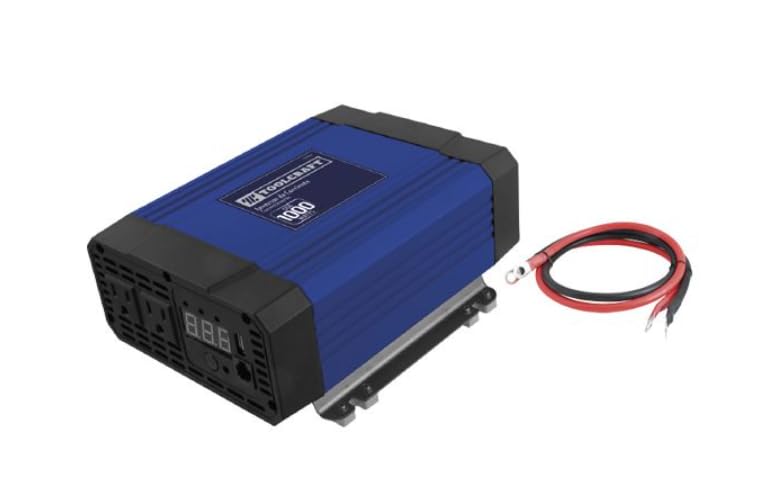
Image 1: Front view of the TOOLCRAFT TC4347 Power Inverter, showing the AC outlets, USB port, and display.
- Continuous Power: 1000W
- Peak Power: 2000W
- Input Voltage: 12.8VDC
- Output Voltage: 115VAC, 60Hz
- USB Output: 5VDC, 2100mA
- LED Indicator: Illuminates to show power status.
- Voltage Display: Shows the current output voltage.
- Construction: Durable ABS plastic housing.
4. Setup
Follow these steps to set up your power inverter:
- Placement: Place the inverter in a well-ventilated area, away from direct sunlight, heat sources, and moisture. Ensure there is enough space around the unit for air circulation.
- Power Source: Connect the inverter to a 12VDC power source, such as a vehicle battery. Use the provided 90cm cables with eyelet terminals.
- Cable Connection:
- Connect the RED cable terminal to the positive (+) terminal of the 12VDC battery.
- Connect the BLACK cable terminal to the negative (-) terminal of the 12VDC battery.
- Ensure the other ends of the cables are securely fastened to the corresponding terminals on the inverter.
- Secure Connections: Double-check that all connections are tight to prevent loose contacts, which can cause overheating or damage.
5. Operating Instructions
Once the inverter is properly set up, you can begin operation:
- Power On: Turn on the inverter using its power switch. The LED indicator will illuminate, and the display will show the output voltage (115VCA).
- Connect AC Devices: Plug your 115VAC devices into the AC outlets on the inverter. Ensure the total power consumption of all connected devices does not exceed 1000W continuously.
- Connect USB Devices: Plug your USB-powered devices into the 5VDC/2100mA USB port.
- Monitor Display: Observe the voltage display to ensure stable output.
- Power Off: When finished, first disconnect all devices from the inverter, then turn off the inverter using its power switch.
Note: The inverter has a peak power capacity of 2000W, which allows it to handle brief surges in power demand from certain appliances upon startup. However, continuous operation should remain within the 1000W limit.
6. Maintenance
Regular maintenance ensures the longevity and optimal performance of your inverter:
- Cleaning: Periodically clean the exterior of the inverter with a dry, soft cloth. Do not use liquid cleaners or solvents.
- Ventilation: Keep the ventilation openings clear of dust and debris to prevent overheating.
- Cable Inspection: Regularly inspect the power cables and connections for any signs of wear, damage, or corrosion. Replace damaged cables immediately.
- Storage: When not in use for extended periods, store the inverter in a cool, dry place, disconnected from the power source.
7. Troubleshooting
If you encounter issues with your inverter, refer to the following common problems and solutions:
| Problem | Possible Cause | Solution |
|---|---|---|
| No power output / Inverter not turning on | Loose battery connections Low battery voltage Blown fuse in vehicle/inverter | Check and tighten all cable connections Recharge or replace the 12VDC battery Check and replace fuses if necessary (consult a professional) |
| Low or unstable output voltage | Overload Poor battery connection Battery voltage too low | Reduce the load on the inverter Check and tighten battery connections Recharge the battery |
| Inverter shuts down automatically | Overload protection Over-temperature protection Low battery voltage shutdown | Reduce the load Allow inverter to cool down, ensure proper ventilation Recharge the battery |
If the problem persists after attempting these solutions, contact customer support or a qualified technician.
8. Specifications
Detailed technical specifications for the TOOLCRAFT TC4347 Power Inverter:
- Model Number: TC4347
- Continuous Power: 1000 Watts
- Peak Power: 2000 Watts
- Input Voltage: 12.8VDC
- Output Voltage: 115VAC, 60Hz
- USB Output: 5VDC, 2100mA
- Material: ABS Plastic
- Dimensions (L x W x H): 33 x 25 x 14 cm (13 x 9.8 x 5.5 inches)
- Weight: 2.5 kg (5.5 lbs)
9. Warranty and Support
For warranty information, please refer to the documentation provided at the time of purchase or contact your retailer. Specific warranty terms and conditions may vary.
For technical support or service inquiries, please contact TOOLCRAFT customer service through their official website or the contact information provided with your product packaging.