
1. Introduction
The EXMAX EX-938 is a UHF wireless audio transmission system designed for clear voice communication over distances up to 492 feet (150 meters). This system is ideal for applications requiring simultaneous interpretation, guided tours, church translation, teaching, and other scenarios where a speaker's voice needs to be transmitted clearly to multiple listeners. It features 11 selectable UHF channels, allowing multiple groups to operate simultaneously without interference. The system is powered by AA batteries, offering over 15 hours of working time, and its design facilitates easy battery replacement and air travel convenience.

Image 1.1: Overview of the EXMAX EX-938 system, illustrating its components and effective transmission range of up to 492 feet (150 meters).
2. Package Contents
Please check the package contents upon receipt to ensure all items are present:
- 1 x EX-938T Transmitter
- 20 x EX-938R Receivers
- 1 x Headset Microphone
- 1 x Lapel Microphone
- 20 x Earphones
- 1 x Audio Cable (3.5mm to 3.5mm)
- 1 x Storage Case
- 1 x User Manual

Image 2.1: All components included in the EXMAX EX-938-1T20R+Case package.
3. Product Overview
The EXMAX EX-938 system consists of a transmitter (EX-938T) and multiple receivers (EX-938R). Both units feature a clear display and intuitive controls.
3.1 Transmitter (EX-938T)
- MIC IN Jack: For connecting the headset or lapel microphone for voice input.
- AUX IN Jack: For connecting external audio sources like MP3 players or smartphones.
- Power Switch: Turns the unit on or off.
- CH-/CH+ Buttons: Adjusts the channel ID.
- Display: Shows current channel ID, battery capacity, and signal icon.
- TX Transmit Antenna: For wireless signal transmission.
3.2 Receiver (EX-938R)
- Headphone Output Jack: For connecting earphones.
- Volume Adjustment Knob: Controls the listening volume.
- Power Switch: Turns the unit on or off.
- CH-/CH+ Buttons: Adjusts the channel ID.
- Display: Shows current channel ID, battery capacity, and signal icon.
- RX Receiving Antenna: For wireless signal reception.

Image 3.1: Detailed diagram of the EXMAX EX-938 transmitter and receiver, highlighting controls and input/output ports.
4. Setup Instructions
Follow these steps to set up your EXMAX EX-938 system:
- Install Batteries: Open the battery compartment covers of both the transmitter and all receivers. Insert two AA batteries into each unit, ensuring correct polarity (+/-). The system is designed for easy battery replacement.
- Connect Microphone to Transmitter: Insert the microphone (headset or lapel) into the MIC IN port of the EX-938T transmitter.
- Connect Earphones to Receivers: Insert the earphones into the headphone output port of each EX-938R receiver.
- Power On: Turn on both the transmitter and all receivers using their respective power switches.
- Select Channel: On the transmitter, press the CH- or CH+ buttons to select a desired channel ID. Ensure all receivers are set to the same channel ID as the transmitter to receive the audio signal.
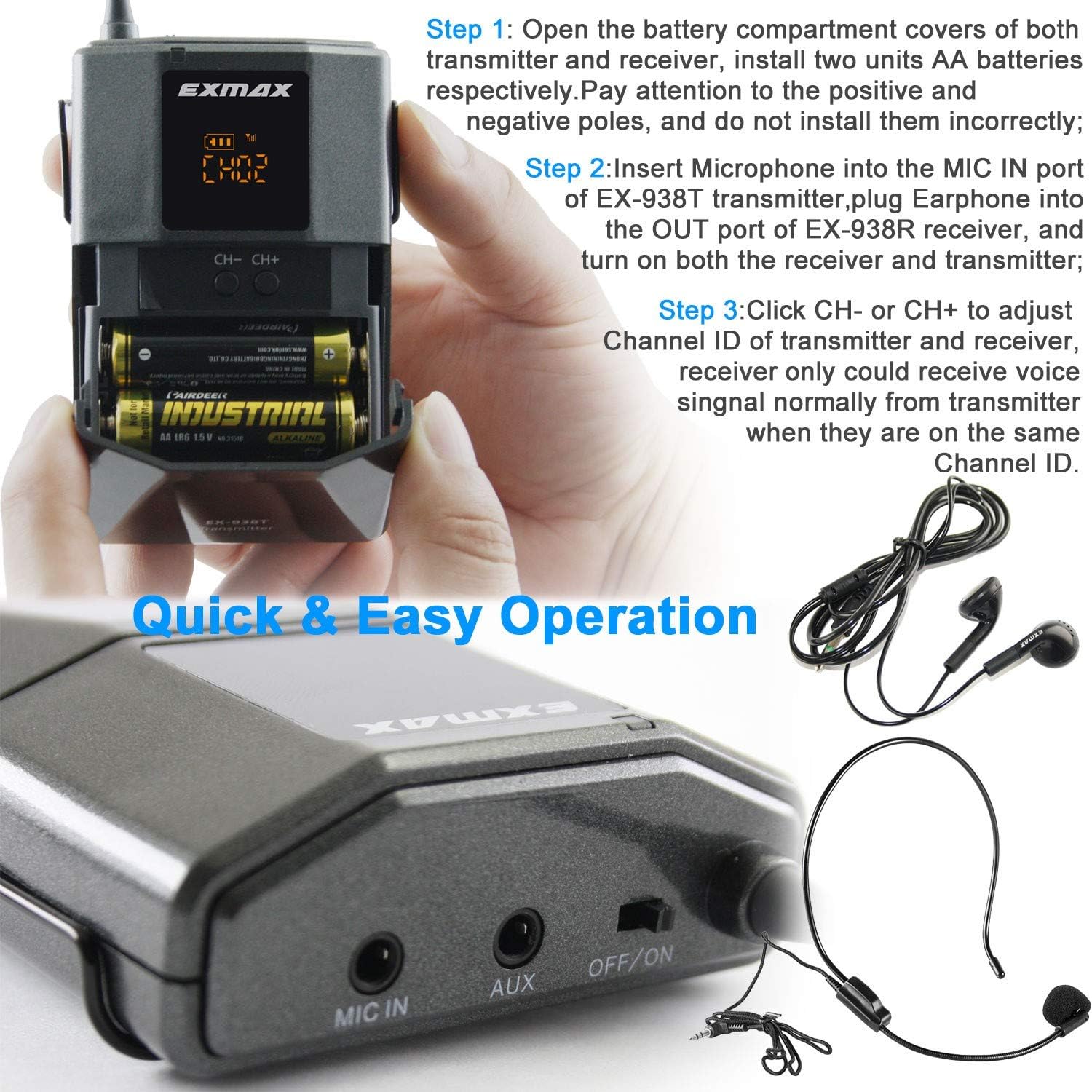
Image 4.1: Visual guide for quick and easy setup of the EXMAX EX-938 system.
5. Operating Instructions
Once set up, the EXMAX EX-938 system is ready for operation:
- Basic Audio Transmission: The person speaking into the microphone connected to the transmitter will have their voice transmitted wirelessly. Listeners wearing earphones connected to receivers tuned to the same channel will hear the audio.
- Using AUX Input: To transmit audio from an external device (e.g., music from a CD/MP3 player), connect the device to the AUX IN jack on the transmitter using the provided audio cable. Important: Do not mix up the AUX IN and MIC IN jacks, as this may result in noise or improper function.
- Volume Adjustment: On each receiver, use the volume adjustment knob to set a comfortable listening level.
- Multi-Group Operation: The system supports 11 selectable UHF channels, allowing up to 5 groups to work simultaneously without mutual interference. Each group should use a unique channel ID. For example, Group 1 uses Channel 01, Group 2 uses Channel 02, and so on.

Image 5.1: Illustration of multiple EXMAX EX-938 groups operating on separate channels.

Image 5.2: How the EX-938 system works and its various applications.
6. Maintenance
Proper maintenance ensures the longevity and optimal performance of your EXMAX EX-938 system:
- Battery Replacement: When the battery indicator on the display shows low power, replace the AA batteries promptly. The system is designed for easy access to the battery compartments.
- Cleaning: Use a soft, dry cloth to clean the exterior of the transmitter and receivers. Do not use liquid cleaners or solvents.
- Storage: Store the system in the provided storage case in a cool, dry place when not in use. Remove batteries if storing for extended periods to prevent leakage.
- Antenna Care: Handle the antennas carefully to avoid bending or breaking.

Image 6.1: EXMAX EX-938 unit with open battery compartment, highlighting AA battery power and long working time.
7. Troubleshooting
If you encounter issues with your EXMAX EX-938 system, refer to the following troubleshooting guide:
| Problem | Possible Cause | Solution |
|---|---|---|
| No sound from receivers |
|
|
| Poor sound quality or noise |
|
|
| Short transmission range |
|
|
If the problem persists after trying these solutions, please contact EXMAX customer support.
8. Specifications
Key technical specifications for the EXMAX EX-938 system:
- Model Name: EX-938
- Brand: EXMAX
- Connectivity Technology: Auxiliary
- Connector Type: 3.5 mm Jack
- Number of Channels: 11 (UHF)
- Transmission Distance: Up to 492 feet (150 meters)
- Power Source: Battery Powered (2 AA batteries required per unit)
- Working Time: Over 15 hours (with fresh AA batteries)
- Microphone Form Factor: Headset
- Polar Pattern: Unidirectional
- Audio Sensitivity: 70 Decibels
- Signal-to-Noise Ratio: 45 dB
- Frequency Response: 2000 Microhertz
- Material: Acrylonitrile Butadiene Styrene
- Item Dimensions (L x W x H): 2.56 x 3.54 x 0.79 inches
- Item Weight: Approximately 4.8 Pounds (total system)
- Special Feature: Volume Control
- Compatible Devices: Speaker (for audio output from AUX IN)

Image 8.1: EXMAX EX-938 units demonstrating UHF frequency band for reliable audio transmission.
9. Warranty and Support
For warranty information and customer support, please refer to the documentation included with your purchase or contact EXMAX directly. If you encounter any problems or have questions regarding the EXMAX EX-938 system, please reach out to the manufacturer's customer service for assistance.