
1. Introduction
This manual provides detailed instructions for the installation, operation, and maintenance of your Brainboxes SW-005 Ethernet 5-Port Unmanaged Switch. Please read this manual thoroughly before using the device to ensure proper functionality and to prevent damage.
The Brainboxes SW-005 is a compact and reliable unmanaged Ethernet switch designed to expand your network connectivity with ease. It features five 10/100Mbps Ethernet ports, offering a simple plug-and-play solution for connecting multiple devices.
2. Safety Information
Observe the following safety precautions to prevent injury and damage to the device:
- Do not expose the device to water, moisture, or high humidity.
- Do not place the device near heat sources such as radiators, heat registers, stoves, or other apparatus (including amplifiers) that produce heat.
- Use only the power adapter supplied with the device. Using an incorrect power adapter may damage the device and void your warranty.
- Ensure proper ventilation around the device. Do not block any ventilation openings.
- Do not attempt to open or repair the device yourself. Refer all servicing to qualified service personnel.
- Keep the device away from strong electromagnetic fields.
3. Package Contents
Please check the package contents carefully. If any item is missing or damaged, contact your vendor immediately.
- Brainboxes SW-005 Ethernet 5-Port Unmanaged Switch
- Power Adapter
- Quick Start Guide (this document)
4. Product Overview
The Brainboxes SW-005 is an unmanaged Ethernet switch designed for simple network expansion. It requires no configuration, making it ideal for home and small office environments.
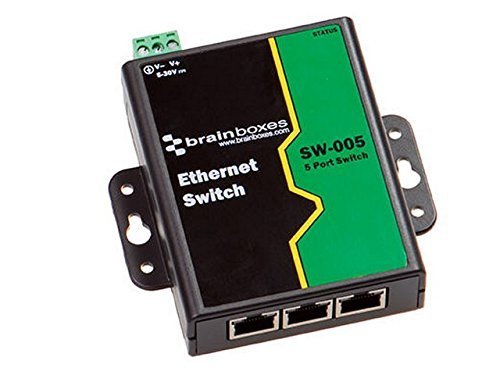
Figure 1: Front view of the Brainboxes SW-005 Ethernet 5-Port Switch, showing the five Ethernet ports and LED indicators.
4.1 LED Indicators
- Power LED: Illuminates when the switch is powered on.
- Link/Act LEDs (per port):
- Solid Green: A device is connected and linked successfully.
- Flashing Green: Data is being transmitted or received through the port.
- Off: No device is connected or the connection is not active.
4.2 Ports
- Ethernet Ports (1-5): Five 10/100Mbps RJ45 ports for connecting network devices such as computers, printers, and network-attached storage (NAS). These ports support auto-negotiation and auto MDI/MDIX.
- Power Input: Connector for the external power adapter.
5. Setup
Follow these steps to set up your Brainboxes SW-005 switch:
- Unpack the Switch: Carefully remove the SW-005 switch and its accessories from the packaging.
- Choose a Location: Place the switch on a stable, flat surface in a well-ventilated area, away from direct sunlight, heat sources, and moisture. Ensure there is enough space around the device for proper airflow.
- Connect to Power: Connect the supplied power adapter to the power input port on the switch, then plug the adapter into a standard electrical outlet. The Power LED on the switch should illuminate, indicating that the device is receiving power.
- Connect Network Devices: Use standard Ethernet cables (Cat5e or higher recommended) to connect your network devices (e.g., computer, router, printer, game console) to any of the five Ethernet ports (1-5) on the switch.
- Verify Connection: Once a device is connected, the corresponding Link/Act LED for that port should illuminate solid green. If data is being transmitted, the LED will flash.
The Brainboxes SW-005 is an unmanaged switch and does not require any software configuration. It operates on a plug-and-play basis.
6. Operating the Switch
The Brainboxes SW-005 is designed for continuous operation. Once powered on and connected, it automatically handles data traffic between connected devices.
- Automatic Negotiation: Each port automatically detects the speed (10Mbps or 100Mbps) and duplex mode (half or full) of the connected device.
- Auto MDI/MDIX: The switch automatically detects the type of Ethernet cable (straight-through or crossover) and adjusts accordingly, eliminating the need for specific cable types.
- Data Forwarding: The switch learns the MAC addresses of connected devices and forwards data packets only to the intended recipient, optimizing network performance.
No user intervention or configuration is required for basic operation.
7. Maintenance
The Brainboxes SW-005 switch requires minimal maintenance to ensure long-term reliable operation.
- Cleaning: Periodically clean the exterior of the switch with a soft, dry cloth. Do not use liquid or aerosol cleaners.
- Ventilation: Ensure that the ventilation openings are not obstructed by dust or other materials. Clean them gently if necessary.
- Power Cycle: If the switch experiences unusual behavior, try power cycling it by disconnecting the power adapter for a few seconds and then reconnecting it.
- Cable Management: Keep network cables organized and free from kinks or excessive bends to prevent signal degradation.
8. Troubleshooting
If you encounter issues with your Brainboxes SW-005 switch, refer to the following table for common problems and solutions.
| Problem | Possible Cause | Solution |
|---|---|---|
| No Power LED illumination. | No power supply or faulty power adapter. | Ensure the power adapter is securely connected to both the switch and a working electrical outlet. Verify the outlet is functional. Use only the supplied power adapter. |
| Link/Act LED is off for a connected device. | Incorrect cable connection, faulty cable, or device is off/faulty. | Check that the Ethernet cable is securely plugged into both the switch port and the device. Try a different Ethernet cable. Ensure the connected device is powered on and functioning correctly. Try connecting to a different port on the switch. |
| Slow network speed. | Network congestion, faulty cable, or device issues. | Check for high network traffic. Ensure all cables are Cat5e or higher and in good condition. Restart the switch and connected devices. |
| Intermittent connection. | Loose cable connection, faulty cable, or interference. | Ensure all cable connections are firm. Replace suspect cables. Move the switch away from potential sources of electromagnetic interference. |
9. Specifications
Technical specifications for the Brainboxes SW-005 Ethernet 5-Port Unmanaged Switch:
| Feature | Description |
|---|---|
| Model Number | SW-005 (Item Model Number: 8541609835) |
| Ports | 5 x 10/100Mbps RJ45 Ports |
| Standards | IEEE 802.3, IEEE 802.3u, IEEE 802.3x |
| Switching Capacity | 1 Gbps (non-blocking) |
| MAC Address Table | 2K entries |
| Jumbo Frame | Not specified (typical for 10/100 switches, usually 1522 bytes) |
| Power Input | External Power Adapter (e.g., 5V DC, 0.6A - typical for such devices) |
| Dimensions (L x W x H) | Not specified (compact design) |
| Operating Temperature | 0°C to 40°C (32°F to 104°F) (typical) |
| Storage Temperature | -40°C to 70°C (-40°F to 158°F) (typical) |
| Operating Humidity | 10% to 90% non-condensing (typical) |
| Item Weight | 8 ounces (226.8 grams) |
| ASIN | B01MF6CZJ9 |
| Date First Available | October 12, 2016 |
Note: Specifications are subject to change without notice.
10. Warranty and Support
10.1 Warranty Information
Brainboxes products are designed for reliability and performance. This product is covered by a limited warranty against defects in materials and workmanship. The specific terms and duration of the warranty may vary by region and product. Please refer to the warranty card included with your product or visit the official Brainboxes website for detailed warranty information.
This warranty does not cover damage caused by accident, misuse, abuse, improper installation, natural disaster, or unauthorized repair or modification.
10.2 Technical Support
For technical assistance, product inquiries, or troubleshooting beyond the scope of this manual, please contact Brainboxes customer support.
- Website: Visit the official Brainboxes website for support resources, FAQs, and contact information.
- Email: Refer to the Brainboxes website for the appropriate support email address.
- Phone: Refer to the Brainboxes website for regional support phone numbers.
When contacting support, please have your product model (SW-005) and any relevant purchase information ready.