
Wagner FURNO 500
Wagner Spraytech FURNO 500 Variable Temp Heat Gun Instruction Manual
Model: FURNO 500 | Brand: Wagner
Introduction
The Wagner Spraytech FURNO 500 is a versatile digital temperature heat gun designed for a wide range of household and crafting projects. It offers precise heat application with variable temperature settings and controlled airflow. This manual provides essential information for safe and effective operation, maintenance, and troubleshooting.
Safety Information
Warning: To reduce the risk of fire or electric shock, do not expose this product to rain or moisture. Store indoors. Read the entire instruction manual before using. This product is ETL Listed, meaning it has been tested and approved by Intertek to UL and CSA Safety Standards. Always prioritize safety during operation to prevent fire or electrical hazards.
What's Included
The Wagner Spraytech FURNO 500 heat gun typically includes the following components:
- FURNO 500 Heat Gun Unit
- Glass Protector Nozzle
- Flare Nozzle

Figure 1: The included glass protector nozzle and flare nozzle, designed for specific heat application needs.
Setup
- Unpacking: Carefully remove all components from the packaging. Inspect the heat gun and accessories for any signs of damage.
- Power Connection: Ensure the heat gun is switched off before plugging it into a standard 120V AC power outlet.
- Nozzle Attachment: Select the appropriate nozzle for your task. Align the nozzle with the heat gun's barrel and push it firmly into place. Ensure it is securely seated before operation.
Operating Instructions
Temperature and Fan Settings
The FURNO 500 features 12 temperature settings ranging from 150°F to 1200°F and 2 fan speeds. These settings are controlled via push-buttons and displayed on the graphic LED screen.
- Power On: Slide the power switch to the 'ON' position. The heat gun will start in a default setting.
- Adjusting Temperature: Use the '+' and '-' buttons on the control panel to increase or decrease the temperature. The selected temperature will be shown on the LED screen.
- Adjusting Fan Speed: Use the fan speed button to toggle between the two available airflow speeds.
- Cool-Down Mode: After use, switch the heat gun to cool-down mode. This blows air to cool the heating element, extending the tool's lifespan. The unit will automatically turn off once a safe temperature is reached.
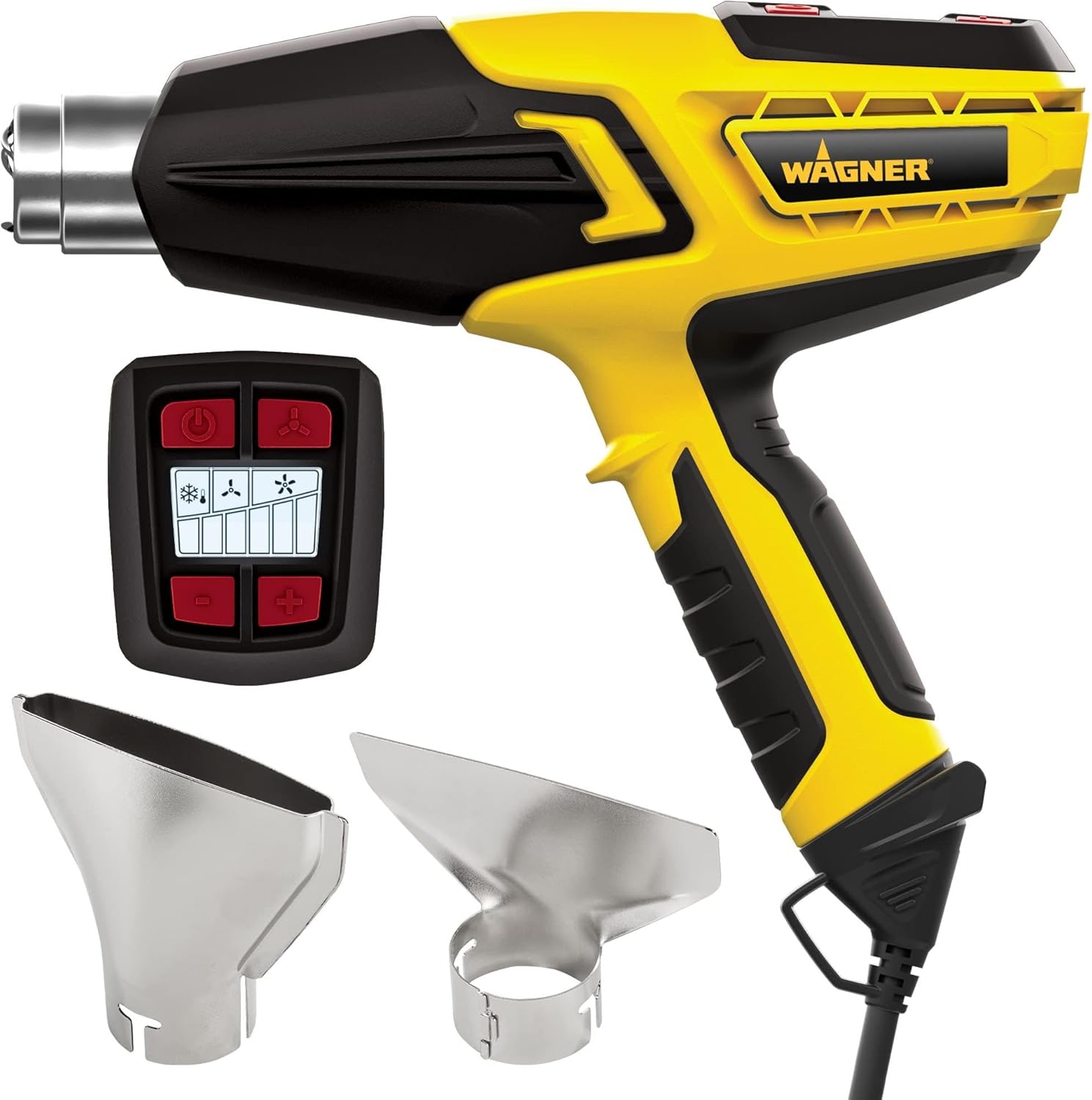
Figure 2: The digital display of the FURNO 500 heat gun, illustrating the variable temperature and fan speed controls.

Figure 3: A detailed view of the heat gun's graphic LED screen with push-button controls for adjusting temperature and airflow.
Video 1: An up-close look at the Wagner heat gun, showcasing its design and features, including the control panel.
Video 2: This video highlights the safe and reliable heat output of the Wagner heat gun for various projects.
Hands-Free Operation
The heat gun features an integrated stand, allowing for safe, hands-free operation when applying heat to a project. Simply place the heat gun on a stable surface with the stand engaged.

Figure 4: The heat gun positioned on its integrated stand, allowing for stable, hands-free use during projects.
Applications
The Wagner FURNO 500 heat gun is suitable for numerous tasks, including:
- Paint Removal: Effectively strips paint without chemicals.
- Softening Adhesives: Loosens stubborn adhesives for easy removal.
- Defrosting Pipes: Safely thaws frozen pipes.
- Bending PVC: Shapes PVC pipes for custom installations.
- Shrink Wrapping: Ideal for packaging and sealing with shrink wrap.
- Shaping Plexiglass: Allows for precise shaping of plexiglass materials.
- Embossing: Useful for various crafting and embossing projects.

Figure 5: The heat gun being used for chemical-free paint removal, showing paint peeling from a surface.

Figure 6: Illustrates the process of paint removal, where heat from the gun softens the paint for easy scraping.

Figure 7: The heat gun is applied to soften adhesive for easy removal of stickers or decals.

Figure 8: Demonstrates the heat gun's capability to bend PVC pipes for various applications.
Video 3: This video demonstrates various applications of the heat gun, including shrinking electrical wires and bending pipes, highlighting its versatility.
Video 4: Watch the heat gun in action as it effectively shrinks wrap, demonstrating its efficiency for packaging and sealing tasks.
Video 5: See the heat gun used in a DIY epoxy resin and wood serving tray project, demonstrating its utility in crafting.
Maintenance
Proper maintenance ensures the longevity and optimal performance of your heat gun:
- Cool-Down Cycle: Always use the cool-down mode after each use to protect the heating element and internal components.
- Cleaning: Ensure the tool is unplugged and completely cool before cleaning. Wipe the exterior with a damp cloth. Keep the air intake and exhaust vents clear of debris.
- Storage: Store the heat gun in a dry, safe place, ideally hanging it from the built-in loop on the handle.
Video 6: A brief demonstration of the heat gun's cool-down mode, ensuring safe handling and storage after use.
Troubleshooting
If you encounter any issues with your Wagner FURNO 500 heat gun, please refer to the following general advice:
- No Power: Check the power cord connection and the electrical outlet. Ensure the power switch is in the 'ON' position.
- Insufficient Heat/Airflow: Verify that the temperature and fan speed settings are correctly adjusted for your task. Ensure air vents are not obstructed.
- Overheating: If the unit shuts off unexpectedly, it may be due to overheating. Allow it to cool down completely before attempting to restart. Ensure proper ventilation during use.
- Persistent Issues: For any persistent problems or concerns not addressed here, please contact Wagner customer service.
Specifications
| Feature | Specification |
|---|---|
| Model | FURNO 500 |
| Temperature Settings | 12 (150°F to 1200°F) |
| Fan Speeds | 2 |
| Power Source | Corded Electric |
| Wattage | 1500W |
| Voltage | 120V |
| Item Weight | 2.75 Pounds |
| Compatible Material | Plastic |
| Color | Yellow |
Warranty and Support
The Wagner Spraytech FURNO 500 heat gun comes with a 3-year limited warranty. For product registration, how-to videos, project ideas, extended warranties, manuals, and customer service information, you can access the Wagner+ app by scanning the QR code on your product or visiting the Wagner website.
Wagner's U.S.-based customer service team is available to assist with any questions or support needs.

Figure 9: The Wagner+ app provides digital access to product support, how-to videos, and project ideas.

Figure 10: Wagner's US-based customer service team is available to assist with product inquiries.
Related documentsFURNO 500


Ask a question about this manual
Ask about setup, troubleshooting, compatibility, parts, safety, or missing instructions. Manuals+ will review the question and use this page’s manual context to help answer it.