
1. Introduction
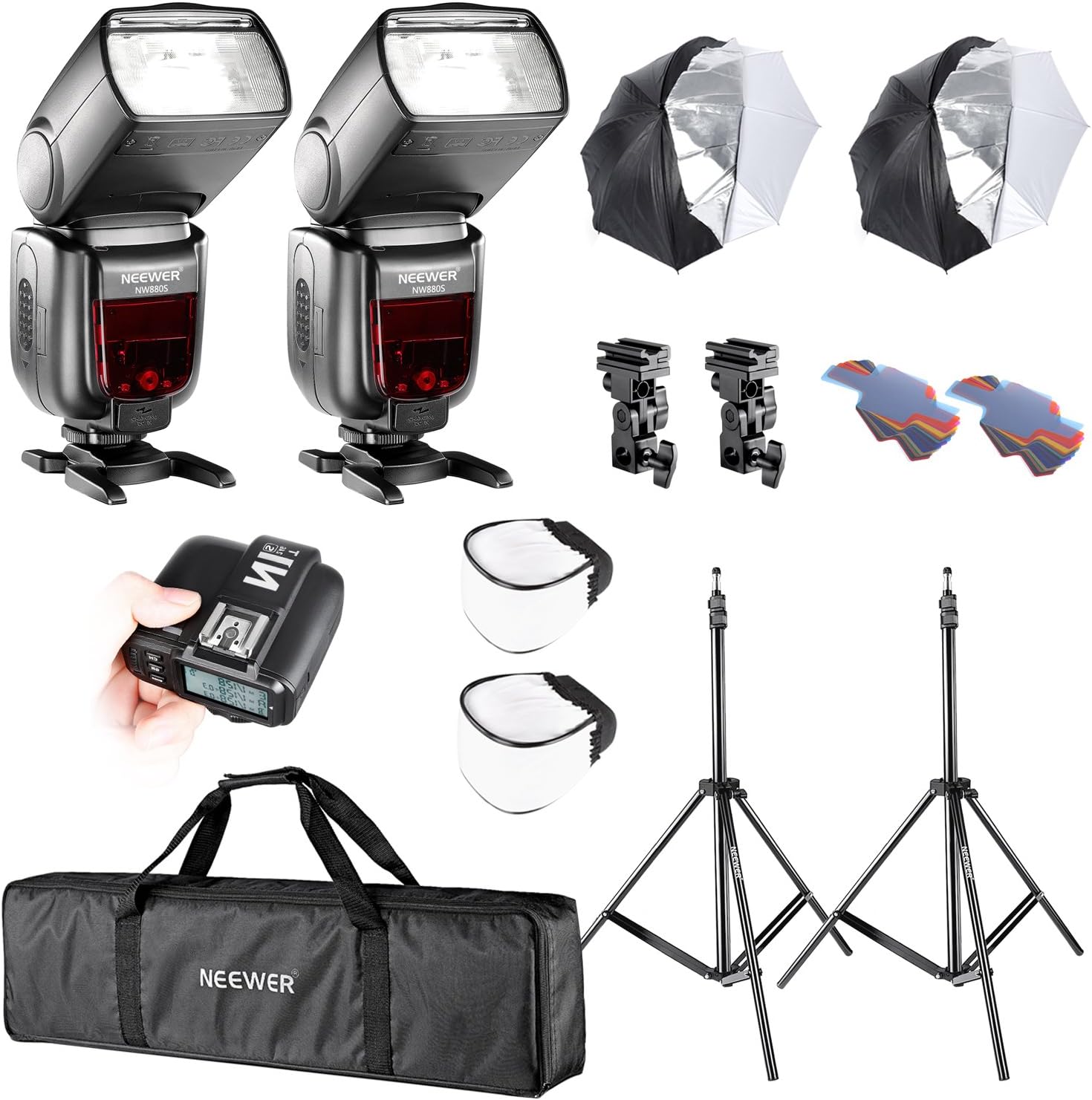
This manual provides detailed instructions for the Neewer 2 Set Camera Studio TTL Flash and Umbrella Lighting Kit. This professional photography kit is designed to enhance your studio and outdoor photography with versatile lighting solutions. It includes two NW880S wireless speedlites, an N1T-S flash trigger, light stands, umbrellas, mini softbox diffusers, and gel filters. The NW880S flashes are specifically compatible with Sony cameras featuring the new MI hot shoe, such as A77II, A7RII, A7R, A58, A99, and A6000.
2. Package Contents
Please verify that all items listed below are included in your package:
- 2 x NW880S Flash for Sony
- 1 x N1T-S Flash Trigger for Sony
- 2 x Light Stands
- 2 x 33"/84cm Umbrellas (White Satin Interior with Removable Black Cover)
- 2 x Umbrella Adapters
- 2 x 20-Piece Flash Gel Filter Sets
- 2 x Mini Softbox Diffusers
- 1 x Carrying Case
3. Key Features
The Neewer 2 Set Camera Studio TTL Flash and Umbrella Lighting Kit offers a range of features designed for professional and enthusiast photographers:
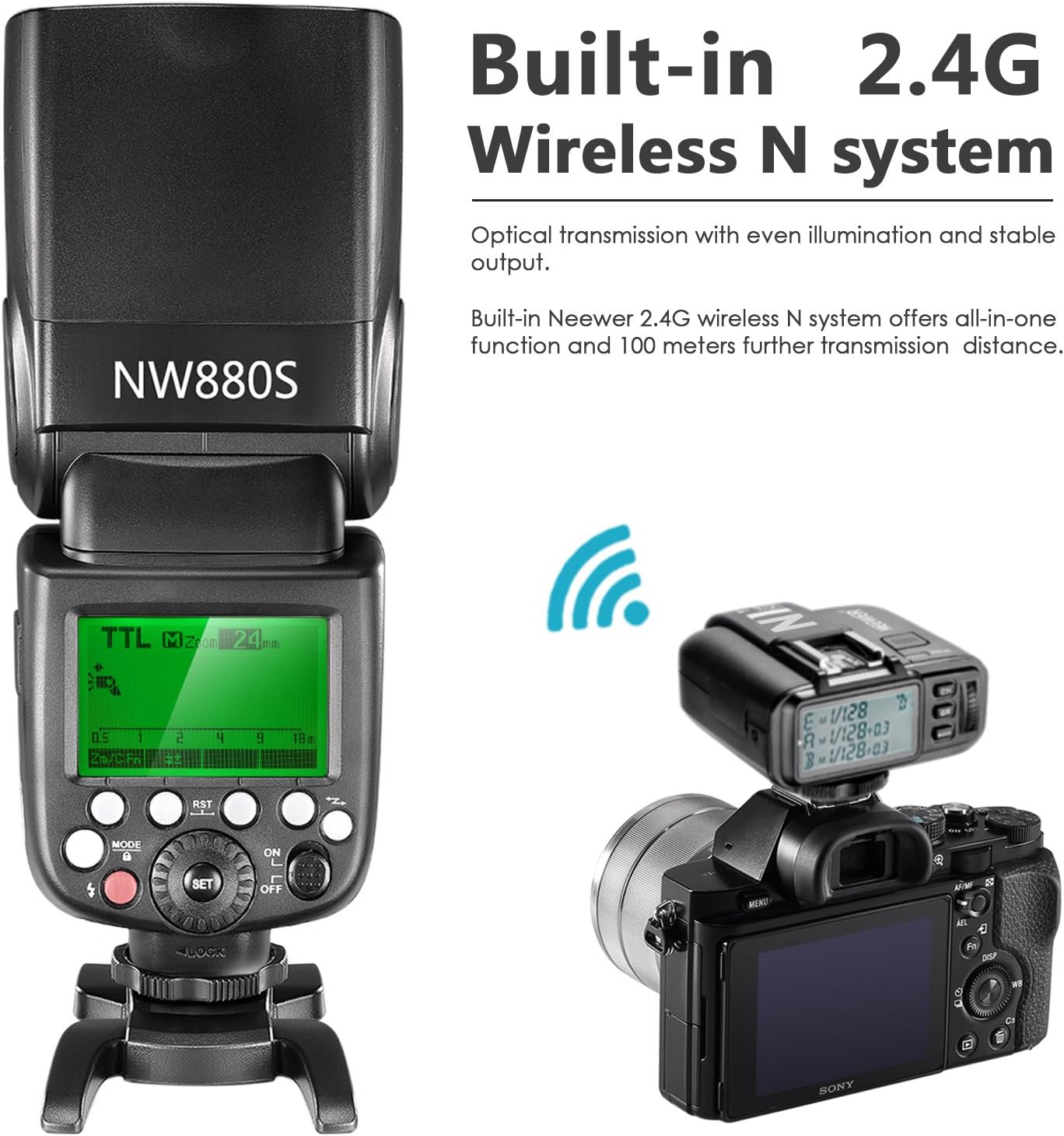
- NW880S Flash: Powerful speedlite with Guide No. 60 (m ISO 100). Supports TTL, M, Multi, FEC, Master, Slave, S1, S2 modes. Features high-speed sync up to 1/8000th of a second and a built-in 2.4G wireless remote system for transmission. Flash coverage from 20 to 200mm with auto/manual zoom.
- N1T-S Flash Trigger: 32-channel 2.4G wireless transmission with over 100m workable distance. Supports TTL autoflash, manual flash, high-speed sync, flash exposure compensation, manual focus, and modeling flash.
- Light Stands: Two Max 83"/210cm light stands with sure-twist section locks and non-slip tips for stability.
- Umbrellas: Two 33"/84cm umbrellas with white satin interior and removable black cover, allowing use as a bounce umbrella or a makeshift softbox.
- Mini Softbox Diffusers: Easily attachable diffusers to reduce harsh shadows and eliminate red-eye effect.
- Gel Filter Sets: Two sets, each containing 20 filters (14 color effects, 5 color correction, 1 diffusion) for creative lighting.

4. Setup
4.1 NW880S Flash Installation
- Battery Installation: Open the battery compartment on the side of the NW880S flash. Insert four Ni-MH or LR6 alkaline batteries (not included) according to the polarity indicators. Close the compartment securely.
- Mounting on Camera: Slide the flash's hot shoe onto your Sony camera's MI hot shoe. Secure it by rotating the lock ring clockwise until it is firm.
- Mounting on Light Stand: Attach the NW880S flash to an umbrella adapter, then mount the adapter onto the light stand's top stud. Secure the flash and adapter.

4.2 N1T-S Flash Trigger Setup
- Battery Installation: Open the battery compartment of the N1T-S trigger. Insert two AA batteries (not included) according to the polarity indicators. Close the compartment.
- Mounting on Camera: Slide the N1T-S trigger onto your Sony camera's MI hot shoe. Secure it by rotating the lock mechanism.
- Pairing with Flash: Ensure both the trigger and flash are powered on. Set the flash to Slave mode (S1 or S2, or 2.4G Slave mode if available). Set the trigger and flash to the same channel (32 channels available). Refer to the operating section for detailed mode settings.
4.3 Light Stand Assembly
- Unfold Legs: Spread the legs of the light stand until they are fully extended and stable.
- Extend Sections: Loosen the sure-twist section locks on each section of the stand. Carefully extend the sections to the desired height (up to 83"/210cm).
- Secure Sections: Tighten all section locks firmly to prevent the stand from collapsing.

4.4 Umbrella Attachment
- Insert Umbrella: Slide the shaft of the 33"/84cm umbrella through the hole in the umbrella adapter.
- Adjust Position: Adjust the umbrella's depth within the adapter to control the spread of light.
- Secure: Tighten the screw on the umbrella adapter to hold the umbrella in place.

4.5 Mini Softbox Diffuser and Gel Filter Application
- Mini Softbox: Simply slide the mini softbox diffuser over the head of the NW880S flash. It is designed to fit snugly.
- Gel Filters: Attach the desired gel filter to the flash head using the integrated tabs or a compatible filter holder (not included).

5. Operating Instructions
5.1 NW880S Flash Modes
The NW880S flash offers multiple operating modes:
- TTL (Through-The-Lens): Automatic flash exposure control. The camera measures the light through the lens and adjusts flash output accordingly.
- M (Manual): Allows manual adjustment of flash power output from 1/1 to 1/128.
- Multi (Stroboscopic): Fires a series of rapid flashes during a single exposure, ideal for capturing motion sequences.
- FEC (Flash Exposure Compensation): Adjusts the flash output relative to the camera's metered exposure.
- Master: The flash acts as a master unit to control other slave flashes wirelessly.
- Slave (S1/S2): The flash acts as a slave unit, triggered by another flash. S1 mode triggers on the first flash, S2 ignores the pre-flash.
- 2.4G Wireless Transmission: Utilizes the built-in 2.4G system for remote control via the N1T-S trigger.
5.2 N1T-S Flash Trigger Operation
The N1T-S trigger allows remote control of the NW880S flashes:
- Mode Selection: Use the mode button on the trigger to select M (Manual) or TTL.
- Channel Setting: Ensure the trigger and all slave flashes are set to the same channel (1-32) for proper communication.
- High-Speed Sync (HSS): Activate HSS on the trigger and camera to allow flash synchronization at shutter speeds faster than the camera's native sync speed (up to 1/8000s).
- Flash Exposure Compensation (FEC): Adjust FEC directly from the trigger to fine-tune flash output.
5.3 Umbrella Usage
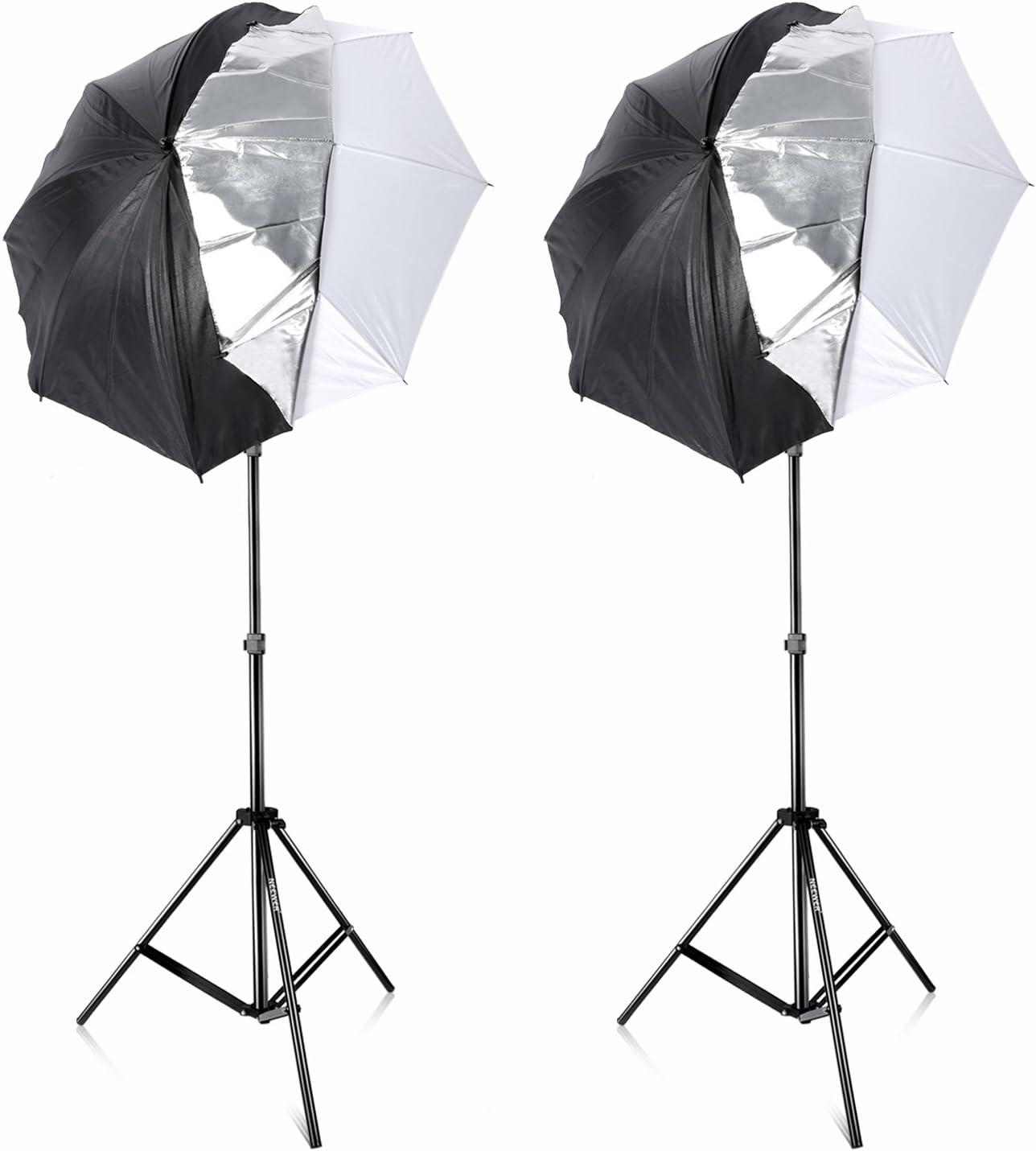
- Bounce Umbrella: Keep the black cover on the umbrella. Position the flash to fire into the white interior. This provides a broad, soft, and diffused light source.
- Makeshift Softbox: Remove the black cover. Position the flash to fire through the translucent white umbrella. This creates a softer, more directional light similar to a softbox.
6. Maintenance
Proper maintenance ensures the longevity and optimal performance of your lighting kit.
- Cleaning: Use a soft, dry cloth to wipe down the flash units, trigger, and light stands. For umbrellas and diffusers, a slightly damp cloth can be used for spot cleaning, ensuring they are completely dry before storage. Avoid abrasive cleaners or solvents.
- Battery Care: Remove batteries from the flash units and trigger when not in use for extended periods to prevent leakage and corrosion. Store batteries in a cool, dry place.
- Storage: Store all components in the provided carrying case or a similar protective bag. Ensure light stands are fully collapsed and umbrellas are folded to prevent damage. Store in a dry environment away from extreme temperatures.
- Handling: Avoid dropping or subjecting the equipment to strong impacts. Handle flash tubes with care as they are fragile.
7. Troubleshooting
This section addresses common issues you might encounter with your Neewer lighting kit.
- Flash Not Firing:
- Check if the flash unit is powered on.
- Verify batteries are correctly inserted and have sufficient charge.
- Ensure the flash is securely mounted on the camera hot shoe or connected to the trigger.
- If using the trigger, confirm both trigger and flash are set to the same channel and group.
- Check camera settings to ensure external flash is enabled.
- Trigger Not Connecting to Flash:
- Confirm both trigger and flash are powered on and have fresh batteries.
- Ensure the trigger is properly seated on the camera's hot shoe.
- Verify that the trigger and flash are set to the same 2.4G wireless channel.
- Check for any obstructions between the trigger and flash that might interfere with the wireless signal.
- Ensure the flash is set to a compatible slave mode (e.g., 2.4G Slave).
- Uneven or Insufficient Light Output:
- Check flash power settings (in Manual mode) or FEC settings (in TTL mode).
- Ensure the flash head zoom matches the lens focal length or is set to auto.
- Adjust the distance of the flash from the subject.
- If using umbrellas, ensure the flash is positioned correctly to bounce or shoot through the umbrella for even diffusion.
- Verify that no gel filters are accidentally blocking the flash output or are incorrectly applied.
- Flash Recycling Time is Slow:
- This typically indicates low battery power. Replace or recharge the batteries.
- Using lower power settings will result in faster recycling times.
8. Specifications
8.1 NW880S Flash
| Guide No. | 60 (m ISO 100) |
| Flash Coverage | 20 to 200mm (Auto/Manual Zoom) |
| Flash Modes | TTL, M, Multi, FEC, Master, Slave, S1, S2 |
| Flash Duration | 1/300s to 1/20000s |
| High-Speed Sync | Up to 1/8000th of a second |
| Wireless Flash | Optic / 2.4G transmission |
| Wireless Triggering Distance | 2.4G (100m); Optic: 12-15m (Indoor), 8-10m (Outdoor) |
| Tilting Head | 0-360 degrees horizontally, -7-90 degrees vertically |
| Recycle Time | Approx. 0.1-2.6 seconds |
| Full Power Flashes | Approx. 230 times |
| Power Supply | Ni-MH / 4*LR6 alkaline batteries (Not included) |
8.2 N1T-S Flash Trigger
| Mode | M / TTL / OFF |
| Support Functions | HSS / FEC / AF Manually opened / Modeling Flash Mode / Multi |
| Wireless Transmission | 2.4G |
| Channel | 32 |
| Transmission Distance (Max.) | >100m |
| Power Supply | 2 x AA battery (Not included) |
8.3 Light Stands
| Max Height | 83" / 210cm |
| Sections | Three section with sure-twist section locks |
8.4 Umbrellas
| Size | 33" / 84cm |
| Type | White Satin Interior with Removable Black Cover |
8.5 General Product Specifications
| Product Dimensions | 34.6 x 8.7 x 7.4 inches |
| Item Weight | 10.51 pounds |
| ASIN | B01MDSLPF5 |
| Item Model Number | 90088960 |
| Date First Available | October 29, 2016 |
| Color | Black |
9. Support Information
Warranty information for this product is not available in the provided data. For technical support, troubleshooting assistance, or inquiries regarding product warranty, please contact NEEWER customer service directly through their official website or the retailer where the product was purchased.


