
1. Introduction
This manual provides detailed instructions for the proper setup and operation of your CRT SWR-2 SWR/Wattmeter. The CRT SWR-2 is designed for measuring Standing Wave Ratio (SWR) and power output in radio communication systems, particularly for CB radio applications within the 26-30 MHz frequency range.
2. Safety Information
- Always operate the device with the CB transceiver turned off during initial connection and disconnection to prevent damage.
- Ensure all connections are secure before transmitting.
- Avoid transmitting if the SWR reading is in the red zone, as this may damage your transceiver.
- Do not expose the device to moisture or extreme temperatures.
3. Package Contents
Verify that all items are present in your package:
- CRT SWR-2 SWR/Wattmeter unit
- 50cm connection cable with SO239 connectors

Image: A 50cm coaxial connection cable with SO239 connectors on both ends, used for connecting the SWR meter to a radio or antenna.
4. Setup and Connection
Follow these steps to connect your SWR-2 unit:
- Ensure your CB transceiver is turned off.
- Insert one end of the supplied 50cm connection cable into the SO239 socket labeled 'TRANS' on the SWR-2 unit.
- Insert the other end of the connection cable into the SO239 socket of your CB transceiver.
- Connect the antenna to be tuned to the SO239 socket labeled 'ANT' on the SWR-2 unit.

Image: Front view of the CRT SWR-2 SWR/Wattmeter, showing the analog meter, switches, and calibration knob.

Image: Rear view of the CRT SWR-2 SWR/Wattmeter, highlighting the 'TRANS' and 'ANT' SO239 connection ports.
5. Operation
5.1. Power Measurement
- Set the right switch on the SWR-2 to 'PWR'.
- Select either '10W' or '100W' on the left switch, corresponding to the expected power output of your transceiver.
- Turn on your CB transceiver and initiate transmission.
- Read the power output directly from the lower scale on the meter.
5.2. SWR Measurement (Standing Wave Ratio)
- Set the right switch on the SWR-2 to 'SWR'.
- Set the left switch to '10W FWD'.
- Turn on your CB transceiver and initiate transmission.
- While transmitting, use the 'CAL' potentiometer to adjust the meter needle until it aligns with the last mark on the right, labeled 'CAL'.
- While still transmitting, move the left switch to '100W REF'.
- Read the SWR value directly from the upper scale on the meter.
- If the needle indicates a value in the red zone, it is strongly advised to stop transmitting immediately to prevent potential damage to your CB transceiver.
- For optimal antenna performance, the SWR value should be as close to 1:1 as possible.
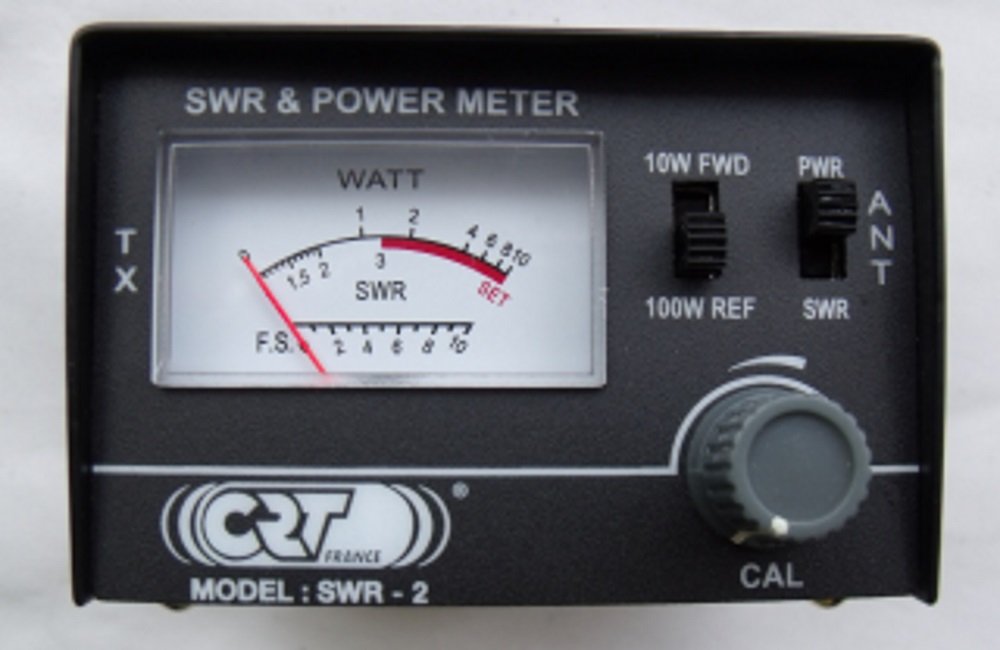
Image: The CRT SWR-2 SWR/Wattmeter, illustrating its compact design and clear meter display for SWR and power readings.
6. Specifications
| Brand | CRT |
| Model Number | SWR-2 |
| Maximum Power | 100 Watt |
| Frequency Range | 26-30 MHz |
| Impedance | 50 Ohm |
| SWR Accuracy | 5% |
| Connector Type | SO239 |
| Color | Black |
| Product Dimensions (L x W x H) | 5.5 x 8.5 x 5.5 cm |
| Recommended Use | Radio communications |
7. Maintenance
The CRT SWR-2 SWR/Wattmeter requires minimal maintenance. Keep the device clean and free from dust. Use a soft, dry cloth for cleaning. Do not use liquid cleaners or solvents. Store the unit in a dry environment when not in use.
8. Troubleshooting
If you encounter issues with your SWR-2, consider the following:
- No Meter Movement: Check all cable connections to ensure they are secure. Verify the transceiver is powered on and transmitting.
- Inaccurate Readings: Ensure the correct power range (10W/100W) is selected for your transceiver's output. Re-calibrate the SWR meter as per section 5.2.
- High SWR Readings: This typically indicates an issue with the antenna system (antenna length, tuning, or cable). Inspect the antenna and coaxial cable for damage or improper installation.
9. Warranty and Support
For warranty information or technical support, please refer to the documentation provided at the point of purchase or contact your retailer. Keep your purchase receipt as proof of purchase.
